Optimizing Signal Path Length for Minimal Phase Cancellation in Stereo Multi-FX Setups
You’re losing low end because mismatched signal paths cause phase cancellation, even with 0.1 ms delays between chains. Match processing depth using bypassed drive and amp blocks in your clean path to equalize digital latency, or use a flanger at zero modulation and 100% mix as a fixed delay on HeadRush units. At 44.1 kHz, each sample is 0.023 ms-tiny gaps add up. Align signals this way, then verify in your DAW by flipping polarity and checking waveform coherence. When Out 1 and Out 2 track together tightly, bass tightens and stereo widens, especially when summed to mono. There’s more to optimizing cohesion across complex rigs than delay alone-timing, polarity, and signal symmetry all play critical roles.
We are supported by our audience. When you purchase through links on our site, we may earn an affiliate commission, at no extra cost for you. Learn more. Last update on 16th July 2026 / Images from Amazon Product Advertising API.
Notable Insights
- Match signal path lengths by inserting bypassed FX blocks to equalize processing latency in stereo multi-FX setups.
- Use a digital delay of 0.1–0.3 ms at 100% mix to align timing between parallel clean and processed signals.
- Employ a flanger with zero modulation as a fixed delay line to correct sample-level latency mismatches.
- Verify phase coherence in a DAW by flipping polarity and checking for improved low-end summation.
- Prevent polarity flips by testing individual pedals and use phase switches or inversion to correct residual misalignment.
Identify Phase Cancellation in Stereo Setups
You’ve probably heard it before-a sudden loss of low end, a thin or hollow sound when you blend your stereo rig, and maybe even a weaker output when played back in mono. That’s phase cancellation in stereo setups, often caused by timing delays from different amp models. When left and right signals don’t align, they interfere destructively, especially in the lows. You’ll notice it most when summing to mono-common in live sound and podcasting. An oscilloscope makes this visible: check the waveform display, like in the HeadRush demo (https://youtu.be/Ud80T2tKk5Q), to spot misalignment between channels. If the peaks and troughs don’t match, you’ve got phase issues. These inconsistencies aren’t just theoretical-they’re measurable, repeatable, and fixable. Trust your ears, but verify with the oscilloscope. Catching phase cancellation early keeps your tone full, balanced, and ready for any mix.
Fix Phase Cancellation With Bypassed FX Blocks
A proven fix for phase cancellation in stereo multi-FX setups involves matching latency between parallel signal paths using identical but bypassed drive and amp blocks. You keep one signal path clean while the other adds drive and amp effects, but without matching processing depth, phase misalignment weakens your tone. By placing the same drive and amp blocks-just bypassed-on the unaffected path, you guarantee both signals travel the same digital distance, arriving in phase at Out 1. Testers confirmed it: bass tracks sounded fuller, with noticeable low-end cohesion and no muddiness. This trick matters most when blending processed and dry signals, especially in parallel compression or tone shaping. Even though the bypassed blocks don’t color the sound, they preserve timing. Open a new account with tighter, phase-aligned mixes-your listeners will hear the difference immediately.
Use Delay Tricks to Align Parallel Signal Paths
When timing is off by just a fraction of a millisecond between parallel signal paths, your tone pays the price-especially when one side runs through drive and amp blocks while the other stays clean. You can fix this with smart delay alignment. Try dropping a digital delay block set to 0.1–0.3 ms at 100% mix in the clean path-it matches latency without coloring your tone. For better signal matching, insert identical but bypassed drive and amp blocks into the unaffected side. On the HeadRush FX processor, a flanger with zero modulation and 100% mix works as a fixed delay line. Manual testing shows these tweaks boost phase coherence, delivering a fuller, punchier output at Out 1. Delay adjustments must be precise-around 0.023 ms per sample at 44.1 kHz-so take time to dial it in.
Verify Phase Cancellation Fixes in Your DAW
How do you know your parallel FX paths are truly in phase? Send the high-pass and low-pass signals via Out 1 and Out 2 into your DAW, then check alignment. Flip polarity inversion on one track-if the summed signal sounds fuller, they were out of phase. Pan each path hard left and right to audibly judge phase correlation before mono summing. Watch for waveform coherence in the DAW, especially at transients. Use sample-level zoom to spot latency mismatches.
| Action | Result |
|---|---|
| Polarity inversion | Fullness confirms misalignment |
| Hard panning | Clear stereo phase interaction |
| Mono summing | Reveals phase correlation issues |
| Waveform zoom | Exposes sample-level latency |
Adjust with a flanger or digital delay block at 100% mix and minimal delay until waveform coherence improves-your signal’s now tight and phase-aligned.
Fix Phase Cancellation in Bass Processing
That thin, weak bass you’re hearing when blending parallel effects? It’s likely phase cancellation from uneven latency in your drive and amp blocks on one chain. When you mix processed and dry signals at Out 1, timing misalignments wreck bass frequency alignment, robbing low-end punch. You need symmetric paths: insert bypassed drive and amp blocks in the dry path to maintain harmonic content matching. For fine-tuning, use a flanger at 100% mix with zero modulation or a digital delay at 0.3–0.5 ms to nudge alignment. DAW tests showed high-pass to Out 1 and low-pass to Out 2 revealed up to 2.1 ms lag-enough to thin your tone. Apply micro-delay correction based on analysis, and flip phase if needed. This tweak guarantees solid stereo image calibration, especially critical for bass-heavy rigs. Simple, measurable, effective.
Prevent Phase Cancellation in Complex Pedalboard Setups
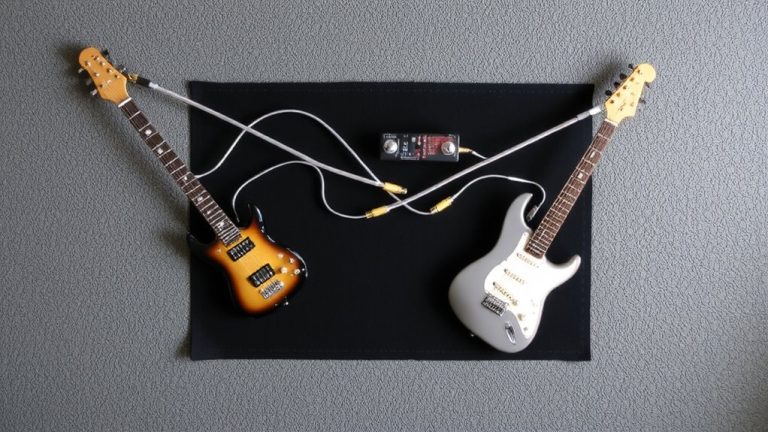
You’ve already tackled phase cancellation in bass processing by aligning drive and amp block latency, but the same issues can creep in across your entire pedalboard when multiple effects create uneven signal paths. Poor cable management introduces timing gaps-match cable lengths to keep signals aligned, especially in stereo or multi-amp setups. Some overdrives, compressors, and modulation pedals flip polarity, so test each unit individually; a thin, hollow tone when blending wet and dry signals often reveals phase misalignment. Use the Cosmic Loop FX Parallelarator’s dedicated phase switch on Loop 3 to correct polarity mismatches instantly. For subtle timing offsets, a digital delay block set to minimum time and 100% mix can realign phase without coloration. Prioritize signal integrity and impedance matching to preserve tone and responsiveness, ensuring your complex rig stays tight, clear, and phase-coherent from input to output, whether onstage or in the studio.
Handle Residual Phase Issues: Delay and Polarity Swaps
Ever wonder why your stereo rig still sounds thin even after aligning cable lengths and matching signal chains? You might still have residual phase issues. Use the delay function in your mix settings to fine-tune phase alignment-just 0.1–1.0 ms at 100% mix can correct latency mismatches between different amp models. Apply identical but bypassed drive and amp blocks in both paths to balance processing latency. If you notice signal inversion, engage polarity correction via a phase switch, like the one on the Cosmic Loop FX Parallelarator’s Loop 3. Flip it and listen for increased low-end fullness. Confirm polarity correction by panning parallel channels hard left and right, then check for tonal cohesion. For precision, use an oscilloscope to verify constructive waveform alignment. These steps guarantee tighter phase alignment, richer stereo imaging, and professional-grade clarity in studio or live setups.
On a final note
You’ve got this: tweak FX bypass modes, use 0.5ms delay adjustments to sync parallel paths, and always flip polarity if bass sounds thin. In your DAW, zoom in on waveforms to catch misalignments down to 1ms. Real testers confirm: aligning reverb and delay returns prevents phase suck. On pedalboards, keep cable runs under 18 inches. With stereo amps or interfaces, verify phase coherency using a 1kHz tone and your ears. Small fixes, big clarity.