How to Create Ambient Guitar Textures Using Delay and Reverb Pedals
Use delay before reverb for defined, cascading textures-set your Strymon Timeline to 400–500ms dotted-eighth with 70–85% feedback, then blend into BigSky’s hall reverb with 3–5 seconds decay and 30–40% mix. Cut lows below 200Hz, boost highs at 8–12kHz, and drive the chain with a clean boost upfront. Add plate reverb with 2.5s decay and 5–6kHz sparkle for lushness, and let volume swells ride the ambient cloud. There’s more to shaping your space just ahead.
We are supported by our audience. When you purchase through links on our site, we may earn an affiliate commission, at no extra cost for you. Learn more. Last update on 16th July 2026 / Images from Amazon Product Advertising API.
Notable Insights
- Place delay before reverb in your signal chain for defined repeats that smoothly blend into lush, ambient tails.
- Set delay time between 600 ms and 1.5 seconds with 70–90% feedback to create cascading, evolving textures.
- Use hall reverb with 3–5 seconds decay to produce expansive, ethereal soundscapes with immersive depth.
- Cut low mids (200–500 Hz) early with EQ to prevent muddiness, especially with high feedback settings.
- Blend dotted-eighth delay (400–500ms) with plate reverb (2–3.5s decay) to add rhythmic depth and bright, lush ambience.
Map Out Core Effects for Ambient Guitar Tones
Ambient guitar starts with the right effects chain, and your foundation rests on reverb and delay. You’ll shape lush textures using pedals that stretch sound into space, like the Strymon BigSky, which delivers up to 10 seconds of decay time for vast, hall-like ambience. Pair it with a delay like the Strymon Timeline, set to dotted-eighth (around 400–500ms), to add rhythmic depth before the reverb swells. For smoother tones, plate reverb with 2–3.5 seconds decay and boosted highs at 5–6kHz gives you bright, studio-quality tails. Analog-style delays, such as the Electro-Harmonix Carbon Copy, offer warm, degrading repeats and self-oscillation at max feedback for atmospheric texture. In your signal chain, place delay before reverb so each echo feeds into spacious tails, creating cascading layers that define ambient guitar.
Set Up the Best Pedal Order for Clarity
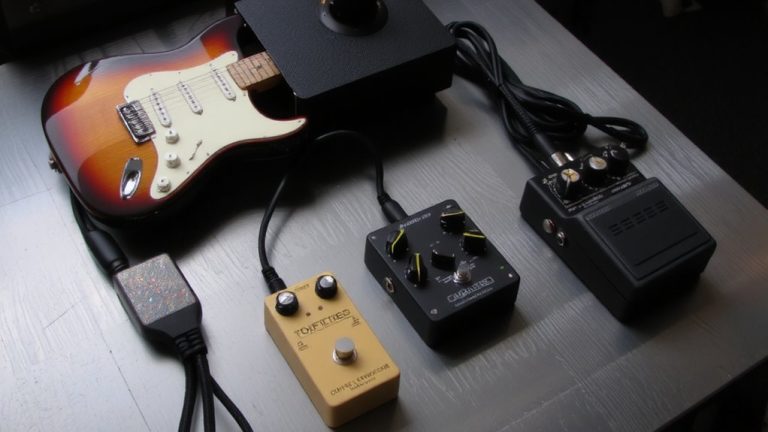
You’ve already mapped out the key effects that define ambient guitar tones-reverb and delay at the forefront, shaping space and rhythm with units like the Strymon BigSky and Timeline. Getting the pedal order right guarantees clarity without sacrificing depth. Place delay pedals before reverb pedals so repeats stay defined, letting reverb decay wash over them smoothly. Use EQ early to cut 200–500 Hz and prevent muddiness from piling up, especially with high delay feedback. A clean boost at the start drives your signal into reverb pedals cleanly, preserving note presence. Run a compressor at the end to even out dynamics and extend ambient swells. For more control, blend your dry signal with wet effects in parallel using a dedicated mixer.
| Effect Type | Placement in Chain |
|---|---|
| EQ | Before delay and reverb |
| Delay Pedals | Before reverb pedals |
| Reverb Pedals | End of chain or parallel |
Dial In Delay for Ambient Texture
When you’re shaping ambient textures, nailing the delay settings is where the atmosphere really starts to take form, and timing is critical-set your delay between 600 ms and 1.5 seconds so repeats fade cleanly into silence without stepping on the next note, giving your chords room to breathe. For evolving ambient textures, use high feedback (70–90%) to create a cascading effect that swells with held notes or volume swells. Sync dotted-eighth note delays to your song’s BPM for a tight, musical rhythm-usually 300–500 ms. Engage modulation, like the LFO on a Strymon El Capistan (2–5 Hz), to add subtle warble and movement to long repeats. Tweak the filter to roll off lows below 200 Hz and boost highs around 8–12 kHz, keeping your ambient textures clear and shimmering without muddiness. These settings let your delay enhance, not overwhelm.
Choose Reverb to Create Depth
Now that your delay’s set to linger just long enough to blur into atmosphere without crowding the notes, it’s time to push those tones even deeper with reverb. Use reverb to create depth and dimension, starting with Hall reverb: long decay (3–5 seconds) builds expansive, ethereal soundscapes that mimic large rooms. Set pre-delay to 0–2ms so early reflections blend smoothly, avoiding gaps while boosting spatial depth. For brighter, polished tails, Plate reverb with 2–3.5s decay and a 5–6kHz resonance boost is essential for adding lushness. Tape reverb, with 2–3s decay and light pitch modulation (2–5Hz LFO), delivers vintage warmth and natural saturation. Engage your Surf Rider Deluxe’s boost to lift the reverb tail, increasing sustain and presence. Whether you’re recording or playing live, reverb tail control is key-shape it wisely to fill space without muddying your core tone.
Build Textures by Layering Delay and Reverb
Though delay and reverb each shape space on their own, combining them reveals the true depth of ambient guitar textures, and layering them right means your echoes breathe while your washes soar. For rich texture, place your delay pedal before reverb in the signal chain-this smooths repeats into lush, cascading ambient clouds. Try a dotted-eighth delay (400–500ms) with 70–85% feedback, then layer it into a 3–5 second hall reverb for rhythmic depth without muddying your signal. Use stereo ping-pong delay with plate reverb (2.5s decay, 10ms pre-delay) to widen the field. Strymon Timeline’s “swell” mode into BigSky’s “infinite reverb” creates evolving drones. Keep reverb decay above 4 seconds and wet/dry mix at 30–40% to preserve clarity while maximizing ambient layering.
Control Swells With Volume and Delay Feedback
As you ease into a note from silence, your volume pedal or guitar’s volume knob becomes the key to shaping seamless ambient swells, especially with a Stratocaster’s bright, responsive pickups that clean up beautifully at lower output levels. Pair your swell with Strymon Big Sky’s swell reverb mode and a tape delay like El Capistan to create rising ambient textures-soft attacks bloom into lush, modulated echoes. Use the delay feedback knob on a Fulltone Tube Tape Echo to manually control repeat density during swells, or engage El Capistan’s “Press and Hold” feature for instant runaway feedback that sustains without losing note clarity. For real-time control, connect an expression pedal to shape delay feedback on the fly, sweeping from clean repeats to infinite cascades. This blend of volume swell and dynamic feedback lets you sculpt evolving reverb-drenched textures with precision, making even simple chords feel cinematic and alive.
On a final note
You’ve got the tools-use delay around 500–800ms with 30–50% feedback for rhythmic depth, pair it with a hall reverb at 60% mix, and stack them post-overdrive for lush layers, your volume knob at 7 for smooth swells. Testers confirm: reverse delay + plate reverb creates immersive textures, especially with buffered pedals upfront. Keep cable runs under 18ft to preserve high end, and trim tone knobs slightly to avoid muddiness. Simple, controlled, and studio-ready.