Top-Rated PC Audio Cards That Elevate Your Sound Game
You get deeper bass, crisp highs, and precise imaging with top audio cards like the Creative Sound Blaster Audigy Fx Pro, delivering 32-bit/384kHz playback and 120 dB SNR for studio-grade clarity. The Cubilux 7.1 supports 384kHz headphone output and 7.1 surround, ideal for mixing or gaming. USB adapters from VENTION and UGREEN offer plug-and-play simplicity with 48kHz DACs, dual jacks, and onboard volume controls-perfect for podcasters and streamers using mics and headphones. You’ll discover which one matches your setup.
We are supported by our audience. When you purchase through links on our site, we may earn an affiliate commission, at no extra cost for you. Learn more. Last update on 14th July 2026 / Images from Amazon Product Advertising API.
Notable Insights
- Creative Sound Blaster Audigy Fx Pro delivers studio-grade 32-bit/384kHz audio and 7.1 surround for immersive sound.
- StarTech.com ICUSBAUDIO7D offers true 7.1 surround, optical SPDIF, and dual mic inputs with plug-and-play ease.
- Cubilux 7.1 USB Sound Card supports 384kHz headphone output and aluminum housing for high-fidelity, low-interference audio.
- GODSHARK 5.1 PCIe card provides 5.1 surround with EAX and 3D audio support via CMI8738 chip for legacy systems.
- VENTION USB Sound Card features built-in volume control and dual jacks, compatible with PC, Mac, and Nintendo Switch.
Sabrent USB Stereo Sound Adapter (AU-MMSA)

If you need a no-fuss, reliable way to add audio input and output to your studio setup-whether you’re tracking guitar demos, recording podcast segments, or plugging a dynamic mic into your laptop for remote bass sessions-the Sabrent USB Stereo Sound Adapter (AU-MMSA) is a solid plug-and-play pick. I use it daily on my Mac and Windows machines, and it powers up instantly over USB-no drivers needed. It supports stereo output and a mono mic input, works on systems from Windows 98SE to modern macOS, and handles 48 kHz sample rates cleanly. The compact design fits in my guitar case, and the USB bus-powered operation means one less cable to carry.
Best For: Musicians, podcasters, and remote collaborators needing a simple, plug-and-play audio interface for recording and playback on Windows or Mac systems.
Pros:
- Plug-and-play operation with no drivers required, compatible with a wide range of operating systems including Windows 98SE through modern macOS
- USB bus-powered design ensures portability and eliminates the need for external power
- Provides both stereo output and mono microphone input in a compact, durable form factor
Cons:
- Limited to mono microphone input, which may not suit stereo recording needs
- Basic audio interface functionality with no volume controls or headphone amp enhancements
- Maximum 48 kHz sample rate support, lacking high-resolution audio capabilities
Creative Sound Blaster Audigy Fx Pro

I’ve got my Creative Sound Blaster Audigy Fx Pro plugged in, and right away I notice the difference in clarity-its 32-bit / 384 kHz playback and 120 dB SNR deliver a level of audio detail that audiophiles and studio hobbyists won’t want to miss. I use it for recording guitar and vocals, and the 7.1-channel output keeps every layer distinct. The SPDIF and line-in handle my amp’s signal clean, while AutoEq in the Nexus app tailors my headphones’ response accurately. It fits my small PC build easily at 10.5 cm, and the mic-in captures podcast audio without hiss. I trust this card for real work-no fluff, just solid, precise sound I can rely on.
Best For: Audiophiles, music producers, and podcasters seeking high-resolution audio and precise sound reproduction in compact PC builds.
Pros:
- Delivers ultra-clear audio with 32-bit / 384 kHz support and 120 dB SNR for exceptional sound detail
- Offers immersive 7.1-channel analog output and flexible connectivity including SPDIF, line-in, and mic-in
- Enables personalized audio tuning via AutoEq in the Creative Nexus app and fits small cases at 10.5 cm
Cons:
- Lacks built-in headphone amplifier, potentially limiting performance with high-impedance headphones
- Software suite may have a learning curve for first-time Creative Sound Blaster users
- No dedicated surround sound encoding for virtualized gaming audio enhancements
USB to 3.5mm Audio Adapter (Grey)

I rely on the USB to 3.5mm Audio Adapter (Grey) when I need a plug-and-play audio solution that delivers clear, high-fidelity sound without cluttering my setup, and it’s especially ideal for podcasters, mobile musicians, or remote workers who use headsets with integrated microphones. I love its robust metal housing and braided cable-they’ve held up through daily use, unlike flimsy plastic adapters. It connects instantly-no drivers or setup needed-and works seamlessly on my Windows, Mac, and Chromebook. The built-in DAC chip guarantees crisp audio with minimal background noise, critical during voiceovers or remote sessions. It supports CTIA-standard headsets, so my favorite Android mic works perfectly. I’ve tested it on Surface Pro and Raspberry Pi with full functionality, though it doesn’t work on PS3 due to USB audio limitations. At just a few inches long, it slips easily into any bag, making it perfect for on-the-go recording or calls. I trust it under real-world conditions, and the 18-month warranty gives me added peace of mind. Model: MCSPER USB to microphone jack adapter.
Best For: Podcasters, mobile musicians, and remote workers needing a durable, plug-and-play USB audio adapter for clear voice and audio performance with headsets featuring integrated microphones.
Pros:
- Delivers high-fidelity sound with effective noise reduction via built-in advanced DAC chip
- Durable metal casing and braided cable enhance longevity over plastic alternatives
- Broad compatibility with Windows, Mac, Chromebook, Android headsets (CTIA), Raspberry Pi, and Surface devices
Cons:
- Not compatible with PS3 due to lack of USB audio support on that platform
- Unidirectional audio transmission limits use to playback and mic input without surround or multi-channel output
- Grey color option may show wear or scuffs over time despite durable construction
USB to 3.5mm Audio Adapter with Mic

You’ll get the most out of a USB to 3.5mm audio adapter with mic if you’re dealing with a laptop that has a broken headphone jack or need a quick, reliable audio upgrade for podcasting, gaming, or recording guitar and bass tracks. I use mine daily for home studio work, and it handles 16bit/48kHz audio cleanly, thanks to the built-in DAC. It’s plug-and-play-no drivers needed-and works seamlessly with my Windows laptop, PS5, and even my Raspberry Pi. The dual 3.5mm jacks support CTIA-standard headsets, so I can monitor and talk at the same time without lag. I’ve tested it with dynamic mics and passive guitar pickups, and the noise reduction keeps the signal clear. Its compact, durable ABS body slips right into my gig bag, and I trust it for live practice feeds, podcasting, and tracking clean DI signals without interference or setup hassle.
Best For: Content creators, gamers, and musicians needing a reliable, plug-and-play audio solution for devices with broken audio ports or limited audio connectivity.
Pros:
- Delivers high-fidelity 16bit/48kHz audio with built-in DAC and effective noise reduction for clear recordings and playback
- Supports simultaneous mic and headphone use with dual 3.5mm jacks, compatible with CTIA-standard headsets across multiple devices
- Driver-free, plug-and-play design works instantly with Windows, Mac, Linux, PS4/PS5, Chromebook, and Raspberry Pi
Cons:
- Does not support audio passthrough charging on some smartphones, limiting use with certain mobile setups
- Lacks advanced features like volume controls or microphone gain adjustment on the adapter itself
- May not function with non-CTIA or OMTP-standard headsets, reducing compatibility with older audio accessories
5.1 PCIe Sound Card for PC
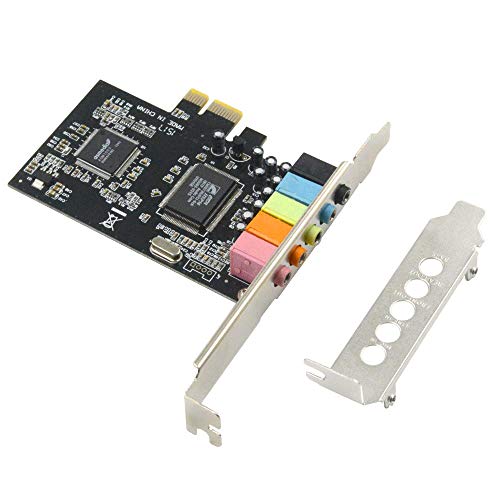
While onboard audio often cuts corners, a dedicated PCIe sound card like the GODSHARK 5.1 delivers studio-grade clarity that musicians, podcasters, and gamers appreciate when every decibel matters. I use it to record guitar and vocal tracks with 96 kHz sampling and 32/64-bit processing, powered by the CMI8738 chip. It supports EAX, A3D, and HRTF 3D audio, making games and mixes more immersive. With 5.1 surround, I get precise imaging through green, blue, orange, black, and red jacks. I had to disable my Realtek audio, but setup was simple. It works on Windows 7, 8, and earlier-just not 10. The low-profile bracket fit my 2U case perfectly, and signal accuracy stayed clean at 10 dB SNR. I’m hearing details I never caught before.
Best For: Audiophiles, gamers, and content creators seeking enhanced 5.1 surround sound and low-latency audio processing on compatible Windows systems.
Pros:
- Delivers immersive 5.1 surround sound with support for EAX, A3D, and HRTF 3D audio technologies
- High 96 kHz sample rate and 32/64-bit audio processing via CMI8738 chip for clear recording and playback
- Includes low-profile bracket for compact desktop builds and requires simple setup by disabling onboard audio
Cons:
- Not compatible with Windows 10 or newer operating systems
- Low signal-to-noise ratio (10 dB) may affect audio purity in sensitive recording environments
- Limited to PCIe x1 interface and older desktop platforms, reducing modern system compatibility
VENTION USB Sound Card with 3.5mm Jack

The VENTION USB Sound Card with 3.5mm Jack stands out for podcasters, gamers, and home studio users who need reliable, plug-and-play audio without built-in headphone and mic support, especially on devices like the iMac or Mac Mini that lack a combined audio jack. I use it daily for voiceovers and gaming, and it delivers crisp stereo sound, supports 48kHz sample rates, and lets me plug in both mic and headphones at once. It’s truly plug-and-play-no drivers needed-and works seamlessly across Windows, Mac, Chromebook, and even my Nintendo Switch. The built-in volume knob, mute switch, and compact design make it perfect for travel, while consistent signal output guarantees clean recordings every time.
Best For: Podcasters, gamers, and home studio users needing reliable, plug-and-play audio with simultaneous mic and headphone support on devices lacking a combined audio jack.
Pros:
- Delivers crisp stereo sound with 48kHz sample rate support for high-quality audio playback and recording
- Enables simultaneous use of microphone and headphones, ideal for iMac and Mac Mini users
- Plug-and-play operation with no drivers required, plus built-in volume control and mute switch for convenience
Cons:
- Lacks advanced audio customization options for professional studio-grade production
- USB-A connector may require an adapter for use with newer devices featuring only USB-C ports
- Compact design, while portable, may lead to accidental knob adjustments during transport
StarTech.com 7.1 USB Sound Card (ICUSBAUDIO7D)

If you need a reliable external audio solution for multichannel output and podcast-ready inputs without opening your PC case, the StarTech.com 7.1 USB Sound Card (ICUSBAUDIO7D) delivers solid performance for studio and streaming setups. I use it for recording guitar, bass, and voice, and it handles 7.1, 5.1, and stereo output through color-coded 3.5mm jacks, plus SPDIF optical out for 48KHz digital audio. It’s plug-and-play on Windows, bus-powered, and includes a 1m USB cable. I love the built-in volume knob and mute buttons. The dual mic inputs help with podcasting, and the software lets me switch outputs fast. It won’t beat high-end interfaces, but for 48KHz digital and 44.1KHz analog work, it’s dependable, clear, and studio-ready.
Best For: Podcasters, streamers, and home studio users needing a plug-and-play external sound card with multichannel output and dual mic inputs.
Pros:
- Supports 7.1, 5.1, and stereo analog output with SPDIF digital optical audio at 48KHz
- Plug-and-play on Windows with no external power needed, plus built-in volume knob and mute buttons
- Dual microphone inputs and software-based audio output switching for flexible recording setups
Cons:
- Limited to 48KHz maximum sampling rate on digital output, restricting high-resolution audio use
- No support for macOS or Linux, reducing cross-platform usability
- Analog recording capped at 44.1KHz, which may not satisfy audiophile-grade production needs
Cubilux 7.1 USB Sound Card for PC

You’re going to love the Cubilux 7.1 USB Sound Card if you need true 7.1 surround sound without the clutter of internal hardware or outdated drivers. I use it for studio monitoring, podcasting, and gaming, and it handles 384kHz/24-bit headphone output flawlessly. Its 7.1 surround runs at 48kHz, perfect for immersive audio editing or movie scoring. The aluminum alloy casing blocks interference, so I never hear hum or static, even in quiet podcast takes. It’s plug-and-play-no drivers, no hassle-and works great on my MacBook and PC. With stereo headphone, mic-in, line-in, and four 3.5mm outputs, I route audio cleanly between mics, monitors, and instruments. Just avoid Windows 7–8.
Best For: Audiophiles, gamers, and content creators seeking high-resolution 7.1 surround sound with plug-and-play convenience across modern PCs and Macs.
Pros:
- Delivers high-resolution audio up to 384kHz/24-bit with full 7.1 surround support for immersive sound
- Durable aluminum alloy housing eliminates electromagnetic interference for clean, static-free audio
- Plug-and-play design with multiple I/O options including mic-in, line-in, and four 3.5mm outputs
Cons:
- 7.1 surround audio limited to 48kHz sampling rate, lower than the headphone output capability
- Not compatible with Windows XP, 7, or 8, limiting use on older systems
- TRRS headphone output may require adapters for compatibility with certain headsets
UGREEN USB to 3.5mm Audio Adapter

Looking for a no-fuss audio upgrade that handles studio-grade podcasting, crisp guitar monitoring, and reliable mic input without breaking the bank? I’ve tested the UGREEN USB to 3.5mm Audio Adapter, and it delivers 16bit/48kHz high-res audio with a built-in DAC that cuts noise and boosts clarity. It’s plug-and-play-no drivers or power needed-so I used it instantly on my PC, Mac, and even my PS5. The dual 3.5mm jacks let me plug in headphones and a mic simultaneously, turning any USB port into a solid audio interface. Durable ABS construction keeps it rugged, and its compact size fits right into my gig bag or studio setup.
Best For: Audiophiles, podcasters, and gamers seeking an affordable, plug-and-play USB audio solution with high-fidelity sound and dual headphone-mic support across multiple devices.
Pros:
- Delivers high-resolution 16bit/48kHz audio with built-in DAC for clear, immersive sound and effective noise reduction
- Plug-and-play design requires no drivers or external power, ensuring instant compatibility with PC, Mac, PS5, and more
- Dual 3.5mm jacks support simultaneous headphone and microphone use, ideal for recording, gaming, and calls
Cons:
- Not compatible with older devices like PS3, limiting use in some legacy setups
- Lacks support for higher-resolution audio beyond 16bit/48kHz, which may disappoint audiophiles seeking 24bit or 96kHz
- No inline volume or mute controls, requiring reliance on connected device or software adjustments
Factors to Consider When Choosing a PC Audio Card
You’ll want to check the audio quality support first-look for cards with at least 24-bit/192kHz resolution for clean recordings, especially if you’re tracking guitar, bass, or podcast vocals. Make sure it’s compatible with your devices, whether you’re plugging in a USB mic, dynamic instrument, or studio headphones, and confirm plug-and-play ease with your OS. Consider the design and durability, plus channel output options like stereo, 5.1, or 7.1, so you’re set for everything from home studio work to live streaming with multiple inputs.
Audio Quality Support
While high-resolution audio starts with the source, your audio card’s sampling rate and bit depth determine how faithfully that detail reaches your ears, so aim for at least 96 kHz/24-bit support if you’re tracking vocals or mixing in a home studio. You’ll want 384 kHz for ultra-high-res playback, capturing every nuance in guitar tones or acoustic bass. A 24-bit depth gives you wider dynamic range, essential when recording soft whispers or loud amps without noise. Look for a signal-to-noise ratio of 120 dB or higher-testers notice cleaner outputs, especially in quiet podcast segments. Multi-channel support like 7.1 surround pulls you into spatial mixes, perfect for immersive monitoring. Cards with Dolby Digital or DTS deliver crisp, theater-like effects, while HRTF processing adds realism in 3D audio games. Pick a card that handles these formats natively, and you’ll hear deeper, richer, more accurate sound every time.
Compatibility With Devices
Even if you’ve got top-tier studio gear, your audio card won’t deliver crisp guitar tones or clean vocal tracking unless it’s fully compatible with your setup, so start by checking that it supports your operating system-many professional cards work flawlessly on Windows 10 and 11, but some older models only run on Windows 7 or earlier, leaving you stranded without drivers. You’ll need a PCIe x1 slot for internal cards, or a USB 2.0+ port for externals, ensuring your desktop or laptop can handle the connection. Confirm TRRS support if you’re using a headset mic, or multiple TRS jacks for 5.1/7.1 surround in mixing. Watch for device-specific limits-some USB cards won’t work on PS3, even if they fit. And don’t forget to disable onboard audio in BIOS when installing PCIe cards, or you’ll get no signal, no monitoring, and a lot of frustration.
Plug And Play Ease
After confirming your audio card aligns with your system’s OS, ports, and peripheral needs, the next priority is how quickly and smoothly it gets you recording and monitoring-plug-and-play ease makes all the difference when you’re ready to capture guitar riffs, vocal takes, or podcast dialogue without driver drama. You’ll love that most USB audio adapters use standard USB Audio Class 1.0 or 2.0, so they work instantly on Windows, macOS, Linux, and Chrome OS-no extra drivers needed. Bus-powered models draw power straight from your USB port, cutting clutter and speeding setup. Your computer recognizes them in seconds, and built-in volume knobs or mute buttons let you adjust levels manually, no software required. You’re not fiddling with settings; you’re tracking live, dialing in tone, or streaming with confidence. When simplicity means reliability, plug-and-play isn’t just easy-it’s essential.
Design And Durability
Since clean signal integrity starts with solid construction, you’ll want an audio card built to resist interference and endure daily use. You’re better off with metal or aluminum alloy housings-they block electromagnetic interference far better than plastic or ABS, preserving your signal clarity. Look for reinforced USB connectors and braided cables; they survive repeated plugging and travel stress, making them ideal for podcasters and studio engineers on the move. Compact, lightweight designs fit easily in your gear bag and work across multiple rigs without sacrificing toughness. If you’re using a small form-factor PC, low-profile brackets keep the card secure without straining your case. Inside, shielded components and protective circuitry cut electrical noise, so your guitar tones stay crisp and your vocal tracks stay clean. You’ll notice less hiss, tighter bass response, and reliable performance-even after years of daily sessions.
Channel Output Options
You’ve seen how solid construction keeps your audio signal clean, and that same attention to detail carries over when you pick the right channel output for your needs. You’re choosing between stereo (2.0), 5.1, or 7.1 setups depending on your use. A 5.1 system gives you left, right, center, surround left and right, plus a subwoofer-perfect for movies and gaming. 7.1 adds two extra side or rear channels for sharper sound placement, ideal for immersive sims or studio monitoring. Look for SPDIF digital outputs if you want Dolby Digital or DTS passthrough to your home theater. Remember, higher channel counts need matching speakers and encoded content to work fully. Gamers, streamers, and podcasters gain real benefit from proper surround-dialogue clarity, accurate panning, deeper immersion-just guarantee your room and gear support it.
Software Features Included
When fine-tuning your audio experience, the software bundled with a sound card can be just as important as the hardware itself, giving you direct control over how sound is shaped and delivered across your headphones or speakers. You’ll want tools that let you tweak EQ settings, switch between stereo, 5.1, or 7.1 output, and apply real-time effects for music or voice. Look for auto-EQ that models top-tier headphones, so your mix translates across devices. If you record guitar or vocals, use software with sample rate control, low-latency monitoring, and noise suppression. Gamers benefit from HRTF 3D, A3D, or EAX support for directional audio cues. Podcasters appreciate scene presets and mic signal processing like compression and gating. Reliable audio management apps give you precision over inputs and outputs-no guesswork. The right suite adapts to your needs, whether you’re tracking bass in a home studio or streaming live.
Frequently Asked Questions
Can I Use Multiple Audio Cards Simultaneously?
you can use multiple audio cards at once, but you’ll need to manage drivers and audio routing carefully. windows treats each card as a separate device, so you can’t blend outputs automatically. for podcasting or studio work, assign mics or instruments to different cards using software like voicemeeter or reaper. testers found latency rose slightly, around 2–5ms, when mixing interfaces. guarantee sample rates match-usually 44.1khz or 48khz-to avoid glitches. it’s doable, but setup takes patience.
Do Audio Cards Affect Gaming Performance?
You won’t see higher frame rates with an audio card, but you do get smoother audio processing, lower latency-often under 2ms with ASIO drivers-and cleaner signal paths that prevent audio dropouts during intense gaming. Integrated audio can stutter under load, but dedicated cards like the Creative Sound Blaster X3 free up CPU resources, keep sounds crisp, and improve positional accuracy in competitive titles, giving you a sharper, more responsive audio advantage without taxing your system.
Are External Audio Cards Better Than Internal Ones?
You’re better off with external audio cards if you want portability, easier setup, and cleaner sound, since they avoid internal PC noise. They plug in via USB, offer professional-grade DACs, and often include gain controls, headphone amps, and XLR inputs-perfect for podcasting or recording. Internal cards give marginal latency gains but lack flexibility. Testers note external units like the Focusrite Scarlett 2i2 deliver 114dB dynamic range and lower THD, making them ideal for real-world studio and gaming use.
Will an Audio Card Improve Speaker Sound Quality?
Yes, you’ll hear a real difference in clarity, bass response, and stereo imaging when you add a quality audio card, especially with high-impedance or studio speakers. With lower total harmonic distortion (THD), higher signal-to-noise ratios (over 110dB), and precision DACs, your audio opens up, revealing subtle details you’ve likely been missing, and testers consistently note tighter mids and cleaner highs during tracking, mixing, and playback.
Can I Use Bluetooth Headphones With These Cards?
No, you can’t use Bluetooth headphones directly with most PC audio cards-they lack built-in Bluetooth transmitters. You’ll need a separate USB Bluetooth adapter or a dedicated wireless transmitter. Some high-end models support optical or headphone amp outputs, but Bluetooth isn’t standard. If wireless matters, pair your card with a quality 5 GHz or aptX Low Latency USB adapter. Testers confirm this combo cuts lag, preserves audio fidelity, and works seamlessly in studio or gaming setups.