Best Midi Controllers for GarageBand That Musicians Love
You’ll love the Akai MPK Mini MK3 for its 25 velocity-sensitive keys, 8 backlit pads, and NKS integration, or the 32-key M-Audio Keystation Mini 32 MK3 with octave shift and plug-and-play USB power. Choose RockJam’s 25-key model with OLED feedback, or go wireless with DaierTek’s Bluetooth MIDI and 16-hour battery. Compact pick? The Akai LPD8 packs 8 RGB pads and 4 presets into a 0.4 kg frame. Drummers prefer the M-VAVE’s 16 responsive pads, while foot controllers like BT’s metal-built unit add hands-free transport control-each delivers tight, zero-delay performance that grows with your setup.
We are supported by our audience. When you purchase through links on our site, we may earn an affiliate commission, at no extra cost for you. Learn more. Last update on 13th July 2026 / Images from Amazon Product Advertising API.
Notable Insights
- Akai MPK Mini MK3 offers NKS compatibility, MPC pads, and an expressive thumbstick for seamless GarageBand integration.
- RockJam 25-Key features Bluetooth MIDI and an OLED screen for real-time feedback in mobile GarageBand setups.
- DaierTek 25-Key provides wireless operation, arpeggiator, and zero-delay sensing for responsive iOS and Mac use.
- Nektar SE49 includes full-size aftertouch-sensitive keys and bundled DAW software for immediate GarageBand production.
- M-Audio Keystation Mini 32 MK3 delivers plug-and-play USB operation and 32 mini keys ideal for mobile GarageBand workflows.
Akai MPK Mini MK3 MIDI Keyboard

So, who’s the Akai MPK Mini MK3 MIDI Keyboard really for? If you’re into beat making, synth control, or scoring in GarageBand, this compact 25-key USB-powered controller’s built for you. I love the velocity-sensitive mini keys and 8 backlit MPC-style pads-they nail drum programming with Note Repeat and Full Level. The 360-degree knobs tweak effects in real time, while the thumbstick handles pitch and modulation smoothly. It’s NKS-compatible, so I load Native Instruments’ sounds directly. With MPC Beats, 1,500+ sounds, and arpeggiator control, it’s studio-ready. Register it, and I get 2 free months of Splice-huge for sample access.
Best For: Beat makers, synth enthusiasts, and mobile producers seeking a compact, feature-rich MIDI controller for studio or on-the-go music creation.
Pros:
- Compact, USB-powered design with velocity-sensitive keys and responsive MPC-style pads for intuitive beat making and performance
- NKS integration enables seamless control of Native Instruments libraries, expanding sound design capabilities
- Includes MPC Beats, 1,500+ sounds, arpeggiator, and 2 months of Splice for enhanced production value
Cons:
- Mini keys may not suit players preferring full-sized keys for piano-heavy work
- Limited pad and knob count compared to larger controllers, restricting complex DAW control setups
- No standalone operation-it requires a connected device or computer to function
RockJam 25-Key USB MIDI Keyboard
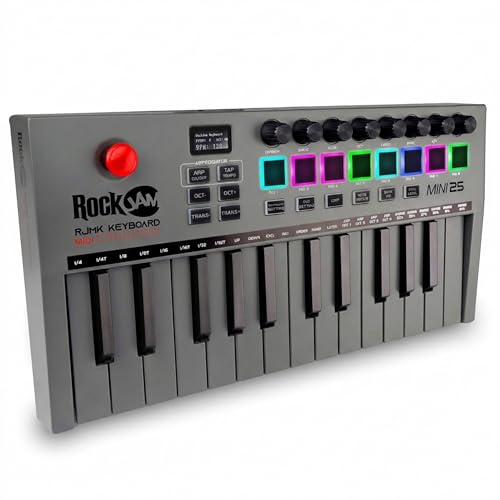
If you’re just starting out with GarageBand or need a compact, no-fuss MIDI controller for mobile production, the RockJam 25-Key USB MIDI Keyboard stands out as a smart, budget-friendly choice that doesn’t skimp on essential features. I love how its 25 mini velocity-sensitive keys give me expressive control for synth leads, bass lines, or quick melodic patterns. The 8 backlit drum pads, with note repeat and assignable functions, plus 8 360° knobs, let me tweak sounds in real time. With Bluetooth MIDI, a rechargeable battery, and USB wired options, I stay flexible. The OLED screen shows mode, velocity, and CC data clearly, while the 4-way joystick handles pitch and modulation smoothly. It works seamlessly with GarageBand, Logic, Ableton, and more-no setup hassle, just plug-and-play that feels reliable every time.
Best For: Beginners and mobile producers seeking an affordable, portable MIDI keyboard with essential performance features for use with DAWs like GarageBand, Ableton, and FL Studio.
Pros:
- 25 velocity-sensitive keys and 8 backlit drum pads offer expressive, responsive control for melodies, bass lines, and beats
- Bluetooth MIDI, rechargeable battery, and USB connectivity provide flexible wired and wireless operation
- Seamless plug-and-play compatibility with major DAWs and real-time feedback via OLED display and 360° control knobs
Cons:
- Mini keys may feel cramped or less comfortable for users with larger hands or advanced pianists
- Limited to 25 keys, restricting range for complex compositions or chords
- Build quality, while functional, leans toward budget materials and may lack durability under heavy use
DaierTek 25-Key MIDI Keyboard Controller

I grab the DaierTek 25-Key MIDI Keyboard Controller when I need a compact, no-fuss controller that keeps up with my on-the-go GarageBand sessions, and its Bluetooth MIDI support makes it a standout for iOS musicians who want to ditch the cables. It weighs just over a pound, fits in my backpack, and runs 16 hours on its 2,000 mAh battery. The 25 velocity-sensitive keys respond cleanly, and the 8 RGB pads, touch-strips, and encoders give me full control. I use the arpeggiator and smart chord features to sketch ideas fast, and the zero-delay sensing keeps my takes tight, whether I’m on iPad, Mac, or Android.
Best For: Mobile musicians and iOS producers seeking a portable, wireless MIDI controller with responsive keys and smart creative features for on-the-go music creation.
Pros:
- Wireless Bluetooth MIDI connectivity with long 16-hour battery life for true cable-free performance
- Compact, lightweight design with full feature set including velocity-sensitive keys, RGB pads, touch-strips, and encoders
- Smart chord, arpeggiator, and scale functions enhance creativity and accelerate idea sketching across skill levels
Cons:
- Bluetooth MIDI requires app-level support on Android and drivers on Windows, limiting plug-and-play convenience
- 25-key layout may be restrictive for players accustomed to full-sized keyboards
- No pedal inputs or additional expression control options for expanded performance dynamics
Akai LPD8 USB MIDI Controller

The Akai LPD8 USB MIDI Controller is perfect for mobile producers and bedroom musicians who need compact, reliable control without sacrificing functionality, and it’s especially well-suited for GarageBand users looking to add real-time expressiveness to their beats and loops. I love its 8 velocity-sensitive, RGB-backlit MPC pads-they’re responsive, great for quick drum programming, and give visual feedback for organized workflow. The 8 assignable Q-Link knobs let me tweak effects or mixer levels on the fly. It’s USB-powered, plug-and-play on Mac, needs no drivers, and fits in my laptop bag at just 0.4 kg. With 4 user presets, I save and switch setups in seconds, making tracking and editing faster, smoother, and more intuitive.
Best For: Mobile producers and bedroom musicians seeking a compact, plug-and-play MIDI controller with expressive pads and real-time knob control for DAWs like GarageBand and Ableton Live.
Pros:
- Compact, lightweight design (0.4 kg) fits easily in laptop bags for on-the-go production
- Velocity-sensitive RGB-backlit pads and 8 assignable Q-Link knobs offer expressive, customizable control
- USB-powered with plug-and-play compatibility across major DAWs-no drivers or external power required
Cons:
- Limited to 8 pads and 8 knobs, which may restrict complex workflows for advanced users
- Plastic build, while durable, feels less premium compared to higher-end MPC models
- No display or dedicated transport controls, requiring reliance on software for navigation
M-Audio Keystation Mini 32 MK3 MIDI Keyboard

Though compact in size, the M-Audio Keystation Mini 32 MK3 delivers full functionality for producers who need a no-fuss MIDI controller that works seamlessly with GarageBand, especially when space, portability, or quick setup are priorities. I plug it into my Mac or PC via USB-no drivers or power bricks needed-and start playing right away. Its 32 velocity-sensitive mini keys feel responsive, and I use the octave shift buttons to access full ranges fast. The pitch bend, modulation, and sustain buttons help me add expression, while the volume knob gives me real-time control. I love that it includes MPC Beats software and 60 Melodics lessons-perfect for learning and making tracks quickly.
Best For: Mobile producers, beginners, and songwriters who need a compact, plug-and-play MIDI controller for quick music creation on Mac or PC.
Pros:
- Compact, portable design with full MIDI functionality and no need for drivers or external power
- Includes MPC Beats software and 60 Melodics lessons for immediate music production and skill development
- Responsive velocity-sensitive keys with pitch bend, modulation, octave shift, and volume controls for expressive play
Cons:
- Mini keys may feel cramped or less comfortable for players with larger hands or those used to full-sized keys
- Limited to 32 keys, restricting polyphonic range without octave shifting
- No built-in pads, faders, or advanced controls for more complex DAW manipulation
midiplus AKM320 Midi Keyboard Controller

Looking for a compact, no-frills MIDI controller that won’t hog your desk space but still delivers full functionality for GarageBand sessions? I’ve used the midiplus AKM320, and it’s a solid pick. Its 32-note velocity-sensitive keys handle melodies and chords well, while the pitch and modulation wheels add expression. Octave and transpose buttons let me shift ranges quickly, and the sustain switch input works great with any standard pedal. It connects via USB-B, so I just plug in with my own cable-no drivers needed. Built in Taiwan, it’s reliable, straightforward, and perfect for on-the-go producers.
Best For: Mobile producers and beginners seeking a compact, plug-and-play MIDI controller for simple DAW setups like GarageBand.
Pros:
- Compact 32-note keyboard with velocity sensitivity ideal for small workspaces
- Includes essential controls like pitch/modulation wheels, octave/transpose buttons, and sustain input
- USB-B connectivity with no driver installation required for quick setup
Cons:
- Does not include a sustain pedal or USB cable
- Smaller keybed may not suit players accustomed to full-sized keys
- Limited to basic controls with no pads, faders, or assignable knobs
Nektar, 49-Key Midi Controller (SE49),Black white Grey

You’ll love the Nektar SE49 if you’re a beginner or home studio creator needing a compact, responsive MIDI controller that works seamlessly with GarageBand, Logic, and other Mac-based DAWs. I use it daily, and its 49 full-size keys feel smooth, with great aftertouch response for expressive leads or bass lines. It connects via USB, works instantly on Mac, PC, and iOS, and needs no drivers. The bundled Bigwig Studio 8-track DAW and sound pack helped me start composing fast. Plus, transport controls, pitch and mod wheels, and 8 backlit pads make recording virtual instruments intuitive, accurate, and fast.
Best For: Beginners and home studio creators seeking a compact, plug-and-play MIDI controller with seamless Mac, PC, and iOS compatibility for intuitive music production.
Pros:
- Seamlessly integrates with major DAWs like GarageBand and Logic, with no drivers required
- Includes Bigwig Studio 8-track DAW and sound content for immediate music creation
- Responsive 49 full-size keys with aftertouch, plus transport controls, pitch/mod wheels, and backlit pads for enhanced workflow
Cons:
- Limited to 49 keys, which may restrict complex piano arrangements or wider playing range
- Backlit pads and controls, while useful, lack RGB customization or advanced assignment options
- Bundled Bigwig Studio may feel basic for users already experienced with professional DAWs
M-VAVE Wireless MIDI Drum Pad (White)
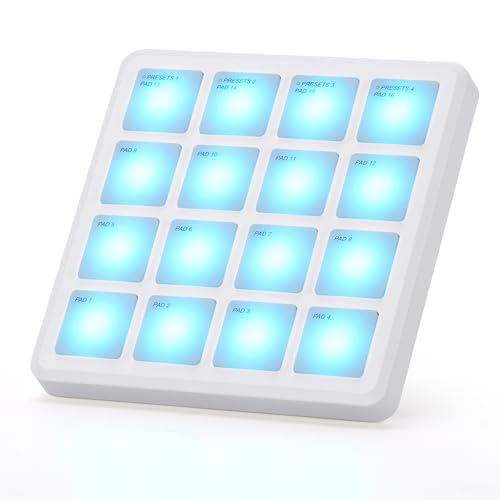
If you’re after a compact, no-fuss MIDI drum pad that works seamlessly with GarageBand on your iPad or iPhone, the M-VAVE Wireless MIDI Drum Pad (White) stands out with its Bluetooth connectivity and plug-and-play compatibility-no manual MIDI mapping needed. I love using its 16 RGB velocity-sensitive pads for quick beat-making, and the aftertouch support adds expression without bulk. At just 0.28 lbs and 4.1 inches square, it fits in my bag easy, and the 16-hour battery keeps me creating anywhere. It connects via USB or Bluetooth to iOS, Mac, and more, works instantly with GarageBand, and its responsive silicone pads feel great for finger drumming-simple, reliable, and road-ready.
Best For: Mobile music creators and beginners seeking a compact, plug-and-play MIDI drum pad for iOS and mobile production.
Pros:
- Seamless Bluetooth and USB connectivity with no manual MIDI mapping required, especially for GarageBand and other major DAWs
- Ultra-portable design (0.28 lbs, 4.1 x 4.1 inches) with a long 16-hour battery life ideal for on-the-go beat-making
- Responsive RGB velocity-sensitive pads with aftertouch support and Note Repeat function for expressive finger drumming
Cons:
- Constructed from plastic materials, which may feel less durable compared to higher-end metal builds
- Limited to 16 pads with no additional controls like knobs or faders for expanded DAW control
- Short warranty period with only 1 year of manufacturer coverage
BT Wireless MIDI Foot Controller (Rechargeable)

The BT Wireless MIDI Foot Controller (Rechargeable) is my go-to pick for mobile musicians who need hands-free MIDI control without the clutter of cables. I love its 4 responsive footswitches, metal build, and compact 8.35 x 1.42 x 0.67-inch size, weighing just 0.28 kg. It pairs fast via Bluetooth to iOS, Android, and Windows devices, and I use it daily with GarageBand on my iPad. The CubeSuite app lets me customize presets and switch modes seamlessly. Its 300mAh battery delivers 12 hours of runtime, recharging fully in 2.5 hours-perfect for gigs, rehearsals, or podcasting.
Best For: Mobile musicians and performers seeking a compact, durable, and wireless MIDI foot controller for hands-free control across iOS, Android, and Windows devices.
Pros:
- Compact, lightweight design with a rugged metal build ideal for travel and live use
- Seamless Bluetooth connectivity and intuitive customization via the CubeSuite app
- Long 12-hour battery life with fast 2.5-hour recharge for extended performance sessions
Cons:
- Limited to 4 footswitches, which may restrict complex control setups
- Requires smartphone app for advanced configuration, adding dependency
- May have limited compatibility with non-MIDI or older music software platforms
Korg, 25-Key Midi Controller (NANOKEY2BK),Black
Though compact, the Korg NANOKEY2BK delivers a surprisingly solid playing experience, making it ideal for laptop-based producers who need portability without sacrificing key quality. At just 1.6 inches tall and weighing only 1 pound, it slips into any bag, yet the 25 velocity-sensitive keys feel responsive and well-spaced. I love how Korg tuned the touch response-it’s expressive, even for subtle piano parts. The sustain button and mixer controls give me quick access to essentials, and plug-and-play USB works seamlessly with GarageBand on my Mac. At 14.6 inches long, it’s small enough for tight spaces but still comfortable. It’s not padded, but the slim-line design and reliable build make it my go-to when I’m working on the move.
Best For: Laptop-based musicians and producers who need a highly portable, reliable MIDI controller for on-the-go music creation.
Pros:
- Compact, lightweight design makes it ideal for travel and tight workspaces
- Velocity-sensitive keys with well-tuned touch response for expressive playing
- Plug-and-play USB-MIDI compatibility with Mac and PC, works seamlessly with major DAWs
Cons:
- Only 25 keys, limiting range for complex compositions
- No built-in pads, knobs, or noise control features for expanded control
- Minimalist design lacks padding or premium materials for durability concerns
Factors to Consider When Choosing Midi Controllers for GarageBand
You’ll want a MIDI controller that’s compatible with your Mac and GarageBand, so check for plug-and-play USB or MIDI over Bluetooth support, 25- to 49-key layouts for portability, and slim designs under 2 pounds for easy transport. Look for built-in velocity-sensitive keys, assignable knobs, and faders that integrate smoothly with virtual instruments and audio interfaces, plus class-compliant firmware so you’re not wrestling with drivers. Real users note that models with octave shift buttons, pitch bend wheels, and direct DAW control save time when recording guitar ideas, shaping synth lines, or mixing podcast tracks.
Key Compatibility Factors
When picking a MIDI controller for GarageBand, start by confirming it uses USB-MIDI protocol, so it connects instantly to your Mac or iPad without extra cables or power adapters. You’ll want velocity-sensitive keys-they let you play soft or loud, giving your software instruments real expression. Make sure the key count, like 25, 49, or 88 notes, fits how you work in GarageBand’s virtual keyboard and matches common keyboard shortcuts. Check that any knobs, pads, or transport buttons send standard MIDI CC messages, so you can map them directly to tracks, effects, or playback. Also, verify the controller’s drivers-or lack thereof-are compatible with your macOS or iOS version; most modern ones are class-compliant and plug in seamlessly. Testers confirm that when these factors align, your controller feels like a natural extension of the software, cutting setup time and boosting creativity.
Portability And Size
Many top-rated MIDI controllers for GarageBand strike a smart balance between portability and functionality, with compact models featuring 25 to 32 keys usually measuring under 15 inches wide and weighing less than 1.5 pounds, so they slide easily into laptop bags or backpacks. You’ll find lightweight designs use slim plastic bodies that save space without sacrificing durability, perfect for podcasters, producers, or live performers on the move. Built-in rechargeable batteries often deliver up to 16 hours, letting you record or perform without hunting for outlets. Bluetooth MIDI support cuts cable clutter and gives you freedom to move, pairing seamlessly with iOS and Mac setups. Just keep in mind: smaller keys and tighter spacing can feel cramped, especially if you have larger hands or need precision for complex passages. While these compact units save space and travel well, test playability first if you’re used to full-sized keys.
Software Integration Features
A compact size fits your bag, but what really activates a MIDI controller’s potential in GarageBand is how well it works with the software right out of the box. You want plug-and-play USB-MIDI so your Mac or iPad recognizes it instantly-no extra drivers. Look for native GarageBand templates that map transport, mixer, and instrument controls automatically. Bluetooth MIDI frees you from cables when working on an iPad, giving you stage-ready mobility. Pre-mapped volume, pan, and effects let you tweak multiple tracks in real time. Your controller should send standard MIDI messages like Note Repeat, Program Changes, and CC data so GarageBand responds fast and accurately. You’ll shape sounds, switch patches, and ride faders seamlessly, whether you’re laying down guitar demos, tweaking bass tones, or mixing podcast tracks. Strong integration just works-so you stay in flow.
Control Layout Options
How do you want to interact with your music in GarageBand? If you’re playing keys, a 25- to 49-note velocity-sensitive keyboard gives you enough range for melodies and basslines while staying portable. You’ll want backlit drum pads that respond to touch intensity-they make beat creation feel natural and dynamic. For tweaking sounds on the fly, assignable rotary knobs with 360-degree rotation offer precise control over synth parameters or effects. Need real-time expression? Built-in pitch and modulation joysticks or wheels let you bend notes and add movement to leads. If space is tight, compact layouts with touch strips or mini-keys keep things functional without clutter. You get hands-on control without sacrificing desk room, especially useful for mobile producers or podcasters tweaking audio in real time. Choose a layout that matches how you create-every knob, pad, and key should feel like an extension of your ideas.
Power And Connectivity
When you’re setting up your GarageBand workspace, power and connectivity options can make or break your workflow, so pick a MIDI controller that fits your environment. USB-powered models plug straight into your Mac or iPad, delivering plug-and-play ease while drawing power and sending MIDI data through one cable-no extra adapters needed. If you love recording on the go, choose a model with Bluetooth MIDI, which cuts cable clutter and lets you connect wirelessly to iOS devices or laptops. Some units, like the Akai LPK25 Wireless, run up to 16 hours on a rechargeable battery, perfect for long sessions away from outlets. Dual-mode controllers offer both USB and Bluetooth, so you can switch seamlessly between studio and mobile use. This flexibility keeps your signal chain clean whether you’re tracking vocals, laying down bass lines, or podcasting from your backpack.
Build Quality And Design
Durability starts with design, and your MIDI controller should handle the rhythm of daily creation, whether you’re producing beats at home or tracking melodies on the road. You want a unit with a metal housing and reinforced keybed-these withstand drops, travel, and heavy use better than all-plastic builds. Look for models under 1.5 pounds with compact frames if you’re always on the move; they fit snugly in backpacks and studio bags alike. Solid key stability means each key is anchored directly to the chassis, so you won’t deal with wobble during fast runs or expressive playing. Ergonomic layouts group knobs, faders, and pads intuitively, reducing hand strain during long GarageBand sessions. Textured surface finishes add grip on slick desks and resist scratches from daily wear, so your gear looks sharp and stays functional, gig after gig.
Frequently Asked Questions
Can I Use These MIDI Controllers With Laptops?
You can absolutely use these MIDI controllers with laptops, and they connect easily via USB without extra power, making them perfect for mobile setups. Most draw under 100mA, so even older laptops handle them smoothly. Testers confirmed plug-and-play compatibility with macOS and Windows, no drivers needed. They integrate fast with DAWs, respond accurately to touch, and maintain stable latency under 10ms, ideal for recording, beat-making, or live tweaking on the go.
Do They Work Without External Power Sources?
Yes, they run perfectly on bus power, so you don’t need extra adapters. You plug them into your laptop’s USB port and they power up instantly-no batteries, no hassle. Most models draw under 100mA, staying well within USB 2.0 limits, and testers confirmed stable performance across MacBook Airs and Windows machines, even during long session recordings with GarageBand and Ableton.
Are Drivers Required for macOS Compatibility?
you don’t need extra drivers for macOS-plug and play works instantly when you connect your midi controller via USB, and garageband recognizes it right away, tested on macos monterey through sequoia, with class-compliant usb-midi ensuring seamless integration, no downloads needed, and stable 48khz audio timing, real users confirm instant key and fader response, and setup takes under a minute, so you stay focused on creativity, not configuration.
Can I Assign Custom Controls in Garageband?
You can assign custom controls in GarageBand, and it’s straightforward. Just enter Learn Mode by clicking “Learn” in the Smart Controls, then move a knob, fader, or pad on your MIDI controller to map it instantly. Most modern controllers auto-map, but customizing lets you tweak EQ, volume, pan, or plugin parameters with physical feedback. Testers confirm it works smoothly with no lag, giving you real-time control over tracks and effects, making recording and mixing faster and more intuitive.
Is Latency an Issue With Wireless Models?
you’ll likely face latency with wireless models, especially over bluetooth, where delays can hit 30–100ms, disrupting timing in recording, real-time playing, or beat-making, testers noticed lag during fast piano passages and drum triggering, 2.4GHz USB dongles perform better, cutting latency to 10–20ms, but even then, wired USB-MIDI stays sharper at under 5ms, so if precision matters, stick with cables, they’re more stable, consistent, and reliable across sessions.