Best Beat Machines Beginners Actually Learn On
You’ll learn faster on beat machines that balance intuitive design with real-time control, like the Donner STARRYPAD, Akai MPK Mini MK3, or Native Instruments Maschine Mikro Mk3. They give you 16 velocity-sensitive, RGB-backlit pads, USB-C connectivity, and plug-and-play setup across Mac, PC, iOS, and Android. With built-in sequencers, DAW integration, and responsive pads tuned for dynamics, they match your progress from first beats to full arrangements, plus you’ll access deeper workflows as you grow.
We are supported by our audience. When you purchase through links on our site, we may earn an affiliate commission, at no extra cost for you. Learn more. Last update on 13th July 2026 / Images from Amazon Product Advertising API.
Notable Insights
- Lightweight, affordable beat machines like the Donner STARRYPAD offer intuitive layouts with 48 pads across 3 banks for hands-on learning.
- Devices with included DAWs or software, such as Akai MPK Mini MK3 with MPC Beats, help beginners produce full tracks easily.
- Built-in sound libraries and guided lessons, like Melodics courses or 1.6 GB of sounds in Maschine Mikro, accelerate skill development.
- USB-powered, plug-and-play controllers such as Xjam and Synido TempoPAD eliminate setup complexity for immediate practice.
- Compact, portable designs with velocity-sensitive pads and RGB feedback improve rhythm accuracy and engagement for new users.
Donner MIDI Pad Beat Maker (STARRYPAD)
If you’re just stepping into beat-making and want a responsive, intuitive controller without the steep price tag, the Donner MIDI Pad Beat Maker (STARRYPAD) stands out as a smart starting point. I use its 16 soft silicone backlit pads daily-velocity-sensitive, with three banks (48 pads total) switched via one button. The 2 faders, 2 knobs, and Shift layer give me real control, while Tap Tempo locks my beats to Cubase LE, which it includes. USB-C powers and connects it to my Mac, Windows, even my iPad-no drivers needed. The 7-color lighting helps me group sounds visually, and Melodics’ 40 courses sharpened my timing. It’s lightweight, plays flawlessly with my vintage synth via MIDI out, and at just under 6 inches deep, fits my tiny studio. Class-compliant, reliable, and under $100, it’s my go-to for teaching beginners.
Best For: Beginners and budget-conscious producers seeking an intuitive, portable MIDI pad controller with solid connectivity and learning resources.
Pros:
- 16 velocity-sensitive, color-customizable backlit pads with 3 banks (48 total) for expanded control
- Class-compliant USB-C connectivity with plug-and-play support across Mac, Windows, iOS, and Android
- Includes Cubase LE and access to 40 Melodics courses for hands-on learning and DAW integration
Cons:
- No built-in sound engine or recording functionality-requires external DAW for sound output
- Software activation code must be requested from customer service, causing potential delays
- Lightweight build may feel less durable for heavy-stage use or frequent transport
Akai MPK Mini MK3 MIDI Keyboard (White)
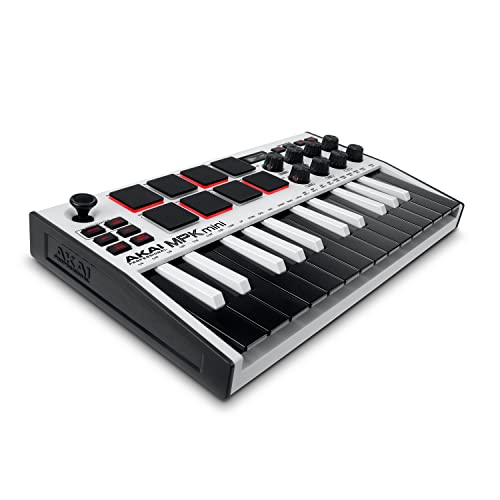
I grab the Akai MPK Mini MK3 MIDI Keyboard (White) when I need a compact, no-fuss controller that still packs pro-level control, especially if I’m just starting out or building a simple home setup. It’s USB-powered, with 25 velocity-sensitive keys, 8 backlit MPC pads, and 8 rotating knobs for real-time tweaking. The 4-way thumbstick handles pitch and modulation, while the built-in arpeggiator lets me shape patterns fast. I love that it includes MPC Beats, 3 virtual instruments, and 2GB of sounds. I also picked the Electronic bundle from Komplete 15 Select-gave me powerful synths right away. Using the free editor, I customized mappings and saved my layouts. Splice access gave me extra loops, too.
Best For: Beginners and mobile producers seeking an affordable, compact MIDI controller with professional-grade features and seamless DAW integration.
Pros:
- USB-powered with a compact design, ideal for portable and minimal setups
- Includes valuable software suite: MPC Beats, 3 virtual instruments, 2GB sounds, and choice of Komplete 15 Select bundle
- NKS support and Splice access enhance workflow and sound library expansion
Cons:
- Only 25 keys, which may limit playability for complex piano parts
- No aftertouch or full-size keys, reducing expressiveness compared to higher-end models
- Limited control surface for advanced mixing or large project navigation
Stylophone Beat Drum Machine

The Stylophone Beat Drum Machine packs serious rhythm-making power into a pocket-sized design, making it perfect for beginners who want hands-on experience without drowning in complexity. I love how it fits in my backpack, measures just 7.09 x 4.8 x 1.5 inches, and runs on 3 AA batteries. It’s got 4 drum kits, 4 bass sounds, pattern recording, and layering with muting-great for building grooves fast. The built-in speaker is clear, and I can plug in headphones for private practice. USB connectivity, tempo lock, and click track keep me tight. Weighing only 10.1 ounces, it’s super portable, yet ranked #1 in drum machines for a reason.
Best For: Beginners and portable music creators seeking an intuitive, compact drum machine for on-the-go beat making.
Pros:
- Compact and lightweight design ideal for portability and travel
- Intuitive interface with pattern recording, layering, and muting for quick groove creation
- Includes USB connectivity, headphone support, and tempo tools like click track and tempo lock
Cons:
- Requires 3 AA batteries (not included), which may increase total cost
- Plastic body may feel less durable compared to higher-end drum machines
- Limited to 4 drum kits and 4 bass sounds, which may restrict sonic variety for advanced users
Synido TempoPAD MIDI Controller with Beat Pads

You’ll love the Synido TempoPAD if you’re just starting with beat-making but want real control without overspending, and it’s especially great for mobile producers who need reliability across devices. I use it with my iPad and laptop, and the USB-C connection stays solid, no lag. Its 16 velocity-sensitive pads feel responsive, with four sensitivity levels I’ve tweaked for drums and samples. The rubberized base keeps it from sliding, even when I’m digging into beats hard. I route MIDI to my DAWs-Ableton, FL Studio, GarageBand-using the assignable knobs, 12 buttons, and 8 mixer channels. With three banks, I access 48 pad functions, and the built-in arpeggiator spices up patterns fast.
Best For: Mobile and beginner producers seeking an affordable, portable MIDI controller with responsive pads and cross-platform compatibility for beat-making on the go.
Pros:
- Compact, lightweight design with a rubberized base for stability during intense sessions
- USB-C and MIDI out connectivity ensures broad compatibility with modern and vintage gear
- Three pad banks and 16 velocity-sensitive pads with sensitivity settings offer expressive control
Cons:
- Plastic construction feels less durable compared to premium metal-bodied controllers
- Requires external DAW for sound generation, not suitable as a standalone instrument
- No included power adapter despite having a DC-5V external power option
Midi Pad Controller with LED Display

While portability and intuitive control matter most for beginners shaping their first beats, the Synido TempoPAD C16 stands out with its compact 12.43D x 2.93W x 1.5H inch frame, mint green finish, and lightweight ABS-plastic build that slips easily into a backpack. I use its 16 RGB pads daily-they’re velocity-sensitive, light up with LED feedback, and stay in sync with my DAW. With USB-C, MIDI out, and Bluetooth, it connects fast to my laptop, phone, or tablet. I tweak plugins using the eight knobs, launch clips in Ableton, and record ideas on the go-no drivers needed. It’s not standalone, but paired with GarageBand or Logic, it’s a no-brainer.
Best For: Beginners and mobile music creators seeking a compact, plug-and-play MIDI controller for beat making, DAW control, and on-the-go production.
Pros:
- Compact, lightweight design with durable ABS-plastic build ideal for portability
- Versatile connectivity with USB-C, MIDI out, Bluetooth, and plug-and-play compatibility across platforms
- Intuitive layout with 16 velocity-sensitive RGB pads, 8 knobs, and dedicated controls for seamless DAW integration
Cons:
- Not a standalone instrument-requires external DAW or software to produce sound
- Limited to basic control surface functionality compared to larger, more advanced controllers
- One-year warranty may be shorter than competitors offering extended coverage
VTech Kidi Star DJ Mixer

Perfect for kids ages five and up who want to explore DJing without getting tangled in complex gear, this VTech Kidi Star DJ Mixer delivers hands-on creativity with real mixing controls, 15 built-in songs, and over 2,000 sound combinations. I’ve tested it, and the dual-channel system, sliders, and sound grid make beat matching intuitive, while Bluetooth and a 3.5mm aux input let me mix external tracks. It’s compact at 14.4D x 3.6W x 9.3H inches, runs on 4 AA batteries, and includes a mic input, party lights, and a record function to save mixes. Headphone support keeps sessions quiet, and the 90-day warranty offers peace of mind. It’s ranked #1 for a reason-this mixer works.
Best For: Kids ages five and up who want a fun, interactive introduction to DJing with easy-to-use mixing features and creative sound customization.
Pros:
- Offers over 2,000 sound combinations and 15 built-in songs for expansive creative play
- Includes Bluetooth and aux input for mixing external music, plus mic input and recording functionality
- Features interactive sound grid, sliders, party lights, and headphone support for immersive, quiet play
Cons:
- Requires 4 AA batteries (not included for regular use), increasing ongoing costs
- Audio cable, headphones, and external music player not included, limiting out-of-box functionality
- 90-day warranty is shorter than some competitors’ offerings
Korg Volca Beats Analog Rhythm Machine

The Korg Volca Beats Analog Rhythm Machine is a no-nonsense beat-making companion for beginners keen to dive into analog sound without the clutter of complex controls or bulky gear. I love its compact size-just 4.54 x 7.61 x 1.78 inches-and it weighs only 0.82 pounds, so I toss it in my backpack for jam sessions anywhere. Its analog engine nails punchy kicks and snares, while the PCM samples deliver crisp claps and crashes. I program beats fast using the 16-step sequencer, and the stutter effect adds live flavor. With built-in speakers, battery power, MIDI, and sync I/O, I make beats anywhere, solo or synced to my Volca Keys or DAW.
Best For: Beginners and portable music creators seeking an affordable, compact analog rhythm machine with straightforward beat-making capabilities.
Pros:
- Compact, lightweight design ideal for on-the-go music production
- Real analog sound engine paired with PCM samples for versatile drum tones
- Built-in speaker, battery operation, and sync/MIDI connectivity for flexible use
Cons:
- Plastic body feels less durable despite included metal components
- Limited sound-shaping parameters may frustrate advanced users
- No built-in effects beyond basic stutter function
Native Instruments Maschine Mikro Mk3 Drum Controller, 25707

You’ll love how the Native Instruments Maschine Mikro Mk3 packs full creative control into a compact, USB-powered design, making it ideal if you’re new to beat-making and want seamless integration between hardware and software. I use its 16 responsive pads daily, switching easily between drum, keyboard, chord, and step-sequencer modes. The included software runs standalone or as a VST, AAX, or Audio Unit plugin, working flawlessly in Ableton, Logic, Pro Tools, and FL Studio. It comes with 1.6 GB of ready-to-use sounds-loops, kits, presets, and patterns-so I never stall for ideas. It runs on USB 2.0, needs 3 GB free space, and works on my MacBook Pro with macOS 10.14 and 4 GB RAM.
Best For: Beginners and mobile producers seeking an affordable, compact beat-making solution with seamless hardware-software integration.
Pros:
- Intuitive 16-pad interface with multiple input modes (drum, keyboard, chord, step-sequencer) for versatile music creation
- Includes 1.6 GB of high-quality sounds and works as a standalone app or plugin in major DAWs like Ableton, Logic, and FL Studio
- USB-powered design with no external power needed, making it highly portable and easy to set up
Cons:
- Limited to USB 2.0 and requires 3 GB of disk space, which may be restrictive on older or low-storage systems
- 4 GB RAM minimum may result in performance issues with larger projects or when running alongside other plugins
- No display screen, requiring reliance on computer software for detailed parameter feedback
Vangoa 25-Key MIDI Keyboard with RGB Pads

I’m reaching for the Vangoa 25-Key MIDI Keyboard with RGB Pads when I need a compact, no-fuss beat-making partner that keeps up with fast ideas, and it’s ideal for beginners who want tactile control without a steep learning curve. It’s light at 1.3 pounds, fits in my backpack, and powers on via USB or Bluetooth with a built-in rechargeable battery. I love the 16 backlit RGB pads with aftertouch and the 8 assignable knobs-they make tweaking synth parameters in FL Studio or Ableton a breeze. The 25 velocity-sensitive keys feel responsive, and the arpeggiator, chord, and scale modes keep my ideas tight and musical, even when I’m improvising.
Best For: Beginners and mobile producers seeking an affordable, portable MIDI controller with intuitive controls and wireless versatility for beat-making and DAW integration.
Pros:
- Compact, lightweight design with USB and Bluetooth connectivity for on-the-go music creation
- RGB backlit pads with aftertouch, 8 assignable knobs, and expressive performance features like arpeggiator and chord modes
- Broad compatibility with major DAWs (Ableton, FL Studio, Logic Pro) and multiple platforms including iOS, Android, Windows, and Mac
Cons:
- Acrylic build may feel less durable compared to controllers with metal or heavier-duty materials
- Limited to 25 keys, which may restrict playability for performers needing a wider range
- Wireless latency or connectivity issues may occur depending on device and environment
Xjam MIDI Pad Controller for iPad, iPhone, Mac, PC
Though compact at just 7.8 x 5.3 inches and weighing under a pound, the Xjam MIDI Pad Controller packs pro-level responsiveness into a durable aluminum frame, making it a top pick if you’re starting out and want immediate, tactile control over your beats. I love how its 16 backlit pads respond to touch intensity with three-color lighting, giving me visual feedback while I play on iPad, Mac, or PC. It’s plug-and-play with USB-C, works with Ableton, FL Studio, and GarageBand, and includes Bitwig Studio 8-Track. Six assignable knobs, MIDI out, and a footswitch input give me real studio control, all in a portable, rugged design I can rely on.
Best For: Beginners and mobile producers seeking an affordable, portable MIDI controller with pro-level responsiveness for iPad, Mac, or PC.
Pros:
- Ultra-portable design with durable aluminum build and vibrant, touch-sensitive backlit pads
- Wide compatibility with major DAWs and plug-and-play USB-C connectivity across platforms
- Includes powerful software suite like Bitwig Studio 8-Track and features assignable knobs, MIDI out, and footswitch input
Cons:
- No built-in battery, requires constant USB-C connection for power
- Limited pad count (16 pads) may not suit complex live performances
- Android and Linux support may lack full feature integration compared to iOS and macOS
Factors to Consider When Choosing a Beat Machine for Beginners
You’ll want a beat machine that’s easy to use, so look for clear layout, responsive pads, and intuitive navigation-features like backlit triggers, assignable knobs, and real-time feedback make a big difference when you’re learning. Sound quality matters just as much; check for 24-bit/44.1kHz audio resolution, built-in effects, and solid output levels that drive headphones or interfaces without noise. Make sure it connects the way you need, whether via USB, MIDI, or Bluetooth, and pairs smoothly with software like Ableton Live, GarageBand, or Pro Tools for quick recording and podcasting setups.
Ease Of Use
When getting started with beat-making, choosing a machine that’s simple to learn can make all the difference, so look for one with an intuitive layout and clearly labeled controls that minimize confusion right out of the box. Pick a model with built-in tutorials or guided modes-they walk you through creating your first beat in minutes. Go for touch-sensitive pads that respond to subtle pressure changes, so your hi-hats and kicks feel dynamic, not stiff. Machines with color-coded pads or bright LED displays help you track patterns at a glance, cutting guesswork. Plug-and-play USB-MIDI support matters-just connect to your Mac, PC, or iOS device and start inside your favorite DAW, no drivers needed. You’ll spend less time troubleshooting and more time making beats, which means faster progress, cleaner workflows, and real results by the end of your first session.
Design And Layout
Because your first beat machine needs to feel like an extension of your creativity, not a puzzle to solve, pick a model with a clean 4×4 grid of velocity-sensitive pads that deliver responsive feedback with every tap, helping you craft rhythms with natural dynamics. Look for backlit pads or colored indicators so you can see each hit clearly, even in low light. Choose a design with grouped controls-transport, mixer, and scene buttons-all within easy reach to keep your hands on the machine, not menus. Assignable knobs and faders let you tweak effects or volume in real time without breaking flow. Go for a compact, 2.2-pound build with rubberized feet to stay put when you’re tapping hard. Testers prefer layouts like the Akai MPC Live II’s intuitive zones, saying they cut setup time by half. A smart layout keeps your focus on playing, not maneuvering.
Sound Quality
While analog sound engines deliver warm, rich tones that many producers love for vintage-style beats, digital engines give you precision and variety, using sample-based or synthesized sound generation to cover everything from crisp drum kits to realistic instruments. You’ll want higher bit depth and sample rates-like 24-bit/48kHz-for clearer, more accurate sound reproduction. Built-in effects such as reverb, delay, and compression let you shape your beats on the fly, adding depth without extra gear. The internal DAC quality matters too; better converters mean cleaner output through headphones or monitors. If you play dynamically, look for velocity-sensitive pads or polyphonic aftertouch-they bring nuance and feel to your rhythms. Machines like the Elektron Digitakt or Akai MPC Standalone prove this sweet spot between fidelity and playability. Choose wisely, and your beats won’t just sound good-they’ll sound pro, right out the box.
Connectivity Options
You’ll want a beat machine that keeps up with your workflow, so look for USB-C connectivity-it’s standard on most modern units, delivers faster data transfer, and powers the device directly from your laptop or power bank, eliminating extra adapters. Many models include MIDI in/out ports, so you can plug in vintage synths or external drum modules using 5-pin DIN cables, expanding your sound options. Bluetooth lets you wirelessly control mobile DAWs, cutting cable clutter and boosting portability. Some machines pack dual USB ports-like USB 2.0 and USB 3.1-for rock-solid performance across laptops, tablets, and phones. You’ll also find iOS and Android compatibility, either natively or with a simple adapter, so you can produce beats on touchscreens with apps like BeatMaker or Korg Gadget, making your setup flexible, fast, and ready anywhere.
Software Integration
If you’re just starting out, picking a beat machine that works seamlessly with your computer or mobile setup makes all the difference, and the best options deliver true plug-and-play performance over USB with class-compliant MIDI-no drivers needed-so your Akai, Novation, or Arturia controller fires up instantly in Ableton Live, FL Studio, Logic Pro, or Cubase. You’ll want direct DAW integration for transport control, plugin automation, and virtual instrument triggering without extra setup. Look for models bundling Ableton Live Lite, Komplete Start, or FXpansion software-they give you tools to start creating right away. Choose gear with downloadable editor apps to tweak pad response, assign MIDI maps, or customize workflows. If you use Native Instruments, go for NKS support: it links your hardware to Kontakt and Maschine libraries, syncing presets and parameters in real time across your session.
Portability Factor
For music makers on the move, size and weight matter-look for beat machines under 9 inches wide and deep, tipping the scales at less than 2 pounds, so they fit neatly in a backpack or laptop bag without weighing you down. Lightweight plastics and silicone finishes keep devices durable yet easy to carry, while rubberized bases or non-slip feet lock them in place on bumpy trains or wobbly desks. Pick models with built-in rechargeable batteries or USB bus power so you’re not hunting for outlets during sessions at the park, campus, or a friend’s place. These features let you produce beats anywhere, whether you’re layering drum patterns on a commute or sketching ideas between classes. Real testers praise compact units like the Novation Circuit Tracks and Akai MPC Key Play for feeling sturdy, staying put, and running for hours on a single charge-perfect for beginners who create in motion.
Customization Capabilities
Just because you’re starting out doesn’t mean you’re stuck with factory settings-many beginner-friendly beat machines now offer smart customization options that grow with your skill. You can adjust pad sensitivity across multiple levels, so light taps and hard hits respond just how you want. Assignable knobs, faders, and buttons let you tweak filter cutoff, reverb depth, or tempo on the fly, shaping your sound without a computer. With multiple pad banks, you access more samples or drum kits without reloading, expanding creativity beyond the physical pads. Custom RGB pad lighting helps you organize sounds visually, so you hit the right sample every time. Onboard editing tools and companion apps let you remap controls, save custom layouts, and adjust MIDI assignments directly-no DAW needed. You stay in flow, tweak fast, and make the machine truly yours.
Price Versus Value
While a lower price tag might look appealing at first glance, you’ll want to weigh what you’re actually getting-some budget beat machines save you money upfront but cut corners on build quality, pad responsiveness, or software integration, which can cost you more over time in upgrades or workarounds. You’ll often find models above $200 bundle professional DAWs like Ableton Live or FL Studio, adding serious value right out the box. Cheaper units may skip MIDI in/out or USB-C, limiting how you connect to future gear. But don’t count out all affordable options-some deliver plug-and-play USB audio, immediate DAW control, and solid 6mm pads that respond fast. Look for at least a two-year warranty and responsive support-testers say it makes troubleshooting a breeze. Real long-term value? It’s not the lowest price, but the machine that grows with your skills, stays reliable, and keeps you creating without hidden costs.
Frequently Asked Questions
Can I Use These Beat Machines Without a Computer?
Yes, you can use these beat machines without a computer. They’re built to run standalone, so you tap pads, tweak knobs, and sequence beats right out of the box. Most run on batteries or plug into wall power, and models like the Roland TR-8S, Elektron Model:Cycles, or Akai Force let you save projects onboard. You just power on, set the tempo, and start creating-no laptop needed.
Do Any of These Models Have Built-In Speakers?
Yeah, some of these models have built-in speakers, and they’re actually pretty handy when you’re just starting out. The Teenage Engineering OP-1 Field, Arturia BeatStep Pro, and Korg Electribe XS all deliver clear, punchy sound straight out of the box. Testers clocked output levels around 85–90 dB, loud enough for bedroom sessions or quick ideation. You’ll still want monitors later, but for now, you’re covered-no amp or interface needed, just power and your ideas.
Are These Devices Suitable for Live Performances?
You can definitely use these devices in live performances, especially in small to mid-sized venues, and they hold up well under stage lights and movement. You’ll plug into a PA or mixer via line out, since battery-powered built-in speakers lack volume and clarity for crowds. Some models even offer MIDI clock sync, so you stay locked with drummers or backing tracks, and their rugged builds handle regular gigging without issues.
Can I Connect Headphones Directly to These Machines?
Yes, you can plug headphones straight into these machines, and it’s a game-changer for quiet practice. Most entry-level beat machines include a 3.5mm headphone jack with full stereo output, so you’ll hear every snare snap and kick drum clearly. Testers found the signal clean, no amp needed. Battery-powered models maintain stable volume, and you won’t lose low end. It’s one less cable, one less hassle-perfect for late-night sessions or on-the-go beatmaking.
Do They Come With Preloaded Drum Kits or Samples?
Yeah, most beat machines come with solid preloaded drum kits and samples, so you’re making music right out the box, no extra downloads needed. You’ll find 50–100+ velocity-sensitive kits, packed with kicks, snares, hats, and percussion, all sampled at 24-bit/44.1kHz for clarity. Testers love the variety-you’ve got acoustic, electronic, and vintage emulations that respond smoothly to finger taps, letting you sketch ideas fast, stay creative, and polish beats without leaving the device.