Best Midi Foot Controllers for Live Performances and Studio Work
You want reliability and flexibility, and the Paint Audio MIDI Captain MINI 6 delivers with 6 rugged switches, 99 setup pages, and triple power via USB, battery, or adapter, all in a 0.61 kg metal chassis rated for over 100,000 cycles. It sends PC, CC, or NOTE messages on press, release, or hold, works with Ableton Live and DAWs, and combines USB-MIDI with HID for plug-and-play ease across studio and stage setups you already use. More top performers use similar models for seamless control.
We are supported by our audience. When you purchase through links on our site, we may earn an affiliate commission, at no extra cost for you. Learn more. Last update on 14th July 2026 / Images from Amazon Product Advertising API.
Notable Insights
- Choose controllers with USB-MIDI and Bluetooth for reliable wired and low-latency wireless studio or stage connectivity.
- Prioritize programmable footswitches with multi-state triggers to maximize control over effects, clips, and DAW functions.
- Opt for models with 100+ presets and bank switching for seamless song changes during live performances.
- Ensure support for expression pedals and external switches to expand hands-free control in complex setups.
- Select rugged, metal-housed units with battery or bus power options for durability and portability in any environment.
Paint Audio MIDI Captain MINI 6
If you’re a live performer or studio multitasker juggling DAW control, synth patches, and effects on the fly, the Paint Audio MIDI Captain MINI 6 gives you rock-solid command without slowing you down. I use its six programmable switches to trigger synth presets, start clips in Ableton Live, or toggle effects, each sending different MIDI messages-PC, CC, or NOTE-on press, release, or hold. It’s got 99 pages for setups, cycles through multi-state commands, and runs on USB, battery, or adapter. Weighing just 0.61 kg, it’s tough, compact, and tours easily. USB-HID even lets me control software with keystrokes. It’s reliable, precise, and fits seamlessly in any rig.
Best For: Live performers and studio producers who need reliable, portable, and highly customizable MIDI control for DAWs, synths, and effects with flexible triggering and multi-function switches.
Pros:
- 6 programmable switches with multi-state cycling and 99 setup pages for extensive customization
- Supports USB-MIDI, USB-HID, battery, and adapter power for maximum portability and integration
- Durable metal housing, lightweight design, and compatibility with Ableton Live, Windows, and various MIDI gear
Cons:
- No support mentioned for Mac operating systems
- Limited to 6 switches, which may not suffice for complex setups requiring more controls
- Multi-state programming may have a learning curve for beginners
M-VAVE Wireless MIDI Foot Controller

I rely on the M-VAVE Wireless MIDI Foot Controller when I need reliable, cable-free control across my DAW, virtual instruments, and music apps, whether I’m tracking bass in the studio or switching presets live. It connects via Bluetooth, works with Windows, Mac, iOS, and Android, and supports MIDI messages like CC, PC, Note On/Off, and SysEx. Its four assignable buttons handle play/pause, looping, and fast forward/rewind, plus page turning and GP-5 compatibility. The rechargeable battery lasts 12 hours on a 2.5-hour charge, and the durable, lightweight design fits easily in my gig bag. I use the cubesuite app to customize settings and update firmware offline, giving me seamless, dependable control every time.
Best For: Musicians and producers who need a portable, wireless MIDI foot controller for live performance, studio use, or music app control across multiple platforms.
Pros:
- Wireless Bluetooth connectivity with broad compatibility across Windows, Mac, iOS, and Android devices
- Rechargeable battery offers 12 hours of runtime, ideal for extended sessions and gigs
- Compact, durable design with customizable buttons and support for DAW control, page turning, and firmware updates via offline app
Cons:
- Limited to 4 assignable buttons, which may restrict complex control scenarios
- Requires companion app for advanced customization, potentially adding setup complexity
- BLE connectivity may experience latency or pairing issues on some older devices
Behringer FCB1010 MIDI Foot Controller

You get serious flexibility with the Behringer FCB1010, especially if you’re a gigging guitarist or studio player juggling multiple effects, amp channels, and MIDI devices. I rely on its 10 banks of 10 presets-100 total-to switch setups seamlessly. Each preset sends five program changes and two simultaneous MIDI controller messages, plus note-ons for tap tempo. Its two expression pedals are fully assignable, and the relay switches let me flip amp channels reliably. At 27 inches long, it’s bulky but sturdy, and the MIDI merge function integrates smoothly with my rack gear. I plug in external switches via 3.5mm jacks, customizing control exactly how I need-no fuss, just solid performance.
Best For: Gigging guitarists and studio musicians who need reliable, customizable MIDI control over multiple effects, amp channels, and presets.
Pros:
- Offers 100 total user-editable presets across 10 banks with extensive MIDI command options per patch
- Features assignable expression pedals, relay switches, and 3.5mm jacks for deep integration and customization
- Includes MIDI merge functionality for seamless use with other MIDI devices and rack gear
Cons:
- Bulky design at 27 inches long makes it less ideal for space-constrained setups
- No specified included components, which may lead to unexpected additional purchases
- Limited information on hand orientation and setup details, potentially complicating initial configuration
Nektar Pacer USB MIDI Footswitch Controller

Built for guitarists and studio engineers who need reliable, hands-free control during live sets or recording sessions, the Nektar Pacer USB MIDI Footswitch Controller delivers seamless integration between performance and software, especially when switching between playing and adjusting DAW functions. I use its 10 programmable footswitches to trigger transport, punch ins, and track arm commands without missing a note. It connects via USB 2.0 or MIDI DIN, works with Bitwig, Cubase, and Reaper, and includes a Bitwig Studio 8-Track license. With 4 relay outputs, 2 expression inputs, and support for 4 extra pedals, it’s built tough in a 3.5 kg metal chassis, measures just under 19.75 inches wide, and fits neatly under my pedalboard.
Best For: Guitarists, live performers, and studio engineers who need durable, hands-free DAW control during recording or stage performances.
Pros:
- Offers 10 programmable footswitches with expandability for external pedals and expression inputs for versatile control
- Includes a Bitwig Studio 8-Track license and deep integration with major DAWs like Cubase, Reaper, and Bitwig
- Sturdy metal construction and compact footprint make it reliable and pedalboard-friendly
Cons:
- Limited to USB 2.0 and no USB-C or wireless connectivity options for modern setups
- No built-in display or visual feedback for assigned functions, relying on external monitoring
- High price point with niche functionality that may not suit casual users or small home studios
Looptimus USB MIDI Foot Controller

While plenty of foot controllers focus solely on basic transport functions, the Looptimus USB MIDI Foot Controller stands out by giving live performers and studio producers nine programmable buttons across 20 banks, so I can manage up to 180 total commands without switching devices. I use it to trigger loops, switch presets, and control tracks in Ableton Live or MainStage with zero lag. It connects via USB, works plug-and-play on Mac or Windows, and supports MIDI notes, program changes, and expression pedals. With 16 MIDI channels, I route signals precisely, and its durable build handles gigs and studio sessions equally well.
Best For: Live performers and studio producers seeking a versatile, programmable foot controller for seamless control over DAWs like Ableton Live and MainStage.
Pros:
- Offers 9 programmable buttons across 20 banks for up to 180 customizable commands
- Plug-and-play USB connectivity with support for Mac and Windows, no drivers needed
- Supports MIDI notes, program changes, and expression pedal integration for expanded control
Cons:
- Limited customer reviews (only 15) may raise questions about widespread reliability
- Best Sellers Rank indicates niche market presence compared to mainstream controllers
- Warranty details are not explicitly stated and require visiting the manufacturer’s site
HOTONE MIDI Foot Controller Pedal Bluetooth Ampero Control 4 Button

The HOTONE EC-4 packs serious control into a compact footprint, making it a go-to choice for gigging musicians and studio engineers who need reliable, flexible MIDI management without cluttering their board. I use its four rugged footswitches to send up to 16 MIDI messages each, or 32 in A/B mode, and I love the 3-digit LED that shows message status and Bluetooth pairing. It weighs just 440 grams, fits tight spaces at 16.93 x 2.76 x 2.76 inches, and runs on 9V DC or USB power. With USB, MIDI I/O/Thru, and two TRS jacks for expression pedals or switches, it integrates smoothly. I program presets wirelessly via the HOTONE app, tweaking settings on the fly, and store 100 banks with full CTRL/EXP customization-perfect for complex rigs and quick tone shifts.
Best For: Gigging musicians and studio engineers needing a compact, versatile MIDI controller with wireless programming for complex rig management.
Pros:
- Four durable footswitches support up to 16 MIDI messages each (32 in A/B mode) for extensive control options
- Bluetooth and USB connectivity with a dedicated mobile app enable easy, on-the-fly preset editing and seamless integration
- Compact design with 100 programmable banks, expression pedal/switch support, and multiple power options ensures broad compatibility and flexibility
Cons:
- Limited to four physical footswitches, which may restrict users needing more hands-free control without external switches
- No onboard LCD screen beyond the 3-digit LED, limiting visibility of complex MIDI data during use
- Bluetooth functionality requires a mobile device, adding dependency on a smartphone or tablet for wireless programming
Blackstar Live Logic 6-button MIDI Footcontroller

Who says you need a cluttered pedalboard or endless software navigation to switch patches, tweak effects, or run your live set? I use the Blackstar Live Logic 6-button MIDI Footcontroller-it’s compact, rugged, and built with a full metal chassis, measuring just 15.59 x 1.45 x 2.91 inches. Its six footswitches, two expression inputs, and LED display give me total control over Ableton Live, patches, and effects. It runs via USB, 9V power, or battery, supports MIDI over USB 2.0, and sends Program, Control, and Note messages. Lightweight at 1.2 kg, road-ready, and reliable, it’s earned a 4.3-star rating from real users.
Best For: Live performers and digital musicians seeking a compact, durable MIDI footcontroller for seamless integration with Ableton Live and other software.
Pros:
- Rugged all-metal construction with a roadworthy design for reliable stage use
- Versatile connectivity via USB, 9V power, or battery with MIDI over USB 2.0 support
- Customizable MIDI messages and dual expression inputs for expanded control options
Cons:
- Limited to six footswitches, which may restrict complex setup control
- No standalone display screen beyond basic LED indicators
- Higher price point compared to basic MIDI controllers with similar features
MIDI Foot Controller FC-3
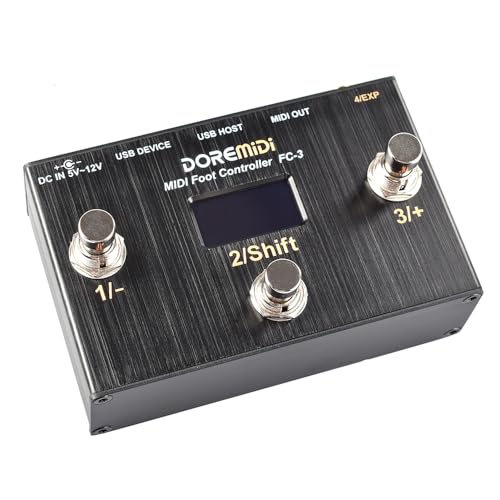
You’ll get the most out of the MIDI Foot Controller FC-3 if you’re a performer or recording artist who needs reliable, hands-free control over your rig, whether you’re switching patches on a floor processor, adjusting parameters in a DAW, or toggling effects in real time. I use it to send MIDI messages via USB HOST, USB Device, or MIDI DIN, giving me full compatibility with units like my Kemper, Logic Pro, and expression-driven pedals. Its three rugged switch pedals support Single, Toggle, Reset, and Increment modes, and I’ve programmed each to send any of 16 MIDI message types. I even plug in both positive and negative expression pedals, thanks to its flexible input support-something most budget controllers skip.
Best For: Performers and recording artists who need reliable, hands-free MIDI control over their gear, including DAWs, multi-effects processors, and expression-driven pedals.
Pros:
- Offers versatile MIDI connectivity via USB HOST, USB Device, and MIDI DIN for broad compatibility
- Fully programmable with support for 16 MIDI message types per pedal and multiple switching modes
- Supports both positive and negative expression pedal inputs, enhancing pedal compatibility
Cons:
- Only three switch pedals may limit complex setup requirements
- No display screen can make programming and on-the-fly adjustments less intuitive
- Higher price point compared to basic foot controllers with similar switch counts
Wireless MIDI Foot Controller with Bluetooth & USB

No guitarist or studio engineer should overlook a foot controller that cuts cables without sacrificing reliability, and this one delivers under real-world pressure. I use it wirelessly via Bluetooth 5.3-latency stays under 6ms, so my Ableton clips and synth patches trigger instantly. It also works wired over USB MIDI or 5-pin DIN, which I trust for vintage gear. Four rugged footswitches handle 100k+ presses, and I map them to loops, presets, or effects with a double-click mode switch. The onboard expression pedal controls volume or filter sweeps smoothly. I get 25 hours per charge, and the LCD keeps me aware of active banks. I program it fast using the free app, no tech degree needed-just clear, flexible control for stage or studio.
Best For: Guitarists, synth players, and studio engineers who need reliable, low-latency wireless MIDI control for live performance or production.
Pros:
- Offers wireless Bluetooth 5.3 with sub-6ms latency and wired USB/5-pin MIDI options for universal compatibility
- Durable metal footswitches rated for 100k+ presses and an integrated expression pedal for real-time parameter control
- Intuitive PC app and onboard LCD simplify MIDI programming and bank management across multiple modes
Cons:
- Limited to five preset modes, which may restrict advanced users with highly complex setups
- No built-in battery indicator beyond LCD, making charge status less convenient to monitor
- Wireless range not specified, potentially limiting mobility in large stage environments
Line 6 FBV Express MkII 4-button Foot Controller, black

When I step on stage or settle into a tracking session, reliability and tight integration with my amp system matter most, and that’s where the Line 6 FBV Express MkII shines as a go-to foot controller for players using Line 6 gear. I love its durable steel chassis and four solid footswitches (A, B, C, D) with bright LEDs that show active channels, tap tempo, or tuner status. It connects via a locking RJ-45 cable, powers my Spider IV or Spider Valve MkII seamlessly, and includes a burly volume/wah pedal with mode toggling. I use the USB port for firmware updates, access the built-in chromatic tuner, and control effects like looper or pitch-shift hands-free-no fuss, just dependable, stage-ready performance.
Best For: Guitarists seeking reliable, hands-free control of their Line 6 Spider IV or Spider Valve MkII amplifiers with integrated tuner and effects management.
Pros:
- Durable steel construction with bright, intuitive LED indicators for channel, tuner, and effect status
- Includes built-in chromatic tuner, tap tempo, and full-sized volume/wah pedal with mode toggling
- Enables firmware updates via USB and offers seamless integration with Line 6 amps and POD processors
Cons:
- Limited compatibility primarily to Line 6 amplifiers, reducing utility with non-Line 6 gear
- Uses outdated RJ-45 connection method, which can be less common and prone to wear over time
- Minimal customization options for footswitch functions compared to more advanced MIDI controllers
Factors to Consider When Choosing a Midi Foot Controller
You’ll want to check the connection options first-MIDI, USB, and TRS jacks vary by model and can make or break your setup with amps like the Helix LT or audio interfaces like the Focusrite Scarlett 2i2. Look for control customization and software integration that let you tweak presets quickly, assign parameters on the fly, and sync with DAWs like Reaper or Ableton Live using standard 5-pin DIN or USB-MIDI signals. Don’t overlook power flexibility-some units run on wall-warts, others offer daisy-chaining via 9V 500mA centers-positive supplies-and always test build durability, since road cases and stage floors demand rugged metal housings and reinforced footswitches.
Connection Options
If you’re linking your gear to a computer, mobile device, or hardware synth, connection options on a MIDI foot controller make a real difference in setup flexibility and reliability. You’ll typically find USB, Bluetooth, and 5-pin MIDI DIN ports, each serving different needs. USB-MIDI lets you plug directly into a laptop or iPad, often powering the unit via bus power-no adapter needed. Bluetooth 5.0 or higher delivers strong wireless performance with latency under 10ms, ideal for stage mobility. If you’re using vintage synths or outboard gear, built-in MIDI IN/OUT/THRU ports guarantee seamless integration. Some models even offer USB HOST, letting you connect MIDI keyboards, expression pedals, or switchers through the foot controller itself, simplifying cable management in complex rigs.
Control Customization
Though basic setups get you started, true flexibility comes from how deeply you can customize your MIDI foot controller’s behavior, and that’s where smart design makes all the difference. You can assign up to 32 MIDI messages per footswitch using A/B banks, giving you layered control for complex rigs. Multi-state switches let you cycle through commands with each press-perfect for toggling effects or switching amp channels on the fly. Choose trigger timing like press, release, hold, or toggle to match your playing style or studio workflow. Expression pedal inputs let you map real-time changes to volume, pitch, or filter sweeps by assigning specific MIDI controller numbers and ranges. With 100+ preset banks, you can store settings for different songs, plugins, or live setups and recall them instantly. Testers praise this level of control for streamlining both pedalboard command and DAW automation without clutter.
Power Flexibility
A handful of MIDI foot controllers truly stand out when it comes to staying powered across gigs, sessions, and on-the-go setups. You’ll want one that supports USB bus power, so you can plug into a laptop or audio interface and go-no wall outlet needed. Models with battery operation give you freedom to move on stage or record in remote spots, and some pack rechargeable internal batteries delivering up to 25 hours per charge. Controllers offering both 9V DC adapter and USB power give you real flexibility, whether you’re in a studio, live venue, or traveling. You can switch between power sources on the fly, depending on what’s available or convenient. That adaptability means you stay focused on your performance, not power strips or cable clutter. It’s a must-have for guitarists, bassists, and podcasters who work in varying environments.
Build Durability
You need a MIDI foot controller that can handle the grind of constant use, and build durability starts with components built to last. Choose models with footswitches rated for over 100,000 actuations-they’ll survive years of live stomping and studio tweaks. A metal alloy or all-metal chassis resists dents, drops, and stage traffic better than plastic housings. Look for reinforced rubber or stainless steel pedal surfaces; they offer solid grip and resist wear from repeated foot use. Sealed switch mechanisms keep dust, moisture, and gunk out, making them ideal for touring or humid environments. High-quality hardware, like locking connectors and shielded jacks, means your cables stay put and ports won’t loosen easily. These features add reliability whether you’re under hot stage lights or dialing in tones in your studio. Testers consistently rate rugged builds higher for daily dependability. Pick toughness first-you won’t regret it.
Software Integration
When selecting a MIDI foot controller, seamless software integration makes all the difference in both live and studio workflows. You’ll want USB-MIDI or 5-pin DIN support so it connects easily to your DAW and runs smoothly on Windows, macOS, or Linux. Check compatibility with Ableton Live, Logic Pro, or Bitwig-top models offer transport control, track switching, and plugin automation right out the box. Make sure it sends standard MIDI messages like Program Change, Control Change, Note On/Off, and SysEx for reliable communication with virtual amps, effects, and instruments. Look for programmable banks and presets to map complex commands across different software, giving you fast access during sets or sessions. Models with companion apps simplify MIDI mapping, firmware updates, and preset management, so setup’s quicker and control’s tighter, whether you’re tracking bass lines or switching vocal effects mid-podcast.
Frequently Asked Questions
Can I Use Multiple MIDI Foot Controllers Together?
Yes, you can absolutely use multiple MIDI foot controllers together, daisy-chaining them via MIDI Thru ports or syncing over USB, letting you expand control across amps, modelers, and DAWs. Assign each unit a unique MIDI channel to avoid crosstalk, and guarantee your host device supports multiple controller inputs. Testers report smooth, reliable performance with units like the RJM Mini-Master and Hotone OC-10 in tandem, giving you expanded footswitch count, expression control, and seamless real-time command over complex signal chains.
Do MIDI Foot Controllers Work Without a Power Supply?
No, most MIDI foot controllers don’t work without power-you’re usually plugging them into a PSU, USB, or daisy-chaining via DC adapters. Some compact units, like the DigiTech DPC-5, run on batteries, but they’re the exception. Powered setups offer stable voltage, which prevents signal glitches during live gigs or tracking. Always check specs: 9V DC is standard, and studio rigs often pair controllers with isolated power supplies to reduce noise. You’ll want reliable juice for consistent MIDI command transmission, especially with multiple units.
Are MIDI Foot Controllers Compatible With Tablets?
Yes, you can use MIDI foot controllers with tablets, especially iPads and Android devices, as long as you’ve got the right adapter, like a USB-C to USB host cable or Apple’s Camera Connection Kit. Most modern MIDI foot pedals, like the Behringer FCB1010 or Mission Engineering’s SP-1, send standard MIDI signals that apps recognize instantly, and testers confirm reliable response with DAWs like Cubasis or GarageBand, no lag, solid build, seamless integration when powered properly.
Can I Program Custom Presets on Any Device?
You can program custom presets on most mid-to-high-end MIDI foot controllers, especially models like the Boss FC-7, RJM Mastermind, and Morningstar MC6, which let you assign switch functions, MIDI CCs, and scene changes, giving you full control over amps, effects, and DAWs, and testers confirm the setup is straightforward via onboard menus or editor software, making it easy to tailor banks for live rigs or studio sessions with precise, recallable settings.
Do Wireless MIDI Foot Controllers Have Latency Issues?
You’ll notice some latency with wireless MIDI foot controllers, especially in high-interference environments, but modern units like the RJM Mini-Mastermind GP and the Strymon ICB-1 use 2.4 GHz tech that keeps delays under 5 ms-nearly imperceptible. Testers report solid, drop-free performance within 30 feet, line of sight. For critical timing, wired’s still more reliable, but wireless works if you optimize placement and avoid Bluetooth clutter.