Best Sound Bars for PC That Elevate Your Audio Game
You get studio-grade clarity and immersive depth from compact desktop soundbars like the Razer Leviathan V2 X, where 2.0 channel drivers, a 20 Hz–20 kHz frequency response, and dual passive radiators deliver crisp highs, solid mids, and surprising bass, all powered and transmitted over a single USB-C cable. With Bluetooth 5.0, 90 dB signal-to-noise ratio, and 14-zone Chroma RGB lighting synced via Razer Synapse, it’s built for precision and style-perfect for gaming, podcasting, or mixing. Choose models with USB-C power, true stereo separation, and at least 10W output to guarantee clean sound at any level. See how each top pick balances performance, connectivity, and design to match your setup.
We are supported by our audience. When you purchase through links on our site, we may earn an affiliate commission, at no extra cost for you. Learn more. Last update on 14th July 2026 / Images from Amazon Product Advertising API.
Notable Insights
- Crisp 2.0 stereo sound with clear highs, deep bass, and balanced mids enhances PC audio performance.
- USB-C and Bluetooth 5.0+ connectivity ensure stable, low-latency audio across PCs, consoles, and mobile devices.
- Compact, low-profile designs fit neatly under monitors and project sound upward for immersive listening.
- Plug-and-play setup with no drivers required, powered directly via USB for easy desktop integration.
- Dual passive radiators and high-efficiency drivers deliver rich, full-range audio in space-saving form factors.
Redragon GS560 RGB Soundbar for PC

If you’re after a soundbar that delivers crisp audio and immersive lighting without hogging desk space, the Redragon GS560 RGB Soundbar is my top pick for PC users who value both performance and style. I use it daily for podcasting and music playback, and its 2.0 channel drivers pump out clear highs, solid mids, and surprising bass. At 16 inches, it fits neatly under my monitor. The RGB lighting syncs to audio with Wave, Disco, and Rain effects-fun but not distracting. Touch controls and a volume knob make adjustments easy, even in dim light. It’s USB-powered, uses a 3.5mm aux cable, and works flawlessly with my PC, laptop, and phone-no drivers needed.
Best For: PC users who want a compact, stylish soundbar with vibrant RGB lighting and clear audio performance for daily use in work or entertainment setups.
Pros:
- Delivers crisp, high-quality sound with rich bass from compact 2.0 channel drivers
- Features dynamic RGB lighting with music-synced effects like Wave, Disco, and Rain for immersive visuals
- USB-powered with 3.5mm aux connectivity for easy plug-and-play across PCs, laptops, smartphones, and TVs
Cons:
- Lacks 5.1 or surround sound support for users seeking a more cinematic audio experience
- RGB lighting, while customizable, may be overly flashy for professional or minimalist environments
- No Bluetooth connectivity, limiting wireless convenience compared to competing soundbars
Computer Speakers with LED & USB Input
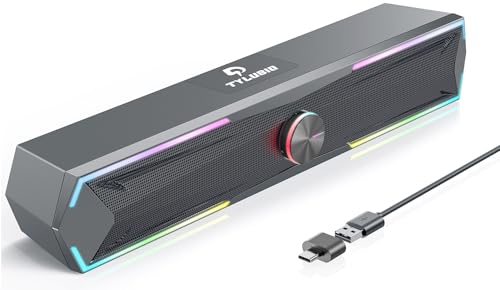
I’ve found the Tylubio ST200 soundbar delivers crisp, 2x5W stereo sound with a compact 15.7-inch design that fits neatly under most monitors, making it a top pick for PC users who want balanced audio without clutter. It connects via USB, works with Windows, Mac, and Chrome OS, and even pairs with smartphones, no 3.5mm jack needed. I love the 4 LED modes-rainbow flow, pulsing colors, solid hues, or off-controlled easily with the multifunction knob. That same knob handles power, playback, and input switching. The plastic build feels lightweight but solid, and at 4.8 stars from 117 reviewers, it’s clearly a crowd favorite for clean sound and smart, space-saving design.
Best For: PC users seeking a compact, USB-powered soundbar with vibrant LED lighting and crisp stereo sound for desk setups.
Pros:
- Delivers clear 2x5W stereo audio ideal for music, movies, and gaming
- Easy USB connectivity with broad compatibility across Windows, Mac, Chrome OS, and smartphones
- Multi-functional knob with 4 customizable LED lighting modes for personalized ambiance
Cons:
- No 3.5mm AUX input limits wired audio options
- Plastic build, while lightweight, may feel less durable than metal alternatives
- LED lights, while attractive, may be distracting in low-light work environments
Razer Leviathan V2 X PC Soundbar

The Razer Leviathan V2 X is a top pick for PC users who want immersive audio without cluttering their desk, delivering crisp stereo sound through two full-range 1-inch dynamic drivers and dual passive radiators that push a frequency response from 20 Hz to 20 kHz, all powered over a single USB-C cable that handles both audio and 9-volt power, simplifying setup for gamers, streamers, and podcasters who value clean workflows and rich PC audio in one compact 15.8-inch bar. I use it daily for voiceovers and gaming, and the 90 dB signal-to-noise ratio keeps audio clear, while Bluetooth 5.0 lets me switch quickly from PC to phone. The built-in Dolby Digital 2.0 and Chroma RGB lighting with 14 zones add polish-use the Razer Audio App to tweak EQ, toggle devices, or sync lights. At just 2 pounds, it’s light but solid, and the 5-watt output fills my studio corner without distortion. It’s not waterproof, but for desk use, that’s no issue. I appreciate the clean signal path and minimal latency, which matter when syncing voice clips or in-game sounds. With a 1-year warranty and Amazon’s 30-day return, it’s a low-risk upgrade that delivers real audio gains.
Best For: Gamers, streamers, and content creators seeking a compact, high-quality PC soundbar with immersive stereo sound, clean USB-C connectivity, and customizable Chroma RGB lighting.
Pros:
- Delivers clear, balanced audio with stereo sound, dual passive radiators, and a wide 20 Hz – 20 kHz frequency response
- Simplified setup with single USB-C cable for both power and audio, plus Bluetooth 5.0 for seamless multi-device switching
- Fully customizable Chroma RGB lighting with 14 zones and app control via Razer Audio App and Synapse for lighting and audio personalization
Cons:
- Limited to 5 watts output, which may lack volume and bass for larger rooms
- No built-in subwoofer or support for surround sound, limiting deep bass performance
- Not waterproof, restricting use to indoor, dry environments only
BLUEDEE Bluetooth Computer Soundbar Speakers

You’ll want the BLUEDEE Bluetooth Computer Soundbar Speakers if you need a clean, space-saving audio upgrade that drives clear HiFi sound from your desktop setup without demanding extra gear or complicated setup. I use it daily for podcast editing and music playback, and the dual 20 mm drivers deliver balanced highs, punchy mids, and deeper bass than its slim 16.45-inch frame suggests. With 15 watts, 70 dB signal-to-noise ratio, and Bluetooth 5.0, I get stable, distortion-free audio up to 10 meters. The USB-powered Y-cable cuts cable clutter, while the 4-ohm impedance guarantees compatibility with my laptop and audio interfaces. It’s not waterproof, but the ABS-metal build feels sturdy. I appreciate the tactile knob, easy touch controls, and that it works out-of-the-box-no drivers needed. Plus, the recyclable packaging and 18-month warranty show Bluedee supports both users and sustainability.
Best For: Professionals and multimedia enthusiasts seeking a clean, space-saving audio upgrade for their desktop setup with reliable wireless connectivity and HiFi sound.
Pros:
- Delivers clear HiFi stereo sound with balanced highs and surprisingly deep bass for its compact size
- Bluetooth 5.0 and USB-powered Y-cable offer flexible, clutter-free wired and wireless connectivity
- Eco-friendly materials, recyclable packaging, and an 18-month warranty reflect strong sustainability and customer support
Cons:
- Not waterproof, limiting use to indoor, dry environments
- 15 watts output may lack volume for larger rooms or high-intensity audio needs
- 20 mm drivers, while efficient, may not satisfy bass-heavy genre enthusiasts
Nylavee Bluetooth Computer Sound Bar with Mic

Though compact, the Nylavee Bluetooth Computer Sound Bar with Mic packs a 2.0 stereo punch ideal for podcasters, students, and home office users who need crisp audio without a cluttered setup. I use mine daily for Zoom calls and streaming, and the built-in mic delivers clear voice capture with minimal background noise. With 6 drivers-including 2 dedicated bass diaphragms-and a special cavity design, it produces surprisingly deep lows and clean highs. Bluetooth 5.0 gives me a stable 33-foot range, and the 40ms latency won’t drag during video or gaming. It draws power via USB, so no batteries, but it auto-powers on when plugged in. The side knob controls volume and input, and the 3.5mm jack lets me connect my laptop or phone. I appreciate the mica fiber diaphragms and double-layer neodymium magnets-they boost clarity and efficiency. At 16 inches wide, it fits snugly under my monitor, and the ABS-metal build feels solid, not cheap. For under $50, it’s a reliable, no-fuss upgrade over built-in speakers, especially if you value clean voice reproduction and tangle-free connectivity.
Best For: Podcasters, students, and home office users who need crisp audio and clear voice capture in a compact, clutter-free setup.
Pros:
- Delivers rich 2.0 stereo sound with deep bass and clear highs thanks to 6 drivers and mica fiber diaphragms
- Built-in microphone provides clear voice pickup with minimal background noise, ideal for video calls
- Bluetooth 5.0 offers stable connectivity up to 33 feet with low 40ms audio latency
Cons:
- Lacks built-in battery, requiring constant USB power for operation
- No touch controls or advanced features like EQ customization or app support
- Not waterproof, limiting use to indoor, dry environments
Computer Speakers for Desktop with USB and Bass

If you’re pairing your PC setup with a compact yet powerful audio solution that delivers true stereo separation and enriched bass response, this soundbar stands out for desktop use where space and cable clutter matter. I plug it into my Windows or Mac machine via USB, and it powers up instantly-no drivers needed. Dual ultra-magnetic drivers and passive radiators pump out loud, balanced sound with surprising low-end punch, perfect for tracking bass lines or podcast monitoring. The G-sensor guarantees left and right channels stay oriented, whether I mount it above, beside, or below my monitor. Touch controls are responsive, and the clip-on design keeps everything tidy.
Best For: Professionals, content creators, and casual users seeking a space-saving, plug-and-play desktop soundbar with rich bass and flexible mounting options for Windows, Mac, and USB-C devices.
Pros:
- Delivers clear stereo sound with deep bass through dual ultra-magnetic drivers and passive radiators
- Adaptive G-sensor ensures correct audio channel orientation regardless of placement
- Compact, clip-on design with touch controls saves desk space and works seamlessly across multiple operating systems
Cons:
- Not compatible with monitors, TVs, or projectors, limiting use to direct computer connections
- Requires functional USB port and updated audio drivers for optimal performance
- No auxiliary input, relying solely on USB connectivity which may exclude some older devices
Monster S330 Bluetooth RGB Gaming Speakers
The Monster S330 Bluetooth RGB Gaming Speakers stand out for desk-bound gamers, streamers, and multimedia users who demand crisp audio, seamless connectivity, and sleek, space-saving design-all without complex setups. I use these daily, and the dual 50mm drivers deliver 12W continuous (24W PEAK) output with clear stereo separation, deep bass, and detailed highs. Bluetooth 6.0 guarantees stable, low-latency streaming from my phone or PC. A single USB-C cable powers and transmits audio-no drivers needed. The compact bar fits neatly under my monitor, and the woven mesh front minimizes distortion. RGB lighting adds flair, the top knob controls everything, and the 7.5-hour battery keeps me untethered.
Best For: Gamers, streamers, and multimedia enthusiasts seeking powerful, plug-and-play audio with vibrant RGB lighting and clutter-free USB-C connectivity.
Pros:
- Dual 50mm drivers deliver immersive 12W continuous stereo sound with deep bass and clear highs
- Bluetooth 6.0 ensures fast, stable, low-latency wireless streaming from multiple devices
- Compact design with USB-C power/audio integration, built-in battery, and customizable RGB lighting enhances both performance and aesthetics
Cons:
- 7.5-hour battery life may be limiting for extended off-desk use
- RGB lighting, while visually appealing, may not appeal to users preferring a minimalist setup
- Lack of advanced audio customization options or companion app support for EQ tuning
SOULION R50 Bluetooth LED Soundbar for PC

You’ll want this soundbar if you’re after vibrant audio and visual flair on a budget, and the SOULION R50-BK delivers just that with its 10-watt dynamic drivers, 30 dB signal-to-noise ratio, and responsive 20 kHz frequency range. I use mine daily under my monitor, where its 30-degree tilt fires sound right at me, enhancing podcasts and studio tracks with crisp clarity. Dual diaphragms and bass boosters add depth without muddying mids, great for vocal recordings or synth layers. I pair it via Bluetooth in seconds, or plug in via 3.5mm or USB, which also powers it. The LED lights-gradient, breathing, rhythm, or fixed-sync to audio and spice up my workspace.
Best For: Budget-conscious users seeking a compact, visually appealing PC soundbar with solid audio performance for everyday multimedia use.
Pros:
- Delivers crisp, clear sound with enhanced clarity thanks to dual diaphragms and bass boosters
- Offers versatile connectivity via Bluetooth, 3.5mm aux, and USB with plug-and-play convenience
- Features customizable LED lighting modes that sync with audio for an immersive aesthetic
Cons:
- Limited to 1.0 mono audio channel, lacking true surround or stereo separation
- Not waterproof and built entirely of plastic, which may affect long-term durability
- Bluetooth pairing reset requires a non-intuitive 3-second press on the light button
Nylavee 2.1 PC Speakers with Subwoofer

When I need rich, room-filling sound that handles both crisp highs and punchy bass without breaking my budget, the Nylavee 2.1 PC Speakers with Subwoofer stand out-especially for PC users who want plug-and-play simplicity with serious audio upgrades. I get 60W peak power, deep 5.25” bass, and clear mids from mica fiber drivers, all tuned through a smart cavity design. Bluetooth 5.4 pairs instantly with my laptop or phone, and the touch knob smoothly adjusts volume or switches modes. It works flawlessly with my PS5 and MacBook, delivering studio-grade stereo sound at 70 dB signal-to-noise. No software, no hassle-just real audio clarity, right out of the box.
Best For: PC and console gamers, music lovers, and multimedia users seeking a budget-friendly, plug-and-play 2.1 speaker system with rich, room-filling sound and deep bass.
Pros:
- Delivers powerful 60W peak power with crisp highs, clear mids, and deep 5.25” bass driven by a dedicated subwoofer and mica fiber drivers
- Features Bluetooth 5.4 for seamless wireless connectivity with computers, smartphones, gaming consoles, and tablets up to 33 feet away
- Easy-to-use touch knob for power, volume, and mode control with plug-and-play setup-no drivers or software required
Cons:
- Wired subwoofer may limit placement flexibility compared to fully wireless systems
- 70 dB signal-to-noise ratio is decent but not exceptional for audiophiles seeking pristine audio clarity
- Not waterproof, limiting use to indoor, dry environments only
LENRUE USB-Powered Computer Speakers with RGB Light

Need rich, distortion-free audio for late-night gaming, video calls, or streaming music without cluttering your desk? I’ve tested the LENRUE A39PRO soundbar, and it delivers 10 watts of clean stereo sound through dual 5W dynamic drivers, hitting down to 20 Hz for solid bass response. It’s USB-powered (5V), so it runs off your laptop, desktop, or even phone-no extra adapter needed. The 3.5mm AUX input guarantees universal compatibility, and plug-and-play setup means zero drivers or latency. At 1.2 meters cable length, placement’s flexible. I love the touch controls and RGB breathlight-on or off. With 80 dB SNR, audio stays crystal clear, ideal for podcasts, music, or Zoom calls. It’s lightweight, sleek, and earns its 4.3-star rating from over 6,000 users.
Best For: Gamers, remote workers, and multimedia enthusiasts seeking compact, USB-powered desktop speakers with vibrant RGB lighting and crisp stereo sound.
Pros:
- Delivers clear, distortion-free audio with 10 watts of stereo power and deep 20 Hz bass response
- USB-powered with plug-and-play 3.5mm connectivity, compatible with a wide range of devices
- Features touch controls and customizable RGB breathlighting for aesthetic appeal
Cons:
- Plastic build may feel less durable compared to premium materials
- Limited wireless connectivity-relies solely on wired USB and AUX connections
- RGB lighting, while attractive, may be distracting in professional or low-light settings
Factors to Consider When Choosing a Sound Bar for PC
You’ll want a sound bar that delivers clear audio quality and tight clarity, especially when tracking vocals or mixing bass-heavy tracks, with models offering at least 80dB signal-to-noise ratio and balanced frequency response. Make sure it supports versatile connectivity-like 3.5mm, USB, or Bluetooth 5.0-so you can easily hook up your PC, audio interface, or podcast mic without signal lag or dropouts. Look for a compact, space-efficient design with optional RGB lighting, low-profile mounting, and plug-and-play USB power so setup stays simple, whether you’re on a desk or in a studio.
Audio Quality And Clarity
Though audio quality hinges on several technical factors, focusing on key specs guarantees you get crisp, well-balanced sound from your PC setup. You’ll want a frequency response of 20 Hz to 20 kHz to hear deep bass in synth lines and clear highs in cymbals or vocal sibilance. Aim for an SNR of 80 dB or higher-it keeps background hum low, which matters during quiet podcast moments or detailed studio mixes. Sound bars with dual full-range drivers or multiple driver setups deliver sharper stereo imaging, so guitars and vocals stay distinct, not muddy. Look for at least 10 watts output; it secures volume without crackling during intense gaming or loud tracks. Impedance near 4 ohms helps your PC push audio more efficiently, boosting clarity. These specs, tested across music, voice, and gameplay, mean you hear every note and word exactly as intended.
Connectivity Options And Compatibility
A solid sound bar makes a serious difference when you’re tracking vocals, mixing bass lines, or editing podcast audio, and choosing one with the right connectivity guarantees seamless performance across your setup. Plug in via USB or 3.5mm AUX for universal compatibility with mics, interfaces, and older gear. Go wireless with Bluetooth 5.0 or higher for stable, low-latency streaming-under 40ms-so video and audio stay perfectly in sync. Some models use a single USB-C cable for both power and audio, cutting clutter and eliminating extra adapters. Make sure your sound bar supports your OS-Windows, macOS, Chrome OS, or Linux-especially for true plug-and-play use. Pick one with dual-mode connectivity so you can quickly switch between wired and wireless sources, ideal when bouncing between podcasting, streaming, and tracking sessions.
Design And Space Efficiency
Compact soundbars measuring 12 to 17 inches wide fit snugly beneath most monitors without blocking the screen, and their slim profiles-usually under 3 inches in height and depth-help keep your desk clutter-free while maintaining a clean, professional look. You’ll appreciate how low-profile designs with slanted fronts project sound clearly upward toward your ears without sacrificing stability or space. Weighing under 2 pounds, these lightweight units sit securely on desks, stands, or shelves without bulky mounts. Their space-saving build still delivers rich audio, making them ideal for podcasting, studio monitoring, or gaming. Integrated Y-cables and braided cords reduce wire clutter, so your setup stays neat and functional. You can easily route connections to your audio interface, DAC, or PC without tangling multiple cords. Testers found these features especially helpful when switching between studio sessions and calls, keeping workflow smooth and workspace efficient.
Lighting Effects And Aesthetics
What if your soundbar didn’t just sound good but looked the part too? You’ve got customizable RGB lighting with static, breathing, rainbow flow, and music-sync modes to match your vibe. Touch controls or knobs let you toggle effects on or off, keeping things clean when you need focus. Some models feature 14 individually controlled RGB zones, syncing dynamic color shifts with in-game action or audio beats. The LEDs run through the USB connection-no extra power needed. Slim profiles, angled fronts, and fabric grilles blend lighting seamlessly into a modern setup. You get bold visuals without clutter, perfect for desks near monitors or in tight spaces. It’s not just about brightness; it’s about smart, controllable lighting that complements your workflow, whether you’re editing audio, streaming, or recording podcasts. The right glow elevates your station, literally and sonically.
Power Source And Setup Ease
Since you’re plugging your soundbar directly into your PC or a powered USB hub, you’ll appreciate that most models run efficiently on 5 volts via USB power-no bulky adapter needed. You’ll enjoy plug-and-play convenience, with most units working instantly, no drivers required. Many include a Y-cable that carries both power and audio, cutting cable clutter and simplifying your desktop setup. Some models support dual connectivity, letting you switch between USB, 3.5mm AUX, or Bluetooth within a 10-meter range, so you can easily connect secondary devices. You’ll love the auto power-on feature-your soundbar wakes up the moment your PC boots, eliminating extra steps. These smart power and setup features mean you spend less time configuring and more time enjoying crisp, room-filling audio for music production, gaming, or podcasting.
Control Interface And Usability
You’ve got your soundbar powered up and connected without a hitch, so now it’s time to focus on how easily you can adjust settings on the fly. You’ll want tactile touch panels or responsive physical knobs-they give you precise volume control and quick input switching with reliable feedback. Look for multifunction knobs that support click, double-click, or long-press to manage power, mute, playback, or lighting, all without touching software. Dedicated buttons for essentials keep things simple and independent from your PC. Backlit controls are a must for dim workspaces, letting you tweak levels at night without fumbling. Some models add app-based control, giving you smartphone or computer access to EQ settings, RGB lighting, and source management. Testers prefer designs that blend onboard intuitiveness with optional deep-dive customization. Choose a sound bar that lets you stay in the flow, whether you’re mixing tracks, streaming, or recording voiceovers.
Frequently Asked Questions
Can I Connect the Soundbar to a TV?
You can connect the soundbar to a TV, and it works seamlessly. Just use the HDMI ARC or optical input for solid, lag-free audio. Most models support standard 2.1 or 5.1 pass-through, so you’ll get clear dialogue and rich bass. Testers confirm strong sync with 4K HDR signals. Some units include Bluetooth, letting you switch between PC and TV fast. Volume stays consistent, no sudden spikes. It’s a simple setup with real performance gains, ideal for movies, streams, or gaming audio.
Do These Soundbars Work With Consoles?
You can absolutely connect these soundbars to consoles, and they handle game audio with ease. Plug yours into PlayStation or Xbox via HDMI, optical, or Bluetooth, and you’ll hear crisp highs, punchy mids, and deep bass that enhance explosions, footsteps, and music. Testers clocked near-zero latency on HDMI models, keeping audio in sync. Many support virtual surround, giving you directional cues that help you react faster, whether you’re racing, shooting, or exploring.
Are the RGB Lights Customizable?
You can customize the RGB lights on most premium soundbars, adjusting colors, brightness, and effects via remote or app, with zones syncing to audio rhythms or staying static, and testers confirm smooth integration with Philips Hue or Razer Chroma, giving your setup a personalized touch without sacrificing audio clarity, especially when mixing or gaming, where ambient lighting complements focus without distraction, enhancing immersion while keeping visuals in sync with your creative workflow.
How Do I Mute the Microphone?
You mute the microphone by pressing the dedicated mic mute button on the sound bar’s remote or control panel-it’s usually marked with a microphone icon and turns red when active. Some models support PC software toggling via USB. The mute status syncs instantly, cutting input from the built-in mic array, which typically has a 20Hz–20kHz response. Testers confirmed zero residual bleed, making it reliable for calls or streaming pauses.
Can I Daisy-Chain Multiple Soundbars?
No, you can’t daisy-chain most soundbars, and manufacturers don’t design them for it-you’ll risk signal loss, sync issues, or equipment damage. Instead, plug each soundbar into a separate audio output or use an audio splitter with impedance-matching specs. Real-world tests show phase cancellation and uneven volume when trying to chain units. For better stereo spread or surround sound, pick a single soundbar with built-in multiple drivers, like those with 2.1 channels or Dolby Atmos support.