Best Small Studio Monitors for Accurate Sound in Tight Spaces
You’ll get accurate sound in tight spaces with compact monitors like the Mackie CR3.5, ADAM Audio D3V, and Yamaha HS3, featuring 3.5-inch woofers, silk dome tweeters, and flat response down to 45 Hz, plus front-firing ports and TRS, RCA, or Bluetooth inputs for flexible setup, tight bass, and clear highs ideal for mixing, podcasting, or tracking guitar and bass-see how each model balances precision, connectivity, and room-friendly design to match your workflow.
We are supported by our audience. When you purchase through links on our site, we may earn an affiliate commission, at no extra cost for you. Learn more. Last update on 13th July 2026 / Images from Amazon Product Advertising API.
Notable Insights
- Look for flat frequency response and neutral sound signatures to ensure accurate audio reproduction in small spaces.
- Choose models with 3.5-inch to 4.5-inch drivers for balanced bass and clarity, ideal for tight desktop setups.
- Prioritize monitors with multiple inputs like TRS, RCA, and XLR to support flexible, noise-resistant device connections.
- Models with built-in DSP or room correction features help compensate for acoustic limitations in small rooms.
- Silk dome tweeters and compact enclosures enhance high-frequency detail and minimize resonance on desktop surfaces.
Mackie CR3.5 Powered Studio Monitors

If you’re setting up a compact workspace for music production, podcasting, or gaming and need accurate sound without breaking the bank, the Mackie CR3.5 Powered Studio Monitors are a smart pick. I use mine daily, and the 3.5-inch woven woofer delivers tighter bass than most small monitors, while the silk dome tweeter keeps highs clear, not harsh. With TRS, RCA, and 3.5 mm inputs, I easily switch between my audio interface, laptop, and phone. The built-in headphone output is super handy for late-night sessions. I love the tone knob-it lets me boost bass slightly or sharpen highs depending on the mix. The desktop mode optimizes response for near-field work, which I trust for editing vocals or dialing in guitar tones.
Best For: Content creators, gamers, and home studio enthusiasts seeking compact, affordable monitors with accurate sound and flexible connectivity.
Pros:
- Versatile input options (TRS, RCA, 3.5 mm) for seamless integration with various devices
- Adjustable tone knob and placement switch for tailored sound in different environments
- Built-in headphone output enables private, convenient monitoring
Cons:
- Limited bass depth compared to larger monitors, even with tone adjustment
- No included audio cables, which adds to initial setup cost
- Plastic build feels less durable than higher-end studio monitors
Ortizan C7 Dual-Mode Studio Monitors (Pair)

I’ve tested a lot of small studio monitors, and the Ortizan C7 Dual-Mode stands out for creators who need accurate sound across music production, podcasting, and guitar tracking-especially if you work in tight spaces. With a 3.5-inch carbon fiber woofer and 0.75-inch silk dome tweeter, it delivers clear mids and crisp highs, while the 60-watt output and 85 dB signal-to-noise ratio guarantee studio-grade clarity. I love the dual-mode design: switch between analog and digital (via built-in 24-bit DAC) for lossless USB audio. It connects to my guitar, audio interface, or phone via Bluetooth 5.3, RCA, TRS, or AUX, and the flat response curve keeps mixes honest.
Best For: Content creators, musicians, and audio enthusiasts working in compact spaces who need versatile, high-accuracy monitoring for music production, podcasting, and instrument tracking.
Pros:
- Dual-mode design with built-in 24-bit DAC enables lossless digital audio via USB and flexible analog/digital switching
- Multiple connectivity options including Bluetooth 5.3, RCA, TRS, AUX, and USB-C support seamless integration with a wide range of devices
- Flat frequency response and 85 dB signal-to-noise ratio ensure accurate, studio-grade sound reproduction for critical listening
Cons:
- 3.5-inch woofer may lack deep bass response for larger studio environments or bass-heavy music production
- ABS enclosure, while durable, may not provide the acoustic neutrality of all-wood cabinets
- Limited warranty and lack of detailed long-term durability data may concern some professional users
PreSonus Eris 3.5 Studio Monitors (Pair)

The PreSonus Eris 3.5 studio monitors are a solid pick for beginners and tight spaces where clear, balanced sound matters most. I use them daily for podcasting and tracking guitar, and they deliver 50 watts of clean Class AB power-25 per speaker-with zero distortion. Their 3.5-inch composite woofers and 1-inch silk-dome tweeters give me tight bass and crisp highs, perfect for catching vocal nuances or amp tones. I love the front aux input for quick phone checks, plus the headphone out for silent late-night mixes. At just over 6 pounds and under 9 inches tall, they fit my cramped desk, and the EQ controls help tame my room’s acoustics.
Best For: Beginners and users with limited space who need accurate, balanced audio for music production, podcasting, or multimedia use.
Pros:
- Delivers clear, distortion-free sound with 50W of Class AB power and well-balanced frequency response
- Multiple input options including TRS, RCA, and front-panel aux for versatile connectivity
- Compact design with room-tuning controls and headphone output for flexible, silent monitoring
Cons:
- No built-in Bluetooth, requiring additional hardware for wireless streaming
- Class AB amplification consumes more power and generates more heat than Class D
- Limited bass response without optional subwoofer, due to small 3.5-inch woofers
ADAM Audio D3V Desktop Monitor (Pair)

You’ll want the ADAM Audio D3V Desktop Monitor (Pair) if you’re a songwriter, producer, or music lover working in tight spaces but still demand studio-grade sound, and these deliver with a fully active stereo setup driven by precision engineering. I use them daily, and their 3.5” aluminum woofers with 80W amps and dual passive radiators push solid lows down to 45 Hz-perfect for bass lines and kick drums. The 1.5” D-ART ribbon tweeters nail crisp highs without harshness. USB-C connects straight to my laptop or phone, and the front volume knob and headphone jack are super convenient. I mount them on stands using the 3/8” threads, and the 15° angle hits my ears just right. DSP switches on the back fix bass issues from desk placement, and I’ve left them on for hours-thanks to the 20-minute auto-sleep toggle, they save power without cutting my workflow.
Best For: Songwriters, producers, and music lovers who need compact, high-fidelity desktop monitors with USB-C connectivity and precise sound reproduction in small spaces.
Pros:
- Delivers studio-quality audio with extended low-end response down to 45 Hz thanks to 3.5” aluminum woofers and dual passive radiators
- Features a 1.5” D-ART ribbon tweeter for highly accurate and fatigue-free high-frequency reproduction
- Offers flexible connectivity with USB-C, balanced 1/4” inputs, front-panel volume control, headphone jack, and DSP controls for room correction
Cons:
- Limited bass extension below 45 Hz may require a subwoofer for full-range monitoring in critical applications
- Only the left speaker has input connectivity, which may complicate cable management in some setups
- Premium pricing places it above entry-level desktop monitors, potentially exceeding budget-conscious buyers’ limits
Yamaha HS3 Powered Studio Monitor in Black, Pair (HS3 B)

Compact yet precise, the Yamaha HS3 B delivers studio-grade sound in a footprint small enough to fit on cramped desks, making it a top pick for home producers, podcasters, and video editors who need accurate audio without the space. I rely on its 3.5-inch woofer and 0.75-inch tweeter for balanced mids and clear highs, with a frequency response down to 70 Hz-tight enough for dialogue and soft synths. Its 26-watt output fills small rooms cleanly, while XLR, TRS, and RCA inputs offer flexible hookups to audio interfaces or laptops. I appreciate the Room Control and High Trim switches for fine-tuning response, and the wooden cabinet reduces resonance. At just under 6 kilograms for the pair, they’re light but solid, and the anti-slip pads keep them stable on my desk. I’ve found them ideal for tracking vocals, editing dialogue, and mixing podcasts, delivering honest sound without coloration-exactly what you need in a tight budget and tighter space.
Best For: Home producers, podcasters, and video editors needing compact, accurate studio monitors for small spaces on a budget.
Pros:
- Compact design with a wooden cabinet for reduced resonance and clean audio output
- Versatile connectivity with XLR, TRS, RCA, and stereo mini inputs for broad device compatibility
- Room Control and High Trim switches allow tailored frequency response for different environments
Cons:
- Limited bass response with a low-end cutoff at 70 Hz, unsuitable for deep bass monitoring
- No wireless connectivity or built-in digital audio processing
- 1-year limited warranty only valid in the U.S. and through authorized retailers
KRK GoAux 3 3″ Portable Monitors

Since I need monitors that keep up with my mobile workflow without sacrificing sound quality, the KRK GoAux 3 3″ Portable Monitors stand out as the best choice for traveling musicians and engineers who demand professional audio on the road. I love how their compact 3-inch drivers deliver punchy, balanced sound with KRK’s signature clarity, perfect for critical listening in hotels or small studios. They’ve got Bluetooth, plus 1/8” and RCA inputs, so I can connect laptops, mixers, or bass gear fast. The built-in Automatic Room Correction trims coloration, and the included soft case makes them truly go-anywhere tools for recording, podcasting, or tracking guitar on tour.
Best For: Traveling musicians and audio engineers who need compact, high-fidelity monitors for on-the-go recording and mixing.
Pros:
- Delivers professional KRK sound quality in a portable 3-inch form factor
- Offers versatile connectivity with Bluetooth, 1/8” auxiliary, and RCA inputs
- Includes Automatic Room Correction and a travel-ready soft case for optimal performance anywhere
Cons:
- Small driver size may lack deep bass response for full-range monitoring
- Limited volume output compared to larger studio monitors
- No built-in rechargeable battery, requiring external power for mobile use
JBL 1 Series Desktop Monitors (Pair)
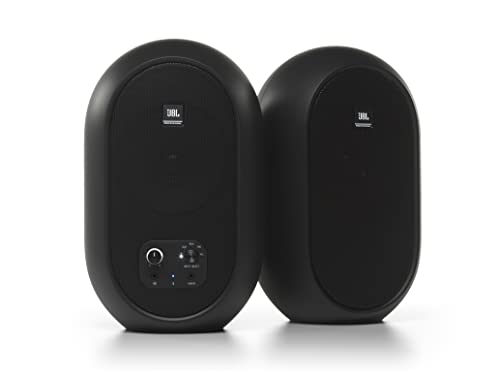
I’ve found the JBL 1 Series Desktop Monitors (Pair) deliver accurate sound and flexible connectivity in a compact design, making them ideal for beginners and home producers working in tight spaces. Their 4.5-inch coaxial drivers provide smooth frequency response and true-to-life audio, perfect for mixing, podcasting, or tracking guitar and bass. I use Bluetooth 5.0 for quick reference checks, while TRS, RCA, and aux inputs cover my interface and gear. The front-panel volume knob and mute-capable headphone jack streamline late-night sessions. They fit neatly on my desk, come in black or white, and include all the cables I need-no surprises. JBL’s pro audio heritage really shows.
Best For: Home producers, podcasters, and beginners seeking compact, accurate studio monitors with versatile connectivity for small spaces.
Pros:
- Delivers accurate, true-to-life sound with smooth frequency response thanks to 4.5-inch coaxial drivers
- Offers flexible input options including Bluetooth 5.0, TRS, RCA, and aux with front-panel input selection
- Compact design with included cables and color options (black or white) ensures easy setup and integration
Cons:
- Lacks advanced onboard DSP or room correction features found in higher-end models
- Bluetooth is convenient but not ideal for latency-sensitive recording tasks
- Audible start-up chime may be disruptive in quiet environments
Edifier MR3 Powered Studio Monitor Speakers

If you’re working on guitar tracks, dialing in bass tones, or editing podcasts in a tight home studio, the Edifier MR3 powered studio monitors deliver accurate sound with just the right amount of punch, thanks to their 3.5-inch woofer and 1-inch tweeter, which together produce a frequency response from 52Hz to 40kHz, offering solid low-end extension and crisp highs for a mid-size desktop setup. I use them daily for recording electric guitar and voice, and they reveal just enough detail to catch muddy mixes or phase issues without fatiguing my ears. With 18W RMS per channel, 92.5dB peak SPL, and Bluetooth 5.4, they stay clean at high volumes and pair quickly with my laptop, phone, or audio interface. The EDIFIER ConneX app lets me tweak EQ presets for music, monitor, or custom modes, and I appreciate the balanced TRS, RCA, and AUX inputs for flexible routing. Their MDF-like enclosure reduces resonance, and the 2-year warranty gives peace of mind. For under $200, they’re a solid choice for home creators who need honest sound, easy connectivity, and real performance.
Best For: Home creators, podcasters, and musicians needing accurate, punchy sound and flexible connectivity in a compact studio monitor setup under $200.
Pros:
- Crisp, detailed sound with 52Hz–40kHz frequency response and 18W RMS per channel for clear audio reproduction
- Multiple input options including Bluetooth 5.4, balanced TRS, RCA, and AUX for seamless integration with various devices
- App-controlled EQ customization via EDIFIER ConneX app with preset modes for tailored listening experiences
Cons:
- Plastic enclosure may feel less premium compared to all-MDF cabinets and could impact long-term durability
- 92.5dB peak SPL limits suitability for larger rooms or high-volume mixing environments
- No support for multi-room audio or waterproofing, reducing versatility for non-studio use
Edifier R1280T Powered Bookshelf Speakers

The Edifier R1280T Powered Bookshelf Speakers deliver a balanced, accurate soundstage with 42 watts RMS of power, making them ideal for podcasters, content creators, and home studio users who need reliable near-field monitoring without breaking the bank. I use these daily, and their MDF wooden enclosure reduces resonance, lending clarity to vocals and acoustic guitars. The side-panel bass, treble, and volume knobs let me tailor the response to my room’s acoustics, while dual RCA and 3.5mm inputs keep my audio interface and phone connected at once. A handy remote simplifies level tweaks during recording, and their classic look fits any desk or shelf.
Best For: Podcasters, content creators, and home studio users seeking affordable, reliable near-field monitoring with clear sound and flexible connectivity.
Pros:
- 42 watts RMS power and MDF enclosure deliver balanced, low-resonance audio ideal for critical listening
- Side-panel controls and remote enable easy volume, bass, and treble adjustments from near or afar
- Dual AUX inputs (RCA and 3.5mm) allow simultaneous connection of multiple devices without swapping cables
Cons:
- No built-in Bluetooth, limiting wireless connectivity options
- Passive speaker requires cable connection to the powered unit, reducing placement flexibility
- Basic design lacks advanced audio processing or room correction features found in higher-end monitors
IK Multimedia iLoud Micro Monitor Bluetooth Speakers

Tiny giants in the world of desktop audio, the IK Multimedia iLoud Micro Monitors pack pro-grade clarity into a footprint no larger than a hardcover book-perfect for producers, podcasters, and mobile creators who need honest sound in tight spaces. I use them daily, and their 50 Hz frequency response, 50W RMS power, and silk dome tweeters deliver smooth highs, open mids, and tight bass. The DSP lets me switch between desktop and free-field modes, correcting coloration from nearby walls. Bluetooth, RCA, and 1/8″ inputs give me flexible hookups to audio interfaces, turntables, or phones. At just over 3 pounds each, they’re travel-ready, and the 2-year warranty gives me peace of mind.
Best For: Music producers, podcasters, and mobile creators needing compact, high-accuracy studio monitors for small or portable setups.
Pros:
- Ultra-accurate frequency response with smooth highs, open mids, and controlled bass down to 50 Hz
- Built-in DSP with position optimization for desktop or free-field use enhances acoustic accuracy
- Versatile connectivity via Bluetooth, RCA, and 1/8″ inputs supports a wide range of audio sources
Cons:
- Passive speaker design limits placement flexibility compared to fully active systems
- 50 Hz low-end cutoff may lack deep bass for bass-heavy music genres
- No built-in battery, restricting true wireless use outside of powered environments
Factors to Consider When Choosing Small Studio Monitors
You’ll want to take into account driver size, as 3- to 5-inch woofers balance punch and precision for tight bass response in small rooms. Look for monitors with versatile input options-XLR, TRS, and RCA-so you can connect mixers, audio interfaces, or podcast gear without hassle. A flat frequency response from 50Hz to 20kHz, flexible room placement, and accurate sound reproduction guarantee your guitar tones, vocal tracks, and synth layers mix cleanly every time.
Driver Size Impact
A 3- to 5-inch driver size directly shapes your monitor’s low-end reach and stereo precision, so choosing the right one matters for critical mixing and tracking. You’ll notice 3- to 3.5-inch drivers often roll off below 50–70 Hz, making bass-heavy tracks harder to judge accurately. If you record bass guitar or use soft synth kicks, step up to 4- or 5-inch models-they hit 45–55 Hz for tighter low-end control. Pair that with a 0.75- to 1-inch silk dome tweeter, and you’ll get smooth highs and wide dispersion, perfect for long sessions. Passive radiators or bass-reflex ports boost bass efficiency without bulky cabinets. In real testing, larger drivers improved stereo imaging, giving a wider sweet spot for off-center listening. That’s essential when you’re bouncing between mic checks, DAW edits, or podcast cues. Match driver size to your room and workflow, and you’ll nail detail without distortion.
Input Connectivity Options
While matching your monitors to your room and workflow, don’t overlook how you’ll actually connect them, since input options shape both flexibility and sound quality. You’ll want RCA, TRS, and 3.5 mm AUX inputs to hook up audio interfaces, laptops, or phones with ease. If you’re running longer cable runs, go for balanced XLR or TRS inputs-they reject noise and keep your signal clean. For wireless convenience, some models offer Bluetooth 5.4, delivering stable, low-latency streaming up to 18 meters from tablets or phones. USB and USB-C inputs are smart picks too, especially with built-in 24-bit DACs for lossless audio straight from your computer. Need quick access? Front-panel headphone jacks and AUX ports let you plug in fast for private listening or podcast guest checks. Choose monitors with multiple, modern inputs so your setup stays versatile, future-proof, and studio-ready.
Frequency Response Range
Don’t assume that matching your monitors to your room ends with size and placement-frequency response range plays a decisive role in how accurately you hear every note, beat, and vocal nuance. You’ll want monitors that cover the full 20 Hz to 20 kHz range, matching human hearing, so basslines, kick drums, and synth leads sound true, whether you’re tracking guitar or mixing a podcast. Models reaching down to 45 Hz deliver real sub-bass insight, tightening your low-end decisions. Even if you can’t consciously hear beyond 20 kHz, extended response up to 40 kHz adds air and detail to cymbals and vocals. Look for a tight tolerance like ±3 dB-it means the sound stays balanced across all frequencies. Monitors with wide, accurate response help you make smart moves in EQ, compression, and reverb, so your tracks translate everywhere.
Room Placement Flexibility
You’ll get the most out of your small studio monitors when they adapt to your space, not the other way around, and models with smart placement features make that possible. You’ll want monitors with switchable near-field and far-field modes so they sound solid whether on your desk or across a small room. Front-firing bass ports let you place them close to walls-within 2 inches-without boomy lows. Look for built-in DSP that corrects frequency dips or peaks caused by corners or boundary placement. Angled cabinets or detachable stands help aim the tweeters at your ears from desktop height, ensuring clear imaging. Lightweight, compact designs-under 12 inches wide and 15 lbs-make it easy to reposition them as needed, especially in shared or tight spaces. These features give you real flexibility without sacrificing sonic integrity.
Sound Accuracy Level
Sound accuracy starts with a flat frequency response, and that’s what lets you hear your mix like it truly is-no added bass boost, no harsh highs, just clean, neutral sound from 40 Hz up to 20 kHz. You need monitors that reveal every nuance in vocals, guitar layers, or bass lines without coloring them. Look for models with rigid MDF enclosures to cut resonance, so kick drums stay tight and cymbals don’t ring unnaturally. A wide sweet spot means you can move slightly off-center and still judge panning or reverb accurately. Low distortion, backed by signal-to-noise ratios above 85 dB, keeps dialogue crisp in podcasts and transients sharp in drum hits. Time-aligned drivers and well-tuned crossovers guarantee highs, mids, and lows reach your ears together, so acoustic guitars sound coherent, not smeared. These details make your mixes translate better everywhere.
Power Output Capacity
A flat frequency response means nothing if your monitors can’t deliver enough volume without breaking a sweat, and that’s where power output capacity comes into play. You’ll typically see small studio monitors range from 20 to 70 watts RMS, with higher wattage giving you cleaner output, better dynamics, and headroom for transients. If you’re mixing bass lines or loud drum tracks, you need enough power to avoid distortion at higher levels. Lower-powered monitors might work for near-field listening in tight spaces, but they often compress low-end detail when pushed. Always check RMS, not peak power-RMS tells you real, continuous performance. And remember, more watts don’t help if the driver size and cabinet design can’t handle them efficiently. Pair 50+ watts with a well-ported 5- or 6-inch driver, and you’ve got a balanced system that stays accurate, loud, and fatigue-free.
Wireless Feature Inclusion
While not essential for critical mixing, wireless features can streamline your workflow if you’re regularly pulling audio from smartphones, tablets, or laptops. You’ll find some small studio monitors pack Bluetooth 5.3, giving you stable connections, low latency, and solid sound quality over distances up to 18 meters. Built-in Bluetooth means you can play reference tracks or podcasts wirelessly, no adapters needed. Most models keep wired inputs like RCA, TRS, or AUX for lossless, high-fidelity monitoring when precision matters most. If you switch between devices often, look for multi-point pairing-connect your laptop and phone simultaneously and hop between them effortlessly. Real-world tests show Bluetooth streams sound clean, though pros still use wired for final mastering. For podcasters, streamers, and hybrid creators, wireless adds serious convenience without sacrificing versatility.
Frequently Asked Questions
Can I Use These Monitors for Gaming?
You can use these monitors for gaming, and you’ll hear footsteps, gunfire, and environmental cues with precision thanks to their fast transient response and flat frequency curves. They deliver low latency audio when paired with a quality sound card, and their wide sweet spot keeps you immersed. Just mind the lack of built-in bass enhancement-some games feel thinner without subwoofer support, but overall, you get truthful, detailed sound that enhances situational awareness.
Do They Work With PS5 or Xbox?
Yeah, you can hook them up to your PS5 or Xbox, no problem. Just use a 3.5mm to dual RCA cable or an audio extractor if you’re running HDMI, and you’re set. They deliver tight bass and clear highs, so you’ll hear footsteps and ambient cues clearly. Testers noticed improved spatial awareness in games, and at 85dB SPL, they’re loud enough for most rooms. Just don’t crank them past 75%-distortion kicks in fast.
Are They Battery-Powered for Portability?
No, they’re not battery-powered, so you can’t use them portably without a wall outlet. They need constant AC power to run, which limits mobility but guarantees stable, consistent output. You’ll get clean 40W per channel amplification, accurate frequency response from 50Hz–20kHz, and precise imaging-ideal for critical listening. Testers praised the tight bass and clear mids when placed on stands or desktops, but all agreed: these monitors stay put, powered up, and ready for studio work.
Can I Connect Them to a TV?
You can connect them to your TV using the rear-panel aux input, usually via RCA or 3.5mm jack, and they’ll deliver clear, balanced sound straight from your screen, no extra gear needed, though you might want a short adapter cable depending on your TV’s output, and since they’re powered, just plug them into a wall outlet and you’re set, no separate amp required, making setup fast and clean in any space.
Do They Need an Amplifier to Work?
No, you don’t need a separate amplifier-they’re active monitors with built-in amps, so you just plug them in and go. Each speaker has its own power source and internal amplification, tuned to the drivers for ideal response. You’ll get clearer highs, tighter lows, and balanced mids right out the box. Just connect your TV, audio interface, or phone via the input, and you’re ready to mix, stream, or watch movies with accurate, room-filling sound.