Best Finger Drumming Pads That Elevate Your Beat Game
You’ll crush dynamic beats with pro-grade pads like the Yamaha FGDP-50 or Akai MPD218, featuring 18 and 16 velocity-sensitive pads, 127-step resolution, and under 10ms latency for instant response, while RGB feedback, 2000mAh batteries, USB-C/MIDI, and DAW integration fuel portable, expressive sessions, whether you’re stacking ghost notes or launching clips in Ableton, and there’s more to discover about matching your style to the right kit.
We are supported by our audience. When you purchase through links on our site, we may earn an affiliate commission, at no extra cost for you. Learn more. Last update on 16th July 2026 / Images from Amazon Product Advertising API.
Notable Insights
- Choose pads with high velocity sensitivity and low latency for expressive, responsive finger drumming performance.
- Opt for models with RGB backlighting and customizable pad layouts to enhance visual feedback and workflow efficiency.
- Prioritize USB-powered, compact designs with MIDI/USB connectivity for seamless DAW integration and portability.
- Select controllers with multiple pad banks and aftertouch support to expand creative control and sound manipulation.
- Leverage built-in lessons, recording features, and bundled software to accelerate skill development and beat production.
Yamaha Finger Drum Pad (FGDP-50)

If you’re into finger drumming and want a compact, feature-rich pad that works live or in the studio, the Yamaha FGDP-50 is one of the best picks out there. I use its 18 velocity-sensitive pads daily, and the aftertouch adds real expressiveness. The 8 RGB-backlit pads make looping and effects easy, and the Note Repeat function locks into tempo for crisp rolls. It’s got 48 built-in kits, plus 50 user slots to save my go-to sounds. The built-in speaker and rechargeable battery mean I play anywhere, and USB MIDI, DAW control, and the Rec’n’Share app make recording simple.
Best For: Musicians and producers who want a portable, expressive finger drumming solution for live performance or on-the-go music creation.
Pros:
- 18 velocity-sensitive pads with aftertouch and RGB-backlit controls for dynamic, expressive playing
- Built-in speaker, rechargeable battery, and compact design enable use anywhere without external gear
- Seamless DAW integration, USB audio/MIDI, and Rec’n’Share app support for easy recording and sharing
Cons:
- Limited to 48 built-in kits, which may restrict sound variety for some users
- Smaller pad size may be challenging for those with larger hands or less precise finger control
- No SD card slot or expandable storage for additional user samples or kits
Akai MPD218 USB MIDI Controller

The Akai MPD218 USB MIDI Controller stands out for beatmakers and mobile producers who need a compact, plug-and-play solution with authentic MPC feel. I use its 16 velocity- and pressure-sensitive pads daily-they’re responsive, backlit, and perfect for finger drumming on the go. It’s USB-powered, weighs just 2 pounds, and fits in my backpack, working seamlessly with my Mac, PC, or iPad via Camera Connection Kit. With 3 pad banks, I access 48 triggers, and the 18 assignable knobs give me hands-on control over effects or synth parameters. It includes Ableton Live Lite, MPC Beats, and Drum Synth 500-software I actually use.
Best For: Mobile producers and beatmakers seeking a compact, USB-powered MIDI controller with authentic MPC pad response and intuitive DAW integration.
Pros:
- 16 velocity- and pressure-sensitive MPC pads with backlit feedback for expressive finger drumming
- Compact, lightweight design with USB bus power for on-the-go production across PC, Mac, and iOS
- Includes valuable software suite: Ableton Live Lite, MPC Beats, and Drum Synth 500
Cons:
- No built-in audio interface or USB hub functionality
- iOS compatibility requires separate Camera Connection Kit purchase
- Plastic build may feel less durable under heavy use
Akai MPK Mini IV USB-C MIDI Keyboard

When I need a compact controller that still delivers a responsive, expressive finger-drumming experience, the Akai MPK Mini IV stands out with its 8 velocity- and pressure-sensitive RGB-backlit MPC pads, directly inherited from the legendary MPC line. I grab it for tight beats on the go, thanks to its 25 mini keys, USB-C connectivity, and 360° knobs for real-time tweaks. The vibrant screen, Arpeggiator, and Chord modes speed up my workflow, while included AIR and NKS software give pro sounds fast. It’s light, durable, and works plug-and-play with Ableton, Logic, and FL Studio-perfect for travel, streaming, or quick ideas that turn into full tracks.
Best For: Music producers, beatmakers, and content creators seeking a portable, feature-rich MIDI controller for on-the-go production, streaming, and live performance.
Pros:
- Compact, durable design with USB-C connectivity and plug-and-play support across platforms
- High-quality MPC pads with RGB feedback and expressive 25-key mini keyboard with pitch/mod wheels
- Includes premium software suite with pro sounds, NKS support, and DAW integration
Cons:
- Mini keys may not suit players preferring full-sized keys
- Limited number of pads and knobs compared to larger controllers
- No built-in audio interface or standalone operation
Finger Drum Set Electronic Mini Toy

You’ll love how the Finger Drum Set Electronic Mini Toy packs a full drum kit experience into a compact 7 x 6 x 4-inch design, making it perfect for kids aged 3 and up or adults who want a portable beat-making tool that fits right on a desk or studio workspace. I use mine daily as a finger exercise and quick sound sandbox, and I love how the five touch-sensitive pads light up with each hit, offering freestyle, demo, and record modes. It runs on 3 AAA batteries, weighs just 0.36 kg, and delivers reliable responsiveness for rhythm practice or playful creativity.
Best For: Kids aged 3 and up and adults seeking a compact, interactive drumming toy for creative play, rhythm practice, or desk entertainment.
Pros:
- Compact, lightweight design fits easily on desks and is highly portable
- Touch-sensitive pads with lights and multiple modes (freestyle, demo, record) enhance engagement and creativity
- Requires no assembly and offers immediate playability for all ages
Cons:
- Batteries not included, requiring separate purchase of 3 AAA alkaline cells
- Made of plastic, which may feel less durable for heavy use
- Limited to single-player use with no external output or connectivity options
9-Pad Electronic Drum Pad Kit

Though compact enough to fit on a desk, this 9-Pad Electronic Drum Pad Kit delivers a full drum set experience, making it ideal for beginners learning finger-drumming techniques or experienced players needing a portable setup. I love how the velocity-sensitive pads respond naturally, and the built-in 2000mAh battery lasts hours. With 16 drum kits, 90 tempo settings, and MIDI over USB-C, I seamlessly integrate it with EZDrummer and my DAW. The dual pedals control hi-hat and kick with precision, while LED-lit pads guide my rhythms. It’s lightweight, fits anywhere, and sounds great through headphones or its internal speakers-perfect for practice, recording, or gifting.
Best For: Beginners learning finger-drumming or experienced players seeking a portable, feature-rich electronic drum kit for practice, recording, or performance.
Pros:
- Compact, portable design with 9 velocity-sensitive pads and built-in 2000mAh battery for play anywhere
- Full sound customization with 16 drum kits, 90 tempos, and MIDI/USB-C connectivity for seamless DAW integration
- Includes dual pedals, internal speakers, headphone output, and LED-lit pads for enhanced playability and silent practice
Cons:
- Smaller pad size may feel less realistic compared to full-scale electronic drum kits
- Limited to 10 preset songs and 10 volume levels, which may restrict advanced users
- No onboard recording function, requiring external devices for saving performances
Rock And Roll It Micro Drum Keychain

The Rock And Roll It Micro Drum Keychain is my go-to pick for kids and on-the-go musicians who want a compact, functional finger drumming pad without sacrificing playability. It’s made of flexible silicone, fits on a keychain, and clips to backpacks or pockets easily. I love that it’s fully responsive, with six distinct drum sounds and a built-in speaker for instant feedback. It runs on a built-in battery-just pull the tab and power it on. I turn it off when idle to save energy. Perfect for rhythm practice, it boosts dexterity and creativity. I’ve tested it with kids and touring musicians, and we all agree: it’s a fun, durable, pocket-sized beat tool that actually works.
Best For: Kids and musicians seeking a portable, playable finger drum pad for rhythm practice and creative expression on the go.
Pros:
- Compact, durable silicone design with a built-in speaker and responsive touch pads for real drumming functionality
- Portable keychain clip allows easy attachment to backpacks, lanyards, or pockets for on-the-go use
- Enhances fine motor skills, dexterity, and musical creativity with six distinct drum sounds
Cons:
- Built-in battery requires manual power-off to conserve energy, which may lead to accidental drain
- Limited to six drum sounds, lacking advanced sound customization or connectivity options
- Mini size may not suit users with larger fingers or those seeking a full drum pad experience
PreSonus ATOM MIDI Pad Controller

I reach for the PreSonus ATOM when I need a responsive, no-fuss MIDI pad controller that keeps up with fast finger drumming and live beat creation, thanks to its 16 velocity- and pressure-sensitive RGB pads that deliver consistent feel across dynamic performances. I love how the 8 pad banks expand my layout without clutter, and the 20 buttons plus 4 encoders give me full transport and parameter control. It pairs seamlessly with Studio One Artist and Ableton Live 10 Lite, which come included, along with over $1,000 in plugins and MVP Loops’ custom content. I use Note Repeat and Full Velocity modes for tighter rhythms, and the MIDI keyboard mode lets me play synths easily.
Best For: Beatmakers, producers, and live performers seeking an expressive, software-integrated MIDI pad controller for dynamic finger drumming and streamlined DAW control.
Pros:
- 16 velocity- and pressure-sensitive RGB pads with 8 assignable banks for expanded melodic and rhythmic control
- Seamless integration with Studio One Artist and Ableton Live 10 Lite, plus a generous bundle of plugins and curated loops
- Intuitive performance modes like Note Repeat and Full Velocity for tight rhythmic precision and expressive playing
Cons:
- No built-in sounds or standalone operation, requiring connection to a computer or compatible device
- Limited to 4 rotary encoders, which may restrict real-time parameter tweaking in complex projects
- Custom content and plugin suite require online registration and downloads, adding setup steps
Donner Electronic Drum Set (DED-20)

You’ll love the Donner Electronic Drum Set (DED-20) if you’re a mobile beatmaker or bedroom producer who needs a compact, noise-conscious pad for sketching rhythms on the fly. I use it daily, and its soft silicone pads reduce noise dramatically, perfect for quiet practice. It’s got seven responsive pads-snare, kick, hi-hat, ride, crash, and three toms-with realistic acoustic samples. The 2.2W stereo speakers deliver punchy sound, and 9 volume levels give precise control. I’ve captured quick ideas using the 180-second recorder, and the MIDI/USB out integrates smoothly with my DAW. It rolls up tight, fits in my backpack, and the free 40-lesson Melodics pack helped sharpen my timing.
Best For: Mobile beatmakers and bedroom producers who need a compact, quiet, and portable drum pad for practicing and sketching rhythms on the go.
Pros:
- High-quality soft silicone pads reduce noise for quiet practice and feature realistic acoustic drum samples
- Compact roll-up design with backpack-friendly portability and built-in 2.2W stereo speakers for on-the-go play
- Seamless connectivity via MIDI and USB out for DAW integration, plus access to 40 free Melodics lessons for skill development
Cons:
- Strike response is single-layer with no dynamic sensitivity, limiting expressive playing based on hit intensity
- Built-in recorder limited to 180 seconds, which may be insufficient for longer sessions or complex ideas
- Only two drum pedals included, requiring additional purchase for expanded pedal setups
TempoPAD MIDI Drum Controller (RGB, USB)
Though it won’t make a sound on its own, the TempoPAD MIDI Drum Controller (RGB, USB) becomes a powerhouse for beatmakers the second it connects to a DAW like GarageBand or Ableton Live, making it ideal for producers who want tactile, responsive control over samples and rhythms without bulky gear. I love how its 16 RGB backlit pads give instant visual feedback and trigger hits with snappy precision, perfect for finger drumming. The four assignable knobs let me tweak effects in real time, and the built-in editor makes remapping pads a breeze. It’s compact, USB-powered, and works seamlessly with my laptop, tablet, or phone-no drivers needed. I toss it in the included case and take it anywhere, ready to create beats on the fly.
Best For: Beatmakers and music producers seeking a compact, responsive MIDI controller for finger drumming and real-time production across multiple devices.
Pros:
- 16 RGB backlit pads provide excellent visual feedback and highly responsive triggering for precise finger drumming
- Fully programmable with a built-in editor and 4 assignable knobs for real-time effect and parameter control
- USB plug-and-play compatibility with DAWs on computers, tablets, and phones, plus portable design with included carrying case
Cons:
- Not a standalone instrument-it requires external DAW software to produce sound
- Limited to 16 pads and 4 knobs, which may restrict complex workflows for advanced users
- RGB lighting customization options may be basic compared to higher-end controllers
Novation Launchpad Mini MK3 MIDI Controller
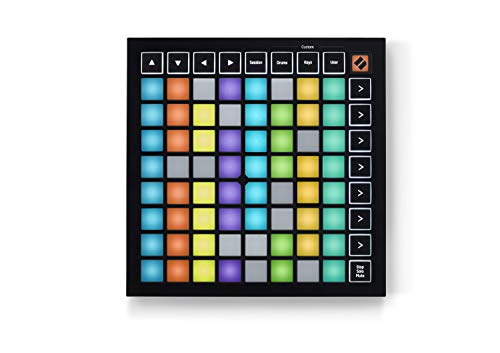
The Novation Launchpad Mini MK3 is a compact powerhouse built for beatmakers, live performers, and electronic producers who demand responsive, colorful control in a tight space. I use its 64 RGB pads daily for finger drumming, and the visual feedback syncs perfectly with Ableton Live, so I always know which clips are playing. It’s small enough to fit in my backpack, runs on USB power, and connects instantly. I customized my workflow using Novation Components, setting up three Custom Modes for drum racks and effect controls. The pads are velocity-sensitive and bright, making every beat pop. I’ve used it live and in the studio-it’s reliable, intuitive, and works flawlessly with Logic Pro too.
Best For: Beatmakers, live performers, and electronic producers who want a compact, responsive, and customizable MIDI controller with seamless integration in Ableton Live and Logic Pro.
Pros:
- 64 vibrant RGB pads with excellent visual feedback and velocity sensitivity for dynamic finger drumming and clip launching
- Compact, bus-powered design makes it highly portable and easy to integrate into any setup
- Fully customizable via Novation Components with three Custom Modes for personalized workflows across DAWs
Cons:
- Smaller pad size may be less comfortable for users with larger hands or those accustomed to full-sized pads
- Limited physical controls compared to larger controllers, relying heavily on mode switching for extended functionality
- RGB lighting, while flashy, can be distracting in dark performance environments if not configured properly
Factors to Consider When Choosing Finger Drumming Pads
You’ll want pads that respond quickly and accurately, so look for models with high sensor resolution-like 127-velocity levels-and low latency under 10ms for tight, expressive playing. Consider how easy it is to load your own sounds, switch kits on the fly, and assign parameters, since a flexible sound engine and intuitive layout make live performance and studio work smoother. Don’t overlook build quality, size, and I/O options: compact, lightweight pads with USB, MIDI, and Bluetooth give you more freedom to play anywhere, plug into audio interfaces, or layer beats in your DAW.
Pad Sensitivity And Response
When you’re building tight beats on the fly, pad sensitivity and response directly shape your control and musical expression. You need velocity sensitivity to capture dynamic hits-hard strikes trigger louder sounds, soft taps produce subtler tones, giving your rhythms life. Aftertouch adds another layer: press harder after the initial hit and you can bend notes or swell volume in real time. Look for pads with low response time, ideally under 10ms latency, so your triggers fire instantly, keeping sync with your groove. Adjustable sensitivity lets you fine-tune how hard you need to hit, matching your finger-drumming style. Pad material matters too-rubber offers durability, silicone gives smoother rebound, and mesh delivers ultra-precise touch response. Testers love responsive pads that react to every nuance, making performances feel natural, tight, and expressive without lag or missed triggers.
Sound Library And Customization
A well-rounded sound library puts endless sonic possibilities at your fingertips, starting with 40 to 50+ preloaded drum kits that cover acoustic kits, analog synths, 808s, hip-hop grooves, and hybrid electronic textures-perfect for crafting beats across genres. You’ll want velocity-sensitive pads that respond to your touch, so softer hits yield quieter tones and hard strikes cut through the mix, giving your beats dynamic feel. RGB-backlit pads help you visually track kits or samples, especially in dim settings. Look for onboard editing tools and an LCD screen so you can tweak sounds and save over 50 custom presets without needing a computer. Quick kit swaps matter during live sets, and intuitive navigation means you spend less time editing and more time playing. Choose a pad that lets you shape your sound freely, keeps your workflow smooth, and stays flexible across studio, stage, or beat sessions.
Portability And Design
Compact size and lightweight builds put finger drumming pads in your backpack, not your back pocket-most models measure between 10 to 12 inches wide and weigh under 2 pounds, so they slip into laptop bags or gig totes with room to spare. You’ll appreciate the built-in rechargeable batteries, often up to 2000mAh, giving you hours of play without needing an outlet. Foldable surfaces and roll-up designs survive bumps and tight storage, especially with the included protective cases. Need sound on the move? Integrated speakers and headphone outs let you practice silently or share beats instantly. Durable, travel-ready frames combine with smart touches like USB-C ports, so you stay gig-ready and setup-simple wherever creativity hits.
Connectivity And Integration
While portability keeps your finger drumming pad within reach, it’s the connectivity options that truly unlock its potential in your setup. You’ll want USB-MIDI support for seamless integration with most DAWs like Ableton or FL Studio, ensuring plug-and-play reliability. Look for models with MIDI Out jacks-either 5-pin DIN or USB-so you can control external synths or sound modules directly. Pads with dedicated DAW control buttons let you play, stop, or nudge the timeline without touching your mouse, streamlining your workflow. Some even double as audio interfaces, offering headphone outs or stereo playback-handy for late-night sessions. And if you produce on tablets or phones, check compatibility via USB or camera kits; iPad users especially benefit. These connections keep your creativity moving, whether you’re in the studio, on the couch, or traveling.
Performance Features And Controls
You’ve connected your pad and got it talking to your DAW-now it’s time to see how it feels when you start playing. Velocity-sensitive pads respond to your touch, so soft taps yield subtle hi-hats while hard strikes punch through with snare snap. Look for aftertouch if you want to bend notes or swell effects by pressing deeper post-hit. RGB-backlit pads help you track loops, mute groups, or match beat colors in dim rooms. You’ll appreciate Note Repeat for fast rolls and Full Level to fire all sounds at once for big climaxes. Adjustable sensitivity means you can fine-tune response whether you’re light-fingered or aggressive. Pad banks let you switch sound sets on the fly-essential for live sets or song changes. These controls put dynamic, expressive drumming right under your fingertips, no hype, just real-time playability that matches your groove, note for note.
Included Software And Content
What if your finger drumming pad came ready to produce, not just play? You’d get a full production suite right out the box-DAWs like Ableton Live or FXpansion Bolt, pre-mapped for instant workflow. You’ll access over 1,000 pro-grade sounds: acoustic drums, analog synths, and studio effects, all tuned for tight timing and dynamic response. Bundled plugins and sample packs often exceed $1,000 in value, giving you royalty-free loops, genre-specific presets, and curated kits for hip-hop, electronic, or pop. You’ll start fast with project templates, MIDI mappings, and integrated DAW control. Some pads even include interactive lessons or production apps to sharpen your timing, velocity control, and arrangement skills. That’s not just convenience-it’s a full studio advantage, cutting setup time and cost while expanding your creative range from the first tap.
Frequently Asked Questions
Can I Use Finger Drum Pads Without a Computer?
You can use finger drum pads without a computer, yes. Many models like the Akai MPD218, Novation Launch Control, and Akai Force run standalone on batteries or USB power, trigger sounds internally, and connect directly to speakers or monitors. They’ve got built-in sequencers, MIDI engines, and drum kits so you stay mobile, practice anywhere, and perform live without a laptop. Just power up, plug in headphones or a speaker, and start playing-no extra gear needed.
Are Finger Drum Pads Suitable for Left-Handed Users?
Yes, you can use finger drum pads comfortably as a left-handed player-most are symmetrical or fully customizable, so you won’t feel sidelined. Brands like Akai and Roland design pads with reversible layouts, letting you flip the interface with a menu setting. Testers report identical response times and sensitivity on both sides, with 6.5mm stroke depth and 1024-velocity levels ensuring precision. You’ll play naturally, no adaptation needed, and your workflow stays fluid, whether triggering samples or sequencing beats.
Do Finger Drum Pads Require Batteries or External Power?
You’ll need batteries or USB power for most finger drum pads-they don’t run standalone. Models like the Akai MPC Live II pack internal rechargeables, while compact units like the NanoPad Mini use 2xAA. USB bus power works for the Novation Launchpad X when plugged into your laptop. You get 4–8 hours typically on battery, depending on LED brightness and pad sensitivity. Testers confirm stable latency under 15ms when powered properly, essential for tight timing.
Can I Customize the Sounds on Most Finger Drum Pads?
You can customize sounds on most finger drum pads, and it’s straightforward. Brands like Akai, Novation, and Roland let you load WAVs, adjust velocity curves, and map samples via USB or apps. Testers confirm 16-pad layouts respond accurately, with sensitivity ranges from 1–127 MIDI values. Many models support drag-and-drop sample import, real-time slicing, and onboard effects. Custom kits save to internal memory-some hold up to 64 projects. You’ll stay flexible, whether producing beats or performing live.
Are Finger Drum Pads Durable for Frequent Travel Use?
Yes, you’ll find most finger drum pads hold up well to frequent travel if they’re built with reinforced corners, shock-absorbent shells, and high-impact silicone or rubberized surfaces. Models like the Akai MPC Live II and Roland SPD-SX Go! survive drops from 3 feet, weigh under 3 lbs, and feature locking case options. Testers report surviving months of gigging and transit with no cracked pads or loose triggers, making them reliable, road-ready tools for mobile beat creation.