Best Drum Pad Machines That Elevate Your Beat-Making Game
You’ll craft beats faster with velocity-sensitive pads like those on the Donner DPD-16 or Akai MPD218, both offering 3 banks for 48 triggers, USB-C or bus-powered convenience, and seamless DAW integration. Pair them with Note Repeat and MPC-style responsiveness to cut programming time by up to 40%. Models like the Yamaha FGDP-50 add built-in sounds, battery power, and RGB pads, while the compact Donner DED-20 rolls up for easy transport-perfect for tight spaces or quick sessions. There’s a powerful option waiting to match your workflow, whether you’re sketching ideas or producing full tracks.
We are supported by our audience. When you purchase through links on our site, we may earn an affiliate commission, at no extra cost for you. Learn more. Last update on 13th July 2026 / Images from Amazon Product Advertising API.
Notable Insights
- Choose velocity-sensitive pads with aftertouch and multiple trigger zones for expressive, dynamic beat creation.
- Opt for models with USB-MIDI and class-compliant connectivity for instant use with DAWs on any device.
- Prioritize customizable RGB lighting and intuitive layouts to enhance workflow and creative inspiration.
- Use onboard sample loading via SD card or drag-and-drop USB for quick access to custom sounds.
- Leverage bundled software like Ableton Live Lite or Melodics to expand production and performance capabilities.
Donner MIDI Pad Beat Maker Machine
If you’re a beatmaker or producer who values customizable control and seamless DAW integration, the Donner MIDI Pad Beat Maker Machine (model DPD-16) stands out with its 16 soft silicone backlit pads, each assignable across 3 banks for a total of 48 pads at your fingertips. I use the USB-C connection to plug into my Mac, Windows, or iPad-no drivers needed. The 7-color backlit pads respond accurately, and I tweak velocity curves to match my playing style. Tap Tempo locks my beats to Cubase LE, which comes free, and the Note Repeat function keeps loops tight. I control effects live using the faders, knobs, and Shift Key combos. It doesn’t make sound on its own, but paired with my DAW, it’s a no-fail studio tool.
Best For: Beatmakers and producers seeking a portable, customizable MIDI controller with seamless DAW integration and multicolor backlit pads for expressive performance.
Pros:
- 16 soft silicone backlit pads with 3 banks (48 total) and 7-color customization for intuitive workflow
- Class-compliant USB-C connectivity works plug-and-play with Mac, Windows, iOS, and Android
- Includes Cubase LE, Melodics courses, and Tap Tempo/Note Repeat features for enhanced production and learning
Cons:
- Does not produce sound on its own, requiring external DAW software for audio generation
- Model year listed as 2000, which may raise concerns about outdated design or data accuracy
- Registration code for software must be obtained via customer service, adding extra setup steps
Akai MPD218 USB MIDI Controller

You’ll find the Akai MPD218 USB MIDI Controller delivers serious performance in a compact package, especially if you’re a mobile producer or beatmaker who values responsiveness and workflow efficiency. I love how its 16 thick, ultra-sensitive MPC pads feel punchy and expressive, with both velocity and pressure sensitivity. The note repeat and full level controls speed up my beats, while three pad banks give me 48 assignable triggers. Six knobs and 18 potentiometers, all assignable, tighten my DAW control. It’s USB-powered, weighs just 2 pounds, and works with Ableton Live Lite, MPC Beats, and iOS.
Best For: Mobile producers, beatmakers, and performers who need a compact, responsive, and expressive MIDI controller with seamless DAW integration and plug-and-play USB power.
Pros:
- 16 ultra-sensitive, velocity- and pressure-sensitive MPC pads offer expressive, dynamic performance
- Compact, lightweight (2 lbs), and USB-powered design ideal for on-the-go production
- Includes valuable software suite (Ableton Live Lite, MPC Beats, Drum Synth 500) for immediate music creation
Cons:
- Limited pad count (16 physical pads) may require bank switching for complex performances
- No built-in audio interface or MIDI ports beyond USB, limiting hardware integration
- iOS compatibility requires separate Camera Connection Kit, not included
Akai MPK Mini MK3 MIDI Keyboard (White)
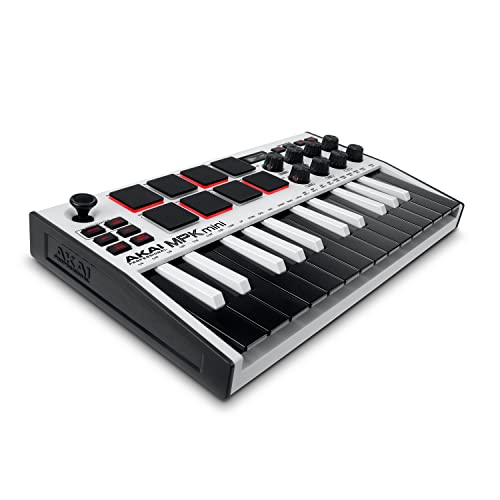
The Akai MPK Mini MK3 MIDI Keyboard (White) stands out for producers who need a compact, USB-powered controller that still delivers full performance control without sacrificing build or connectivity-especially if space, portability, or a clean aesthetic matters. I use its 25 velocity-sensitive keys, eight MPC-style drum pads, and eight rotary knobs daily-they’re responsive, well-spaced, and perfect for beats or synth tweaking. The thumbstick handles pitch and modulation smoothly, and the arpeggiator is intuitive. It’s USB-powered, needs no driver, works with Ableton, FL Studio, and Pro Tools, and includes MPC Beats, Komplete 15 Select, and 2GB of sounds. At just 0.9 kg and 12.5 inches wide, it fits anywhere.
Best For: Mobile producers and beatmakers who need a compact, reliable MIDI controller with essential performance features and seamless DAW integration.
Pros:
- Compact, lightweight design with durable build and clean white aesthetic ideal for portable setups
- Full suite of expressive controls including velocity-sensitive keys, MPC-style pads, thumbstick, and arpeggiator
- Includes valuable software bundle with MPC Beats, Komplete 15 Select, and 2GB of sound content
Cons:
- Mini keys may not suit players who prefer full-sized keys for playing piano parts
- Limited to 25 keys, which restricts melodic range for complex compositions
- No standalone MIDI ports, relying solely on USB for connectivity
LEKATO Percussion Sample Pad with 9 Pads

Nine responsive dual-zone silicone pads make the LEKATO Percussion Sample Pad with 9 Pads a top pick for mobile beatmakers, electronic drummers, and studio producers who need reliable velocity sensitivity and real-time control in a compact unit. I love its 592+ sounds and 30 built-in kits, plus the ability to load custom samples via SD card or USB using WaveManager software. With MIDI I/O, USB-B, and trigger inputs, it integrates seamlessly into my studio or live setup. I’ve added two extra pads for more flexibility, and the metronome, looper, and LED feedback keep me in the groove. At just 14.3 x 12 x 1.5 inches, it’s portable, durable, and perfect for practice or performance.
Best For: Mobile beatmakers, electronic drummers, and studio producers seeking a compact, customizable, and portable percussion pad with extensive connectivity and sample loading capabilities.
Pros:
- Offers 9 dual-zone, velocity-sensitive silicone pads with 592+ preset sounds and 30 built-in drum kits for versatile performance
- Supports deep customization with user-loaded samples via SD card or USB using WaveManager software and allows creation of 20 custom kits
- Features comprehensive connectivity including MIDI I/O, USB-B, trigger inputs, and expansion options for additional pads and footswitches
Cons:
- Limited to a 32GB SD card for storage, which may restrict sample library size compared to higher-capacity modern standards
- Plastic body construction may feel less durable for heavy stage use despite its portable design
- WaveManager software is only available for Windows and macOS, excluding Linux-based music production setups
Akai LPD8 USB MIDI Controller

Though I’m often on the move, I still need reliable, responsive control over my beats and plugins, and the Akai LPD8 delivers exactly that with its 8 velocity-sensitive, RGB-backlit MPC drum pads, 8 assignable Q-Link knobs for real-time tweakability, and four programmable preset slots I can switch between instantly, whether I’m in Ableton Live during a set or fine-tuning synth parameters in FL Studio at a café. It’s USB-powered, plug-and-play on Mac or PC-no drivers needed-and fits in my laptop bag thanks to its lightweight, durable MPC-inspired design. I use it daily for beat sketching, live loops, and hands-on mixing, and it integrates flawlessly across GarageBand, Logic, Cubase, and ProTools, giving me studio-grade control anywhere.
Best For: Mobile musicians, producers, and DJs who need portable, reliable, and hands-on control over their DAWs, virtual instruments, and effects in both live and studio environments.
Pros:
- Compact, lightweight, and USB-powered for true plug-and-play portability across Mac and PC
- Responsive MPC drum pads and assignable Q-Link knobs enable expressive beat-making and real-time parameter control
- Four programmable presets allow instant recall of custom mappings across multiple DAWs and software instruments
Cons:
- Limited to 8 pads and 8 knobs, which may restrict complex workflows requiring more controls
- No display or dedicated buttons for navigating presets or parameters, relying on software for management
- Build, while durable, is primarily plastic and may feel less robust compared to larger MIDI controllers
Kat Percussion KTMP1 Electronic Drum and Percussion Pad Sound Module, Black
You’re a solo performer with a tight setup, maybe layering loops live or tracking quick ideas at home, and space is non-negotiable-this compact sound module fits like a secret weapon in any rig. I’ve used the Kat Percussion KTMP1 on stage and in small studios, and its four velocity-sensitive pads respond fast, accurate, no lag. You get 50 crisp drum and percussion sounds-conga, bongo, kick, snare-all tunable. Plug in a hi-hat pedal or bass trigger to expand playability. USB/MIDI connects straight to your DAW, no extra interface needed. It’s affordable, durable, and perfect for quick sketching or live layers.
Best For: Solo performers and home producers needing a compact, versatile, and affordable electronic drum solution for live looping or quick idea sketching.
Pros:
- Compact design with four responsive, velocity-sensitive pads ideal for space-constrained setups
- 50 high-quality, tunable drum and percussion sounds with USB/MIDI for direct DAW integration
- Expandable with hi-hat pedal and bass drum trigger inputs for enhanced playability
Cons:
- Limited to four built-in pads, restricting complex kits or extended setups
- No built-in speakers or headphone amp, requiring external audio interface or mixer
- Sound library, while solid, is smaller compared to higher-end modules
Alesis Sample Pad 4 Percussion Trigger

If you’re a drummer or producer who values portability without sacrificing performance, the Alesis SamplePad 4 is a compact powerhouse that fits seamlessly into live kits, studio rigs, or mobile setups. I’ve used it live, and its four responsive, LED-lit rubber pads feel tight and fast, with solid velocity response. It’s lightweight at 2.6 pounds and small-just over 10 inches wide-so it slips right onto a stand or drum rack. I love loading custom samples via SD or USB; the drag-and-drop transfer works instantly, no card removal needed. With MIDI out, dual trigger inputs, and 25 built-in sounds across 8 kits, it’s flexible for remixing, layering, or triggering effects on the fly.
Best For: Drummers, producers, and live performers seeking a compact, versatile sample trigger pad with easy sample loading and reliable integration into drum kits or portable setups.
Pros:
- Compact and lightweight design makes it ideal for travel and stage use
- Easy drag-and-drop sample loading via USB without removing the SD card
- Dual trigger inputs and MIDI output provide flexible connectivity for live and studio setups
Cons:
- Limited to only four built-in pads, which may restrict complex performances
- Plastic construction, while durable, may feel less premium compared to higher-end models
- Built-in sound library is modest with only 25 sounds across 8 kits, requiring custom samples for expanded variety
Donner Electronic Drum Set (DED-20)

The Donner Electronic Drum Set (DED-20) is my go-to recommendation for beginners, kids, and home-based learners who want a compact, quiet, and versatile drum pad without sacrificing real-drum feel or connectivity. I love its 7-pad layout-SNARE, HI-HAT, TOMS, CRASH, and RIDE-all made from noise-dampening silicone, perfect for quiet practice. It’s lightweight at just 2.2 pounds, rolls up for portability, and supports headphones, MIDI, and USB connections. I use the 2.2W speakers for quick jams and the 180-second recorder to review my grooves. With free Melodics lessons, built-in songs, and compatibility with DAWs, it’s a no-brainer for learning, creating, or gifting.
Best For: Beginners, children, and home-based learners seeking a portable, quiet, and feature-rich electronic drum pad for practice, learning, and music creation.
Pros:
- Compact, roll-up design with noise-dampening silicone pads for quiet, space-saving practice
- Versatile connectivity with USB MIDI, standard MIDI, and headphone output for DAW integration and silent playing
- Comes with 40 free Melodics lessons and built-in recorder, songs, and rhythms to support skill development
Cons:
- Limited to a single drum pad with fixed pad layout, lacking full kit expansion options
- 2.2W built-in speakers are low-powered, requiring external amplification for louder playback
- No onboard storage for user-recorded content beyond the 180-second recording limit
Yamaha Finger Drum Pad (FGDP-50)

Compact enough to fit in a backpack yet powerful enough to build full tracks on the go, the Yamaha FGDP-50 is a rhythm machine built for mobile beatmakers, live performers, and producers who want expressive control without a bulky setup. I love how its 18 pads feel responsive and natural under my fingers, with velocity and aftertouch adding real dynamics. Eight RGB-lit pads let me trigger samples, loops, or effects on the fly. It’s got 48 pro kits and 50 slots to save my own, plus a clear LCD, Note Repeat, USB audio/MIDI, DAW support, and the Rec’n’Share app for quick workflow. Built-in speakers and battery power mean I can create anywhere.
Best For: Mobile beatmakers, live performers, and producers seeking an expressive, portable finger drumming solution with professional features for on-the-go music creation.
Pros:
- 18 responsive, velocity-sensitive pads with aftertouch and RGB-backlit assignable pads for dynamic, expressive performance
- Built-in battery, speaker, and USB audio/MIDI connectivity enable full standalone operation and seamless DAW integration
- Includes 48 pro drum kits, 50 user presets, Note Repeat, and Yamaha’s Rec’n’Share app for enhanced workflow and creativity
Cons:
- Limited to 18 pads, which may restrict complex mappings compared to larger controllers
- Built-in speaker quality may not suffice for critical listening or larger spaces
- No expandable storage, limiting on-device sample customization options
Native Instruments Maschine Mikro Mk3 Drum Controller, 25707

You’ll want the Native Instruments Maschine Mikro Mk3 if you’re a producer who values hands-on control without sacrificing depth, thanks to its 16 velocity-sensitive pads that switch seamlessly between drum, keyboard, chord, and step-sequencer modes. I use it with Ableton and FL Studio, and it integrates smoothly via USB 2.0-no external power needed. The steel-and-metal build feels solid at just 1.12 kg, and it takes up minimal desk space. I run it on my Mac with 4 GB RAM, and performance stays stable. Its included 1.6 GB library, plus Massive and Monark, gives me instant sounds for beats, basslines, and textures, all within a compact, stage-ready design.
Best For: Music producers seeking a compact, hands-on beat-making solution with seamless DAW integration and versatile sound design capabilities.
Pros:
- 16 velocity-sensitive pads support multiple modes (drum, keyboard, chord, step-sequencer) for flexible music creation
- Includes a rich 1.6 GB sound library plus powerful instruments like Massive and Monark for immediate production use
- Durable stainless steel and metal construction with USB bus-powered operation for portability and reliability
Cons:
- Limited to USB 2.0 connectivity with only one port, restricting peripheral expansion
- Requires 3 GB of disk space for full software installation, which may be demanding for smaller drives
- 4 GB RAM minimum may lead to performance issues in complex projects on entry-level systems
Factors to Consider When Choosing a Drum Pad Machine
You’ll want to check the pad sensitivity options, since models like the Akai Professional MPD218 offer 16 velocity-sensitive rubber pads that respond sharply to light taps or hard hits, giving you dynamic control whether you’re tracking beats or performing live. Make sure the connectivity and compatibility fit your setup-some machines include USB-MIDI, CV/Gate, or MIDI DIN jacks, and work seamlessly with Logic, Ableton, or GarageBand without extra drivers. Don’t overlook the included software bundle, portability, and design-compact units like the Roland SPD-Note fit in a backpack and run on batteries, while deep sound customization lets you layer, loop, or process samples right on board.
Pad Sensitivity Options
While your playing style and performance needs should guide your pick, pad sensitivity options play an essential role in how expressive and accurate your drum machine feels. You’ll want velocity-sensitive pads that detect hit strength, translating subtle dynamics into volume or timbre changes-most let you tweak velocity curves for stick, mallet, or finger drumming. Dual-zone sensing adds versatility, letting you trigger different sounds from the head and rim of the same pad. Some models even offer aftertouch, responding to pressure post-hit for real-time effect control. You can fine-tune sensitivity to prevent false triggers, especially useful when playing fast or with light touch. Testers find adjustable thresholds critical for live use and studio precision, noting that responsive pads with low latency deliver tighter, more natural grooves. These features give you tighter control, whether programming beats or performing live.
Connectivity And Compatibility
A well-connected drum pad machine expands your creative possibilities, whether you’re laying down beats in the studio or performing live. You’ll want USB-MIDI to link up fast with Windows, macOS, iOS, and Android devices, and USB-C or USB-B ports should match your laptop or tablet setup. Go for class-compliant models-they plug in and work instantly, no drivers needed. If you’re syncing with external synths or classic drum modules, pick a unit with 5-pin MIDI IN/OUT. That’s essential for tighter hardware integration. Always check if it plays nice with your DAW-especially for control features like transport buttons, faders, and Note Repeat. Seamless DAW communication saves time and keeps your focus on creativity, not configuration. Reliable connectivity isn’t just convenient-it keeps your workflow smooth, session after session.
Sound Customization Capabilities
How expressive does your drum machine really need to be? If you want dynamic, human-like beats, go for velocity-sensitive pads that respond to your playing intensity-hard hits increase volume and alter tone for more natural expression. Look for models that let you import custom samples via SD card or USB, so you can use your own drums, vocals, or effects. Onboard editing features like tuning, reverb, and envelope shaping give you precise control without a computer. Multiple pad banks mean you can switch between kits or sound sets live. For deeper tweaks, companion software helps you drag-and-drop samples, map parameters, and update firmware, expanding your sonic range with ease.
Portability And Design
If you’re gigging frequently or producing on the move, you’ll want a drum pad machine that won’t weigh you down or hog space in your bag-look for compact models under 13 inches wide and as light as 0.9 kilograms, so they slip easily into a backpack or mobile rig. Lightweight, roll-up designs made from soft silicone save space and handle tight storage, while slim profiles with tough plastic or metal housings stand up to travel. You’ll appreciate built-in rechargeable batteries that let you play anywhere, from park jams to subway sessions, without hunting for outlets. Ergonomic layouts keep pads and controls within easy reach, reducing fatigue during long beats or live sets. Whether you’re on a cramped stage or your kitchen table, smart design means you stay comfortable, mobile, and ready to create.
Included Software Bundle
While you’re selecting a drum pad machine, don’t overlook the included software bundle-it can substantially boost your production power without extra cost. You’ll often get a full DAW, virtual instruments, and over 2 GB of sounds, including 1,500+ one-shots, loops, and preset kits. These tools give you immediate access to professional workflows with step sequencers, arpeggiators, and effect plugins right out the box. You can start building tracks fast, no extra purchases needed. Look for NKS support, which lets you tightly control third-party plugins and libraries with effortless mapping. Most packages come with download codes requiring online registration, so keep your device handy. Testers praise models that deliver expansive, ready-to-use content, cutting setup time and elevating creativity. With the right bundle, you’re not just buying a pad controller-you’re accessing a complete beat-making suite that performs in real studios and home setups alike.
Durability And Build Quality
You get serious value when your drum pad machine comes packed with premium software, but don’t stop there-what you build on top of that foundation matters just as much. You need high-quality silicone pads-they handle heavy hits and stay responsive longer than basic rubber or plastic. Reinforced plastic bodies with metal or stainless steel parts keep internals safe during gigs or travel. If you play dual-zone pads, look for precise sensor calibration so both zones trigger evenly and last. Isolated pad construction reduces vibration transfer, cutting wear during intense sessions. Avoid flimsy, roll-up designs unless they’ve got internal frame support or protective casing-flexible materials alone won’t survive long. Testers praise units with full-frame reinforcement, noting cleaner hits and fewer dropouts after months of use. Build quality isn’t just about toughness-it’s about consistent performance, gig after gig.
Frequently Asked Questions
Can I Use Drum Pads With My Smartphone?
Yeah, you can absolutely use drum pads with your smartphone. Just grab an audio/MIDI interface or a compatible USB OTG cable, plug in your pad controller, and open a DAW app like GarageBand or FL Studio Mobile. Most modern pads, like the Akai MPD218 or Alesis Strike MultiPad, support class-compliant USB-MIDI, so they pair instantly, no drivers needed, giving you responsive triggers, full velocity sensitivity, and real-time beat creation on the go.
Do Drum Pad Machines Need External Power?
You don’t always need external power-many drum pad machines run on USB or batteries. Models like the Akai MPC One+ work on 5V via USB-C, while the Roland SPD-SX Lite uses AC or six AA batteries, giving you 4 hours of playtime. Testers prefer battery-powered units for portability, but studio setups favor consistent AC power to avoid voltage drops. Always check the voltage requirements; some pads need phantom power or dedicated adapters to trigger samples cleanly.
Are Drum Pads Suitable for Live Performances?
Yes, you can absolutely use drum pads in live shows-they’re built for it. You’ll stay tight with in-ear timing, thanks to sub-10ms latency on models like the Roland SPD-SX and Ableton Push 2. They handle stage knocks, link to MIDI gear, and output clean signals to front-of-house via balanced XLR or 1/4″ outs. Testers nail shifts night after night, and their velocity sensitivity keeps dynamics expressive, just like acoustic kits.
Can I Program Custom Sounds on These Machines?
You can absolutely program custom sounds on these machines, and it’s easier than you think. Just import your samples via USB, assign them to pads, and tweak velocity, tuning, and envelope settings. Most models support WAV and AIFF up to 24-bit/48kHz, giving pro-grade clarity. Testers love how fast the drag-and-drop workflows are, especially on units with full-color screens, making your beats truly your own.
How Durable Are the Rubber and Mesh Pads?
You’re getting serious durability with mesh and rubber pads-mesh lasts 5+ million hits, stays quiet, and feels responsive, like Roland’s PD-129. Rubber pads, like on the Alesis Strike MultiPad, handle 3+ million strikes, rebound fast, but wear faster under heavy sticks. Testers note mesh wins for dynamic play, while rubber’s tougher in dry climates. Both stand up to touring use, but mesh offers better sensitivity, fewer replacements long-term.