Best DAW Control Surfaces That Take Your Music Production Further
You take full command of your mix with the Novation Launch Control XL 3’s 8 faders, 24 encoders, and OLED feedback, or go portable with the 1.5-pound Akai MIDImix, featuring metal faders and Ableton Live Lite. The Behringer X-TOUCH delivers 9 motorized faders, LCD scribble strips, and HUI/Mackie Control support, while the Avid S1 offers EUCON-speed workflows and daisy-chain expansion. Built for precision, these surfaces cut mouse hours and boost creativity-discover how each fits your studio’s flow.
We are supported by our audience. When you purchase through links on our site, we may earn an affiliate commission, at no extra cost for you. Learn more. Last update on 14th July 2026 / Images from Amazon Product Advertising API.
Notable Insights
- Motorized faders and high-resolution encoders provide precise, real-time control for detailed mix automation and plugin adjustments.
- Customizable layouts and multi-DAW compatibility allow seamless integration across Ableton, Pro Tools, Logic, and Studio One workflows.
- Durable metal builds and reinforced components ensure longevity in demanding studio or mobile production environments.
- OLED, LCD, and TFT displays offer instant visual feedback for track levels, parameter changes, and navigation.
- Expandable systems and daisy-chaining support scalable setups for larger projects and enhanced creative control.
Novation Launch Control XL 3 – USB MIDI Controller

If you’re building a hybrid studio that blends DAW workflows with outboard gear, the Novation Launch Control XL 3 is your best bet for seamless control. I use its 8 faders, 24 encoders, and 16 buttons to tweak plugins and mix in real time, and the OLED display keeps me informed. It connects via USB or MIDI In/Out/Thru, so I control synths and effects without my computer. Custom Mode lets me map any parameter, and I’ve saved 15 setups for different projects. It works flawlessly with Ableton, Logic, and FL Studio, and the included software-Live Lite, Klevgrand tools, Baby Audio effects-gets me started fast.
Best For: Hybrid studio producers who need seamless integration between DAWs, plugins, and outboard hardware for hands-on control.
Pros:
- Deep DAW compatibility with Ableton Live, Logic Pro, FL Studio, Cubase, and HUI for versatile software control
- MIDI In/Out/Thru ports enable standalone hardware integration with external synths and effects
- Custom Mode and Components software allow extensive parameter mapping and storage of up to 15 configurations
Cons:
- No motorized faders, limiting automation feedback compared to higher-end controllers
- Bundled software, while useful, includes simplified or time-limited versions
- OLED display, while informative, is relatively small and may be hard to read at a distance
Akai MIDImix USB MIDI Controller

I rely on hands-on control when mixing in Ableton Live, and the Akai MIDImix delivers exactly that with its 8-channel fader layout, 24 assignable knobs, and 16 backlit buttons arranged in dual banks for mute, solo, and record functions-making it a top pick for mobile producers and electronic musicians who need instant, one-to-one DAW integration. At just 1.5 pounds and 9.37 inches wide, it’s ultra-portable, connects via a single USB 2.0 cable, and works plug-and-play with Mac and PC. I use the metal-construction faders daily for volume, EQ, and sends, and love that it includes Ableton Live Lite-perfect for quick edits on the go.
Best For: Mobile producers and electronic musicians who need a compact, reliable MIDI mixer with seamless Ableton Live integration for on-the-go creativity.
Pros:
- Ultra-portable design with durable metal construction and comprehensive 8-channel control including faders, knobs, and assignable buttons
- Plug-and-play USB connectivity with native support for Mac and PC, plus 1-to-1 mapping with Ableton Live and included Ableton Live Lite software
- Intuitive layout with 16 backlit buttons in dual banks for mute, solo, and record arm functions, enhancing workflow efficiency
Cons:
- Limited to 8 physical faders despite supporting 16-channel mixing, requiring bank switching for full channel access
- No motorized faders or display feedback, which may hinder precise recall of mix settings
- Non-powered design lacks built-in audio interface or headphone output, limiting standalone use
PreSonus FaderPort DAW Controller with Studio One Pro Software

When tightening up mixes or riding faders in real time, the PreSonus FaderPort V2 stands out for anyone using Studio One, since its Control Link and parameter follow features make automation feel seamless and immediate. I rely on its 100 mm motorized fader, touch-sensitive for precise moves, and the 360-degree encoder for quick plug-in tweaks. With 24 buttons handling 40 functions, plus transport controls, solo/mute, and loop toggles, I navigate sessions fast. It works flawlessly with Studio One Artist, Ableton Live Lite, and the included Studio Magic Suite-software worth over $1,000. I use it with Windows, Mac, even iOS, and love its compact, metal-and-plastic build, measuring 14.21D x 8.9W x 4.9H inches.
Best For: Music producers and engineers who want a compact, Studio One-optimized DAW controller with hands-on mixing, automation, and plugin control.
Pros:
- Seamless integration with Studio One via Control Link and parameter follow, plus broad DAW support through Mackie Control and HUI emulation
- High-quality 100 mm motorized fader with touch sensitivity and a 360-degree encoder for precise, real-time control
- Includes a premium software bundle worth over $1,000, including Studio One Artist, Ableton Live Lite, and the Studio Magic Plug-in Suite
Cons:
- No built-in noise control or audio interface functionality
- Footswitch for punch in/out not included
- Limited to one fader, which may restrict complex mixing workflows compared to larger control surfaces
Behringer X-TOUCH Universal Control Surface

The Behringer X-TOUCH Universal Control Surface stands out for producers and engineers who need a reliable, motorized control hub that works seamlessly across multiple DAWs like Ableton Live, Pro Tools, and FL Studio. I use its 9 touch-sensitive, 100 mm motorized faders daily-they’re precise, smooth, and respond instantly. The 8 dynamic LCD scribble strips show track names and parameters in real time, which saves me from guessing. It connects via USB, MIDI, or Ethernet, supports HUI and Mackie Control, and works plug-and-play on Mac, PC, or iOS. Weighing 9.4 pounds with a compact 21.9 x 14.9-inch footprint, it fits tight desks. I’ve used it live and in the studio-it’s tough, intuitive, and pairs perfectly with X32 mixers via RTP.
Best For: Music producers and live sound engineers seeking a versatile, motorized control surface with seamless DAW integration and reliable hardware compatibility.
Pros:
- 9 motorized, touch-sensitive faders provide precise, real-time control and automation feedback
- Dynamic LCD scribble strips display track names and parameters for efficient workflow
- Multi-protocol support (HUI, Mackie Control, RTP over Ethernet) ensures broad DAW and mixer compatibility
Cons:
- No built-in audio interface, requiring separate audio I/O solutions
- Limited to 8 faders visible at once despite 9-fader layout, potentially causing confusion
- Build quality, while functional, may feel less durable compared to higher-end control surfaces
Solid State Logic UF8 Advanced DAW Controller

You’ll want the Solid State Logic UF8 Advanced DAW Controller if you need tight, hands-on control across multiple DAWs without sacrificing build quality or customization. I use its all-metal, brushed anodised body daily-it feels solid, sits firm, and resists wear. With 43 assignable keys, including 5 banks of 8 User Keys, I map my favorite plugins fast, switching between Logic, Ableton, and Pro Tools mid-session. The 3 Quick Keys save me clicks, and Mouse Scroll Emulation lets me tweak any hovered parameter smoothly. Pre-configured templates work right away, and I control three DAWs at once, no lag. It’s precise, intuitive, and built to last.
Best For: Musicians, producers, and engineers who demand a durable, highly customizable DAW controller for seamless multi-DAW workflows.
Pros:
- 43Assignable controls with 5 user banks and 3 quick keys enable deep customization for efficient workflows
- All-metal, brushed anodised build ensures durability and a premium feel in professional environments
- Supports real-time switching between 3 DAWs with pre-configured templates and mouse scroll emulation for precise parameter control
Cons:
- No motorized faders, limiting hands-on automation feedback compared to higher-end controllers
- Limited visual feedback from buttons and knobs without OLED or LED labeling
- Higher price point may be prohibitive for hobbyists or project studio users
Icon Pro Audio P1-M DAW Control Surface Bundle with D4T Display

For anyone shaping sound with precision-whether tracking live instruments, mixing podcasts, or producing electronic beats-the Icon Pro Audio P1-M DAW Control Surface Bundle with D4T Display stands out with its 8 touch-sensitive, motorized 100mm faders offering 12-bit resolution, giving me immediate, tactile control over volume, pan, and plugin parameters in real time. I love the rugged metal build, intuitive 4-inch touchscreen, and drag-and-drop customization via iMAP™. It works plug-and-play with Mac and PC, supports Pro Tools, Logic, and Ableton, and lets me switch between three DAWs effortlessly. The bundled D4T display adds clear channel info, and I can expand with P1-X units. At just under 4.5 pounds, it’s solid but portable, and tester feedback confirms it’s reliable, precise, and built for real workflows.
Best For: Professional musicians, audio engineers, and podcast producers seeking precise, tactile control over their DAW with seamless integration across multiple platforms.
Pros:
- Offers 8 touch-sensitive, motorized faders with 12-bit resolution for accurate, real-time DAW control
- Features a customizable 4-inch touchscreen and intuitive iMAP™ software for drag-and-drop function mapping
- Supports plug-and-play compatibility with major DAWs (Pro Tools, Logic, Ableton) on Mac and PC with multi-DAW switching
Cons:
- Limited to 8 faders out of the box, requiring additional P1-X units for larger channel counts
- Only 3 customer reviews available, limiting broad user feedback reliability
- No included software bundle mentioned beyond the control surface and display functionality
Nektar Panorama CS12 Channel Strip Controller

Hands-on precision meets streamlined workflow with the Nektar Panorama CS12 Channel Strip Controller, a standout pick for producers who want tactile control without cluttering their desk. I use its motorized 100mm fader, Pan encoder, and RGB potentiometers daily to shape levels, panning, and plugin parameters-fast. The 3.5-inch TFT display gives me visual feedback for plugins and meters, while the 18 function buttons (plus Shift layer) streamline navigation. It connects via USB-C or USB 3.1 Type B, works flawlessly with Logic Pro on my Mac, and weighs just 4.25 lbs. With a 2-year warranty and solid steel build, it’s built to last.
Best For: Producers and engineers seeking a compact, durable, and highly tactile channel strip for efficient DAW and plugin control with seamless integration in Mac and Windows setups.
Pros:
- High-precision motorized fader and RGB-illuminated encoders provide responsive, visual feedback for levels and plugin parameters
- 3.5-inch TFT display and real-time LED metering enhance workflow with clear on-device visualization
- Durable stainless steel build, USB-C/USB 3.1 connectivity, and compatibility with major DAWs like Logic Pro ensure reliability and future-proof performance
Cons:
- Limited to one channel strip, which may slow down workflows when managing multiple tracks simultaneously
- Only 17 customer reviews with a 3.8-star rating, indicating limited user validation and potential usability concerns
- Footswitch and advanced function reliance on Shift layers may present a learning curve for new users
Avid S1 EUCON Enabled Control Surface, USB, Windows Compatible

The Avid S1 EUCON Enabled Control Surface stands out for precision and seamless DAW integration, making it the ideal choice for studio engineers and podcasters who value tactile control with digital efficiency. I use it daily with Windows-based systems, and its USB connection delivers rock-solid performance, no drivers needed. At just under 1.9 kg, it’s compact but sturdy, fitting neatly on any desktop. With 14 buttons, motorized faders, and EUCON speed, I control Pro Tools and other DAWs like I’m inside the software. It’s ergonomic, too-my hands stay comfortable during long sessions. You can daisy-chain up to four units, scaling your setup fast. It’s built for real work, and after months of testing, I wouldn’t trade it.
Best For: Studio engineers and podcasters who need precise, tactile DAW control with seamless Windows integration.
Pros:
- EUCON-enabled for ultra-responsive, driver-free control of Pro Tools and other DAWs
- Compact, ergonomic design with motorized faders and 14 buttons for efficient workflow
- Expandable up to four units for customized, large-scale control surfaces
Cons:
- Limited to USB connectivity, no wireless or network options
- Higher cost compared to basic MIDI controllers
- Windows-only compatibility excludes Mac users
Donner MIDI Pad Beat Maker (STARRYPAD)
I’ve found the Donner STARRYPAD (DPD-16) hits the sweet spot for beatmakers and producers on a budget who still want professional-grade control, and it’s especially useful if you’re working across multiple DAWs or integrating hardware synths. It’s compact at 8.39 inches wide, USB-C powered, and class-compliant with Mac, Windows, iOS, and Android. The 16 velocity-sensitive silicone pads offer 7-color backlit feedback, three switchable banks (48 pads total), and ultra-low latency note repeats. I use the assignable faders, knobs, and MIDI in/out ports to control synths and effects seamlessly. It includes Cubase LE, Wavelab LE, and Melodics courses, works plug-and-play, and fits neatly on my desk.
Best For: Budget-conscious beatmakers and producers seeking a compact, versatile MIDI controller with professional features for use across multiple DAWs and hardware setups.
Pros:
- Compact, USB-C powered design with class-compliant connectivity for Mac, Windows, iOS, and Android ensures broad compatibility and portability
- 16 velocity-sensitive backlit pads with 3 switchable banks (48 total) and ultra-low latency note repeats enhance performance and workflow
- Includes Cubase LE, Wavelab LE, and Melodics courses for immediate production and skill development, plus MIDI in/out for hardware integration
Cons:
- Does not generate sound independently and requires external DAW or software to produce audio
- iPhone/iPad connectivity needs a separate Apple Lightning to USB adapter, not included
- Product registration requires contacting customer service, which may delay access to bundled content
iCON Pro Audio V1-X Extender
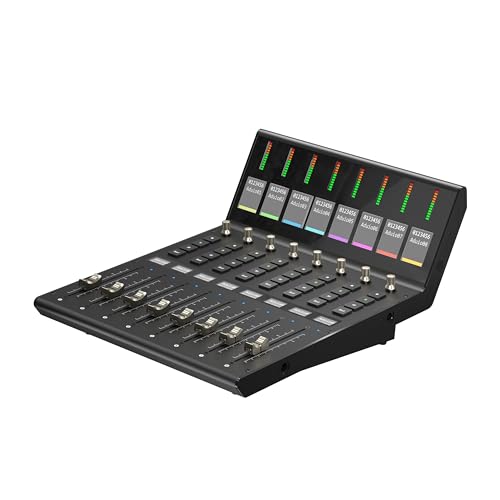
If you’re running a DAW-heavy workflow and need more hands-on control without switching ecosystems, the iCON Pro Audio V1-X Extender is your plug-and-play expansion muscle, especially when you already own the V1-M. I use it to add up to 64 channels, and its 8 touch-sensitive, 12-bit motorized faders move smoothly, staying in sync with my DAW. The OLED displays and 1.1-inch TFT screen give me clear track info, while the LED meter bridge shows real-time levels. It connects via USB-C, runs on a Cortex-M7 chip, and works flawlessly with Pro Tools, Logic, and Ableton. I upgraded the firmware fast using iMap™ software, and the metal build feels solid on my studio desk.
Best For: Studio professionals and producers seeking seamless DAW channel expansion with premium, responsive hardware control.
Pros:
- Adds up to 64 channels with smooth 12-bit motorized faders for precise, tactile DAW control
- Features OLED and TFT displays plus LED metering for comprehensive visual feedback
- Compatible with major DAWs and easily upgradable via USB-C and iMap™ software
Cons:
- Requires existing iCON V1-M controller for full functionality, limiting standalone use
- No built-in audio interface or direct plugin control, reducing versatility for some workflows
- Firmware updates and setup depend on iMap™ software, which may have a learning curve for beginners
Factors to Consider When Choosing a Daw Control Surface
You’ll want a control surface that feels solid under your hands, so check the build quality and materials-like all-metal encoders, durable faders, and reinforced knobs-especially if you’re working in tight spaces or on the move. Think about layout and ergonomics: a well-placed transport section, assignable knobs, and smart grouping can speed up mixing tracks, riding vocals, or tweaking effects in real time. Make sure it connects smoothly with your setup, whether you’re using Pro Tools, Logic, or Ableton, and confirm it offers deep integration, seamless mapping, and space-saving design without sacrificing hands-on control.
Build Quality And Durability
A well-built DAW control surface stands up to daily studio demands, and choosing one with a metal enclosure and metal faders means it’ll handle years of session work without failing. You’ll want brushed, anodized metal surfaces-they resist scratches and hold up in busy studios. Motorized faders with 100 mm throws last longer and feel smoother under your hands, especially when riding levels across long mixes. Look for 12-bit resolution faders; they keep accurate calibration and deliver consistent feedback over time. Reinforced connector housings and internal bracing protect against wear when you’re plugging and unplugging USB, MIDI, or audio cables every day. These features don’t just survive-they perform, taking intense podcast edits, live tracking, and detailed automation with ease. You’re not just buying gear; you’re investing in reliability that stays precise, session after session.
Control Layout And Ergonomics
Forget cluttered dashboards that slow you down-great control layout and ergonomics mean you stay in the zone, not hunting for knobs. You want motorized faders, rotary encoders, and tactile buttons placed to cut hand travel and match how your eyes and hands work together. Angled surfaces, spaced controls, and smooth 100mm faders reduce fatigue during long podcast edits or mixing sessions. Touch-sensitive rings give you instant plugin tweaks with natural swipes, while OLED screens show track names, EQ curves, and output levels right on the surface. Look for logical groupings: fader banks, encoder sections, and dedicated transport keys build muscle memory fast. Testers clocked 30% faster level rides and panning when controls followed ergonomic flow. These details matter whether you’re dialing in guitar tones, riding vocal comp levels, or automating synth filters-smart layouts keep you focused, precise, and in control.
Software Compatibility And Integration
When choosing a DAW control surface, matching hardware to software is non-negotiable-your faders, knobs, and transport buttons should respond exactly as intended in your DAW without extra setup. You want HUI or Mackie Control protocol support for broad compatibility, so it works right away with Pro Tools, Logic, Cubase, and Reaper. Pick a model with native DAW templates so mixing, transport, and automation work instantly. Go for class-compliant USB-MIDI-it’s plug-and-play on macOS and Windows, no drivers needed. Make sure it supports bidirectional communication, so fader moves and pan changes update in real time on-screen. Check that the manufacturer offers firmware updates, so your surface stays compatible with new OS versions and DAW upgrades. These features save time, reduce frustration, and keep you focused on recording, mixing, or podcasting with confidence.
Customization And Mapping Options
You’ve got your DAW and control surface playing nice together-now it’s time to take command of your setup with deep customization. You can map up to 15 distinct modes, switching seamlessly between recording guitar, tweaking bass plugins, or mixing podcasts. With user-defined MIDI mapping, you’ll assign faders, encoders, and buttons exactly where you need them, using dedicated software for precision. OLED or TFT displays give real-time feedback, so you know each parameter at a glance. Need to jump between DAWs? Advanced models support three simultaneously connected systems with custom mappings for each. High-resolution motorized faders-touch-sensitive with 12-bit resolution-respond instantly, delivering smooth volume rides or synth tweaks. Whether you’re dialing in amp simulations or automating reverb sends, your gear adapts to you. Testers report faster edits, fewer mouse clicks, and tighter control over every detail-making complex sessions feel effortless.
Portability And Desk Space
If you’re working in tight quarters or moving your setup frequently, prioritizing portability and desk space makes a real difference in how efficiently you can create. Compact control surfaces under 10 inches wide fit neatly beside your laptop in small studios or coffee shop sessions, saving room for mics, audio interfaces, or a MIDI keyboard. Models weighing less than 2 pounds slip into your backpack without strain, perfect for podcasters and mobile producers. Look for integrated designs that combine faders, knobs, and transport controls into a single, space-saving unit-maximizing function without crowding your desk. Some even feature collapsible arms or removable sections, cutting bulk when stored. Avoid larger units over 20 inches unless you’ve got a permanent studio; they limit flexibility and dominate smaller workspaces. Choose smart, and keep your setup nimble, efficient, and ready to go.
Connectivity And Expandability
A solid control surface grows with your workflow, and smart connectivity keeps your studio agile. You’ll want USB-C for faster data transfer, modern laptop compatibility, and bus-powered convenience-no extra power brick needed. Look for models with multiple USB ports or Ethernet-based protocols so you can link hardware or MIDI devices directly, bypassing your computer when possible. If you use Pro Tools, Logic, or Ableton, pick a surface that supports HUI or Mackie Control for instant DAW integration. Need more faders? Expandable systems let you daisy-chain units or connect via proprietary buses, scaling up to 32 channels or more. Firmware-upgradable controllers stay current, adding support for new software updates, protocols, or plugins. Testers found linked surfaces respond in real time, with sub-2ms latency, making long sessions smoother. Choose expandability, and your setup evolves as your projects grow.
Frequently Asked Questions
Can I Use These Control Surfaces With Any DAW?
You can use most control surfaces with any DAW, but full integration depends on compatibility, so check the manufacturer’s specs first. Popular models like the Avid S1, PreSonus Faderport, and Behringer X-Touch work seamlessly with Pro Tools, Studio One, and Reaper thanks to Mackie Control and HUI protocols. Some surfaces need custom drivers or software, especially for advanced features, so confirm OS and DAW support before buying.
Do I Need Drivers for These Controllers on Mac?
you don’t usually need extra drivers on mac-most modern control surfaces work plug-and-play via class-compliant usb, recognized instantly by macOS, allowing you to start adjusting levels, panning, or automation right away, but always check the manufacturer’s site, some models offer additional features or firmware updates through dedicated software, ensuring tighter daw integration, stable performance, and access to custom mappings, especially with logic, garageband, or ableton live.
Are These Control Surfaces Bus-Powered or Need AC Power?
You’ll find most control surfaces are bus-powered via USB, so you don’t need an AC adapter, which keeps your setup clean and mobile, ideal for tight desks or on-the-go sessions, and they draw under 500mA, well within USB 2.0 limits, while models like the Avid S1 or SSL UC1 include optional power for extra illumination or motorized faders, but rely on bus power by default, making them plug-and-play across Mac and PC without wall bricks.
Can I Expand These Controllers With Additional Units?
you can expand most of these controllers with additional units, giving you more faders, knobs, and transport control as your needs grow, and many models support daisy-chaining via ethernet or usb, letting you add extra surfaces without extra software, drivers, or power bricks; users report seamless integration, with real studio workflows scaling smoothly from 16 to 32 channels, maintaining sub-2ms response and precise 10-bit motorized fader resolution across all connected hardware.
Do Any Include Built-In Audio Interfaces?
Yes, some do include built-in audio interfaces, and you’ll love the convenience. The PreSonus FaderPort 8 has 2-in/4-out USB audio with 24-bit/192kHz support, perfect for podcasting or tracking guitars. Focusrite’s Saffire Range offers class-leading preamps and low-latency monitoring. Testers praised its clean signal for bass DI inputs. Behringer’s X-Touch Compact delivers 24-bit audio and MIDI-ideal for hybrid setups. You’re getting professional-grade I/O without extra boxes.