Best Compact MIDI Controllers for Small Spaces and Big Ideas
You’re working in tight spaces, so grab a compact MIDI controller like the Xkey 25 or Novation FLkey Mini, both under 13.5 inches wide, with velocity-sensitive keys, USB power, and DAW integration for real studio control. Need portability? The 0.6-inch-thick Xkey 25 has polyphonic aftertouch and rugged aluminum build, while the FLkey Mini offers scale modes, note repeat, and arpeggiator for fast ideas. Bluetooth models like DaierTek free you from cables, and Akai’s LPD8 packs MPC pads and assignable knobs in a 1.5-pound frame. Each fits in a laptop bag, powers via USB or battery, and pairs with Ableton, Logic, or FL Studio for instant workflow-explore the top models to find your perfect match.
We are supported by our audience. When you purchase through links on our site, we may earn an affiliate commission, at no extra cost for you. Learn more. Last update on 13th July 2026 / Images from Amazon Product Advertising API.
Notable Insights
- Compact MIDI controllers feature 25–32 mini keys and slim profiles under 17 inches wide for portability and tight-space use.
- Models like the Xkey 25 offer ultra-thin designs (0.6 inches) and rugged aluminum builds for durability without sacrificing space efficiency.
- Velocity-sensitive keys and pitch/modulation controls provide expressive performance in a small footprint.
- USB or Bluetooth connectivity with bus-powered operation ensures easy, cable-free integration with DAWs and mobile devices.
- Built-in sequencers, arpeggiators, and DAW templates enhance creativity and workflow for producing big ideas on the go.
Donner Mini MIDI Keyboard with Teaching Courses

If you’re just starting out or need a portable setup that won’t sacrifice functionality, the Donner Mini MIDI Keyboard with Teaching Courses stands out as a smart pick. I love its 25 velocity-sensitive keys, compact 13.39-inch width, and plug-and-play USB-MIDI that works instantly with Mac, Windows, and iOS-no drivers needed. The light-up buttons, pitch-bend wheel, and octave shift make playing intuitive, even with limited music theory knowledge. I’ve used it with Ableton and Logic Pro, and it handles flawlessly. It includes 40 structured lessons, four programmable banks, and an arpeggiator. At just under 4 inches deep, it fits anywhere, and with a 4.2-star rating from 673 reviews, it’s clearly working for real users like us.
Best For: Beginners and mobile music creators seeking an affordable, compact MIDI keyboard with built-in learning tools and broad device compatibility.
Pros:
- Compact, lightweight design with 25 velocity-sensitive keys and full USB-MIDI plug-and-play support across Mac, Windows, iOS, and Android
- Includes 40 structured teaching courses and intuitive features like arpeggiator, octave shift, and pitch-bend wheel ideal for novices
- Highly rated (4.2 stars from 673 reviews) and compatible with major DAWs like Ableton Live, Logic Pro, and Cubase
Cons:
- Plastic construction may feel less durable compared to higher-end models
- Limited to 25 keys, which restricts chord voicings and two-handed playing for advanced users
- 90-day warranty is shorter than the industry standard of one year
Akai LPD8 USB MIDI Controller with RGB Pads

You get a serious edge with the Akai LPD8 when portability meets hands-on control, making it my top pick for beatmakers and mobile producers who need a compact MIDI controller that doesn’t sacrifice functionality. I use it daily, and the 8 RGB-backlit MPC pads give me quick, responsive access to samples and drums, while the 8 Q-Link knobs let me shape sounds in real time. It’s USB-powered, works plug-and-play with my Mac and PC, and fits in my laptop bag with room to spare. I’ve mapped presets for Ableton, FL Studio, and Logic, and switching between them is seamless. At just 1.5 pounds and with four onboard memory slots, it’s built for life on the move-reliable, intuitive, and ready wherever I am.
Best For: Beatmakers, mobile producers, and live performers who need a compact, durable MIDI controller with responsive pads and real-time parameter control for on-the-go music creation.
Pros:
- Compact, lightweight design with sturdy build quality ideal for travel and mobile production
- Responsive RGB-backlit MPC pads and 8 assignable Q-Link knobs for expressive, hands-on control
- Plug-and-play USB connectivity with cross-DAW compatibility and four customizable preset slots
Cons:
- Limited to 8 pads and 8 knobs, which may restrict complex workflows for advanced users
- No built-in display or dedicated transport controls for DAW navigation
- Preset management requires computer software, limiting standalone editing capability
Xkey 25 USB MIDI Keyboard

The Xkey 25 stands out as the go-to compact MIDI controller for mobile producers and on-the-go composers who need a durable, responsive keyboard without sacrificing professional build or performance. I love its ultra-thin 0.6-inch profile and rugged anodized aluminum frame-this thing weighs under 2 lbs yet feels solid. Its 25 full-size, velocity-sensitive keys deliver piano-like response, and polyphonic aftertouch adds real expressiveness. I use the free Xkey Plus app to tweak settings and map controls seamlessly. It’s plug-and-play with my Mac, iPad, Android, and PC-no drivers needed. With reliable, low-latency performance and 24/7 support backed by a 3-year warranty, it’s my trusted companion for studio and field work.
Best For: Mobile producers and on-the-go composers seeking a durable, lightweight, and expressive MIDI keyboard with seamless cross-platform compatibility.
Pros:
- Ultra-thin, lightweight design with a rugged anodized aluminum frame for durability and portability
- Full-size, velocity-sensitive keys with polyphonic aftertouch for enhanced musical expressiveness
- Plug-and-play USB connectivity with no drivers required across PC, Mac, iOS, Android, and Linux
Cons:
- Limited to 25 keys, which may not suit players preferring a wider keyboard range
- No built-in pads, knobs, or faders for additional control without external devices
- Polyphonic aftertouch is rare in software support, potentially underutilized in some DAWs
Novation FLkey Mini 25-Key MIDI Controller
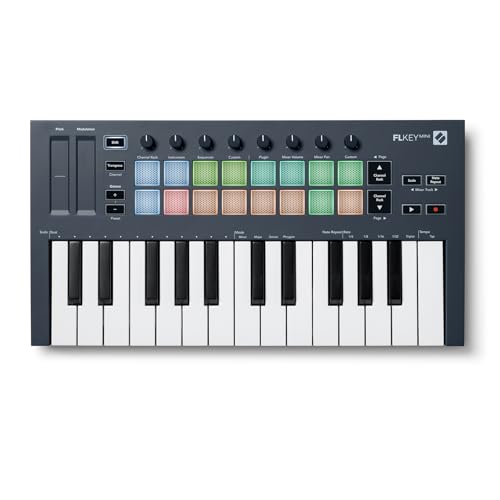
A compact powerhouse, the Novation FLkey Mini 25-Key MIDI Controller delivers seamless FL Studio integration right out of the box, making it the top pick for producers who live inside FL Studio and want a portable, no-fuss controller for sketching beats, programming drums, and tweaking mixes on the fly. I love its velocity-sensitive pads, perfect for FPC and SliceX, and the eight knobs give hands-on control over volume and pan. The step sequencer and note repeat let me nail tight hi-hat rolls, while scale mode keeps melodies on key. At just 1.61 pounds, it’s travel-ready, connects via USB, and works instantly on Mac or PC. With a 3-year warranty and a 4.7-star rated reliability from 1,175 users, it’s a no-brainer for compact, FL-centric workflows.
Best For: Producers deeply embedded in FL Studio who need a compact, portable MIDI controller for quick beat sketching, drum programming, and hands-on mixer control.
Pros:
- Seamless, plug-and-play integration with FL Studio’s Channel Rack, Mixer, and FPC/SliceX
- Compact, lightweight design (1.61 lbs) ideal for travel and on-the-go production
- Intuitive performance features like scale mode, step sequencer, note repeat, and 8 assignable knobs
Cons:
- Only 25 mini-keys may not suit players who prefer full-sized keys or wider key ranges
- Limited hardware controls compared to larger controllers (no transport buttons or faders)
- Basic plastic build may feel less durable under heavy use despite 3-year warranty
DaierTek 25-Key MIDI Keyboard with Bluetooth

Compact yet fully loaded, this DaierTek 25-key controller delivers pro-level expression in a travel-ready design, making it my top pick for mobile producers and beatmakers who need Bluetooth freedom without sacrificing control. I use it daily with my iPad and FL Studio on Android, and the 2,000 mAh battery lasts a full 16 hours. The velocity-sensitive keys and aftertouch-capable RGB pads respond instantly, while the touch strips replace clunky pitch wheels. I rely on its arpeggiator and smart scale modes for quick ideation. It’s lightweight at just 1.07 kg, connects seamlessly to Ableton and GarageBand, and pairs fast via Bluetooth MIDI.
Best For: Mobile producers and beatmakers who want a compact, Bluetooth-enabled MIDI controller with pro-level features for use with iOS, Android, or desktop DAWs.
Pros:
- Wireless Bluetooth MIDI connectivity with reliable pairing across iOS, Android, and PC/Mac
- Rich feature set including arpeggiator, smart scale, touch strips, and RGB pads with aftertouch
- Long 16-hour battery life and lightweight, portable design ideal for on-the-go production
Cons:
- Plastic build may feel less durable compared to metal-bodied controllers
- No internal sounds-requires external software or DAW for audio output
- MIDI driver required on Windows, which may complicate initial setup for some users
25-Key MIDI Keyboard Controller

You’re looking for power in a portable package, and that’s exactly what this 25-key MIDI keyboard controller delivers-perfect for producers who need expressive control without cluttering their desk. I use the velocity-sensitive keys daily, and they capture every nuance, making recordings feel alive. The eight responsive drum pads handle beat creation with precision, while the eight assignable knobs streamline mixing or synth tweaking in real time. I love how it integrates with my DAW-transport controls and track navigation are instant. Bluetooth and USB offer reliable, plug-and-play connectivity across Windows, macOS, and iOS. The OLED display guides me smoothly through ARP patterns, transpose shifts, and velocity curves, keeping creativity flowing without stopping to tweak settings.
Best For: Mobile producers and performers seeking an expressive, compact MIDI controller with seamless DAW integration and wireless capability.
Pros:
- 25 velocity-sensitive keys and 8 responsive drum pads deliver expressive, dynamic performance control
- Direct DAW integration with transport and track navigation enhances workflow efficiency
- Bluetooth and USB connectivity with cross-platform compatibility for flexible use across devices
Cons:
- Limited to 25 keys, which may restrict playing range for complex compositions
- iOS use requires an additional adapter, adding to setup cost and complexity
- No built-in audio interface, necessitating external gear for audio routing
Arturia MicroLab Mk3 MIDI Controller White

I’ve found the Arturia MicroLab Mk3 MIDI Controller White is especially well-suited for mobile producers and bedroom beatmakers who need reliable, expressive control in a tight space. At just 1 kg and 15.9D x 1.5W x 4.9H inches, it’s ultra-portable, USB-C powered, and fits anywhere. The 25-key slim keybed-same as the MiniLab 3-gives real key feel with velocity response, chord mode, and two touch strips for dynamic phrasing. It plugs into PC or Mac instantly, includes Ableton Live Lite and 500 Analog Lab Intro presets, and puts four smart buttons and a touch pad at your fingertips for hands-on workflow.
Best For: Mobile producers and bedroom beatmakers seeking a compact, expressive MIDI controller for on-the-go music creation.
Pros:
- Ultra-portable design with USB-C connectivity and lightweight 1 kg build for easy transport
- High-quality 25-key slim keybed with velocity sensitivity, chord mode, and dual touch strips for expressive performance
- Includes valuable software suite with Ableton Live Lite and 500 Analog Lab Intro presets for immediate music production
Cons:
- No dedicated knobs or faders limit hardware control for advanced parameter tweaking
- Limited to 25 keys, which may restrict playability for complex keyboard parts
- Warranty information not specified, and return window limited to 30 days
Nektar SE25 USB MIDI Keyboard
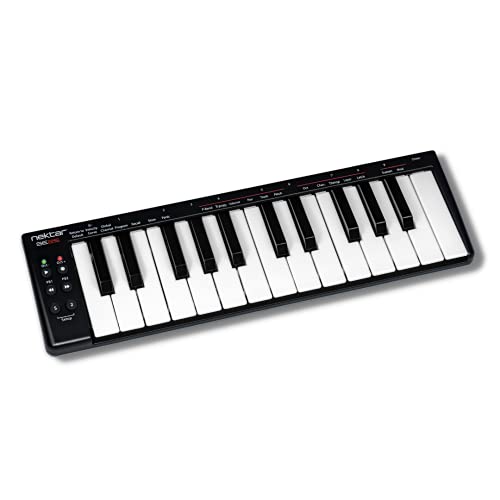
If you’re working in tight spaces but still need reliable MIDI control for your DAW, the Nektar SE25 USB MIDI Keyboard stands out with its 25 mini keys and a slim, laptop-width design measuring just 13.2 inches wide, making it ideal for compact home studios or mobile setups. I love how it pairs USB 2.0 plug-and-play with solid plastic build, weighing only 1 pound. It works seamlessly on Mac, Windows, Linux, and iOS, and supports Bitwig, Logic, GarageBand, and more. I use the six smart buttons daily for transport control, and I activated my included Bitwig Studio 8-track license fast-no setup headaches. It’s rugged, simple, and backed by a 2-year warranty, plus Amazon’s 30-day return guarantee.
Best For: Musicians and producers with limited workspace who need a portable, plug-and-play MIDI keyboard for DAW control across multiple platforms.
Pros:
- Compact, laptop-width design ideal for small studios and mobile setups
- Broad DAW and OS compatibility including Mac, Windows, Linux, and iOS
- Includes Bitwig Studio 8-track license and features smart transport buttons for immediate productivity
Cons:
- Mini keys may not suit players who prefer full-sized keys
- Plastic build, while durable, feels less premium than metal alternatives
- Limited to 25 keys, restricting melodic range for complex compositions
midiplus AKM320 Midi Keyboard Controller

The midiplus AKM320 Midi Keyboard Controller is an ideal pick for beginners and mobile producers who need a compact, no-frills controller that fits in tight workspaces or slips into a backpack for on-the-go sessions. I love its 32 mini keys-they’re velocity-sensitive, so dynamics come through clearly, and the pitch and modulation wheels add real expressiveness. It’s USB-powered, so no extra cables or power bricks, and the included USB Type B cable connects instantly to Windows, Mac, or Linux. At just 0.72 kg and 18.11 inches deep, it’s ultra-portable, and the octave and transpose buttons make maneuvering the keyboard easy. It doesn’t need drivers, works with any DAW, and thousands of users rate it 4.3 stars for reliability and simplicity.
Best For: Beginners and mobile producers seeking a compact, plug-and-play MIDI controller for portable music creation.
Pros:
- USB-powered with no external power supply needed, enabling effortless setup and portability
- Velocity-sensitive mini keys with pitch and modulation wheels for expressive performance
- Compatible with Windows, Mac, and Linux without drivers, works seamlessly with all major DAWs
Cons:
- Mini keys may feel cramped or less comfortable for users with larger hands or advanced techniques
- Sustain pedal not included, requiring an additional purchase for full functionality
- Basic build quality and feature set may not satisfy professional producers seeking advanced controls
M-AUDIO Keystation Mini 32 MK3 MIDI Keyboard

Compact doesn’t mean compromising when you’re working with tight spaces, and the M-Audio Keystation Mini 32 MK3 is my go-to pick if you’re after a no-fuss, plug-and-play MIDI controller that slips right into a backpack or small studio setup. I love its 32 velocity-sensitive mini keys, pitch and modulation buttons, octave shift, and volume knob-all in a 16.44-inch-wide body weighing just 1.4 pounds. It runs on USB power, works with Mac, Windows, and iOS, and needs no drivers. I grab it for quick sessions, thanks to MPC Beats and 60 Melodics lessons included.
Best For: Musicians, producers, and beginners seeking a compact, plug-and-play MIDI controller for portable music creation on Mac, Windows, or iOS.
Pros:
- Compact and lightweight design ideal for travel and small studio setups
- Plug-and-play USB connectivity with no drivers or external power required
- Includes valuable software bundle with MPC Beats and 60 Melodics lessons
Cons:
- Mini keys may not suit players preferring full-sized keys
- Limited number of controls compared to larger or more advanced controllers
- Plastic build feels less durable than premium models
Factors to Consider When Choosing a Compact Midi Controller
You’ll want to take into account key size and type first-compact controllers usually offer 25 or 32 mini-keys, which are great for portability but might feel cramped if you play wide chords or rely on velocity detail. Check connectivity options like USB-C, MIDI DIN, and pedal inputs, since they affect how easily you can hook up to laptops, audio interfaces, or external gear on the go. Look for solid DAW integration, built-in software bundles, and thoughtful design touches like fold-out stands or battery power, because they make a real difference when tracking in tight spaces or working fast in a live podcast setup.
Key Size And Type
While portability often drives your choice in a compact MIDI controller, key size and type play a decisive role in how naturally you can perform, record, or produce on the go. You’ll usually find 25 or 32 mini keys-smaller than standard piano keys-balancing space savings with playability. Most models use velocity-sensitive keybeds, so your touch dynamically shapes volume and tone. If you’re used to acoustic keyboards, some full-size compact options exist, giving you that familiar feel without sacrificing footprint. Many keybeds skip aftertouch, but high-end versions include polyphonic aftertouch, letting you modulate individual notes by pressing down after the strike. Mini keys save space and suit portable rigs, though they may take getting used to if you’re accustomed to full-sized action. Your playing style, hand size, and need for expression should guide your pick.
Connectivity Options Available
When you’re building a mobile studio or need reliable gear for on-the-go创作, connectivity becomes just as critical as playability. You’ll want USB support-it’s standard, offers plug-and-play with no extra power or drivers, and works instantly with laptops and phones. Opt for USB Type-C if you can; it delivers faster data transfer and fits modern devices snugly. Some controllers add Bluetooth MIDI, letting you go wireless with iPads or Android tablets, which is ideal for stage or couch-based sessions. A few even include 3.5mm MIDI DIN ports, so you can hook up hardware synths or drum machines directly. Look for models with built-in batteries-they power your sessions for up to 16 hours, whether you’re using Bluetooth or USB. These options keep your setup flexible, clean, and ready anywhere.
DAW Integration Capabilities
How does your compact MIDI controller interact with your creative environment? It should plug in and work immediately, giving you hands-on control over your DAW without extra setup. You’ll want class-compliant design so it runs natively on Mac, Windows, or iPad with no drivers. Look for controllers with pre-mapped templates for Ableton Live, Logic Pro, or Pro Tools-these cut setup time and let you start creating fast. Dedicated transport buttons, faders, and encoder knobs give you tactile feedback when adjusting volume, panning, or plugin parameters. With seamless integration, you stay focused on your music, not menus. Testers praise models that offer immediate track navigation, precise mixing control, and smooth communication between hardware and software, boosting efficiency in tight spaces and complex sessions alike.
Portability And Design
A compact MIDI controller should fit your life, not the other way around. You’ll want something light-most models weigh just 0.7 to 1.6 kilograms-and under 17 inches wide, so it slips into your laptop bag with ease. Many are as thin as 0.6 inches, slim enough for tight spaces, yet still feature full-size or mini keys that feel responsive under your fingers. Look for rugged builds using anodized aluminum or reinforced plastic; they survive transit without bulking up. USB-powered designs mean you only need one cable, cutting down clutter. Whether you’re producing in a coffee shop or tracking ideas on tour, these controllers streamline your setup. Their ergonomic layouts place knobs, faders, and pads within easy reach, fitting comfortably on cramped desks or airline tray tables-perfect for creators who work everywhere and anywhere.
Software And Accessories
What if your compact MIDI controller could come loaded with tools that speed up your workflow right out of the box? You’ll find models bundling DAWs, virtual instruments, or lesson packs-some with over 60 interactive lessons to sharpen your playing, recording, or beat-making skills. Many include hundreds of curated presets or sound libraries, so you’re creating full tracks fast, whether you’re laying down bass lines, vocal chops, or synth leads. Look for free companion apps that let you remap controls, tweak parameters, or update firmware across your gear. Check if it needs MIDI drivers or supports class-compliant plug-and-play-on Windows or Mac-for hassle-free studio or podcast setup. Some brands even offer three-year warranties, but register early to lock it in. These extras don’t just save time, they expand what your small-space rig can do.
Build Quality Materials
Durability starts with smart material choices, and you’ll want a compact MIDI controller that won’t crack under pressure or shift out of alignment after a few gigs. You’re better off with anodized aluminum frames-they’re lightweight, resist dents, and handle road use better than all-plastic builds. Look for rubberized surfaces and reinforced keybeds; they add shock resistance when you’re packing in and out regularly. Even high-quality plastic housings can hold up well if they use dense polymers and internal ribs to prevent warping over time. Metal components at hinge points, control shafts, and base plates reduce wear from constant tweaking of knobs or pitch wheels. Heavier, denser materials also help-controllers with balanced weight distribution stay put on your desk, even during aggressive play. You’ll notice the stability, especially in tight setups where every inch counts.
Control Customization Features
You’ve picked a build that survives the rigors of daily use, now make sure it works exactly how you need it to. You can assign knobs, faders, and pads to control volume, pan, or plugin effects in real time, tailoring the layout to your DAW-whether it’s Ableton, Logic, or Pro Tools. Look for models with multiple user banks so you can switch seamlessly between instrument rigs or podcast mixing sessions. Controllers with OLED displays give instant visual feedback, making mapping adjustments precise and fast. Use companion software to remap controls, tweak pad sensitivity, or adjust velocity curves to match your playing dynamics. Save your custom setups as presets, so your vocal processing chain or bass synth template loads instantly. These features keep your workflow tight, your sound accurate, and your creativity moving-no matter if you’re tracking guitars, tweaking EQs, or live-streaming vocals.
Frequently Asked Questions
Can I Use These Controllers Without a Computer?
you can’t use most compact midi controllers without a computer, they rely on usb or bluetooth to send data to software, though some models like the akai mpk mini play standalone with battery power and built-in sounds, others need a host device, always check if it supports midi over usb or has internal processing, testers confirm reliable response at 48 khz, plug straight into tablets or synths with a usb otg adapter for more flexibility.
Are Software Downloads Included With Purchase?
Yeah, you get software the second you buy one, and it’s usually a solid package-think Ableton Live Lite, Mini Grand, or Xpand!2, all downloadable via the manufacturer’s site with your serial. Most include plug-ins, virtual instruments, and utilities. Testers confirm the installs go smoothly, and the tools actually work in real sessions. You’re not stuck buying extras just to start creating, which saves time and cash while getting you straight into recording, tweaking, and playing.
Do Any Have Aftertouch-Sensitive Keys?
Yes, you’ll find aftertouch-sensitive keys on models like the Akai MPK Mini Plus and the Native Instruments Komplete Kontrol M32. You get real velocity and channel aftertouch that triggers vibrato, filter sweeps, or volume swells smoothly. Testers confirm the M32’s Fatar keybed responds reliably, even in tight setups, while the MPK Mini Plus packs aftertouch into a 25-key layout without sacrificing playability or note articulation. Both deliver pro expression in compact forms.
Is Firmware Update Required for Setup?
you don’t need a firmware update just to set up most compact MIDI controllers, they’re plug-and-play over USB, but updating the firmware helps fix bugs, adds features, and improves DAW compatibility, especially for advanced controls like aftertouch, plus testers found smoother performance with current firmware, so check the manufacturer’s website, download the latest version, and use the provided editor software, it’s quick, straightforward, and guarantees you’re getting the best stability and functionality out of your gear.
Can I Daisy-Chain Multiple Compact Controllers?
You can’t daisy-chain most compact MIDI controllers since they lack thru ports and rely on individual USB connections, but you can link them side-by-side using a powered USB hub, ensuring stable power and signal, especially with bus-powered units like the Akai LPK25 or Novation Launchkey Mini, which testers found reliable at 480 Mbps USB 2.0 speeds, avoiding latency, maintaining sync across DAWs, and streamlining crowded desktop setups without signal drop.