Best Audio Interfaces Under $500 for Studio-Quality Sound
You get studio-quality sound with 24-bit/192kHz resolution, low THD under 0.003%, and over 100dB dynamic range across top picks like the Focusrite Scarlett Solo 3rd Gen, MAONO PS22 Lite, and SSL 2 MKII, ideal for vocals, guitar, bass, and podcasting. These interfaces offer XLR inputs, +48V phantom power, Hi-Z switches, and zero-latency monitoring, with clean preamps and solid ADC/DAC performance. Their portability, plug-and-play ease, and bundled software make them reliable for home studios or mobile sessions, and there’s more to explore about which one fits your setup best.
We are supported by our audience. When you purchase through links on our site, we may earn an affiliate commission, at no extra cost for you. Learn more. Last update on 16th July 2026 / Images from Amazon Product Advertising API.
Notable Insights
- Focusrite Scarlett Solo 3rd Gen delivers studio-quality sound with 24-bit/192kHz resolution, Air mode preamp, and included software under $500.
- SSL 2 MKII offers 32-bit/192kHz conversion, Legacy 4K enhancement, and zero-latency monitoring for professional-grade recordings.
- Universal Audio Volt 1 features vintage 610 tube preamp, 24-bit/192kHz clarity, and bundled UAD plugins for premium sound shaping.
- MAONO PS22 Lite provides 24-bit/192kHz resolution, 106dB dynamic range, and loopback for high-fidelity vocal and instrument tracking.
- M-Audio M-Track Solo includes XLR input with phantom power, 48kHz resolution, and zero-latency monitoring for entry-level studio setups.
Focusrite Scarlett Solo 3rd Gen Audio Interface

If you’re a singer-songwriter, podcaster, or solo musician looking for a no-fuss, high-quality recording setup, the Focusrite Scarlett Solo 3rd Gen is my top pick under $500. I use it daily, and its single high-headroom instrument input handles my guitar and bass without clipping. The mic preamp’s Air mode brightens vocals beautifully, and 24-bit/192kHz converters deliver crisp, studio-grade audio. It’s bus-powered via USB-C, weighs just 12.32 ounces, and fits in a pocket. I monitor with zero latency, and the bundled Pro Tools Intro+, Ableton Live Lite, and Splice subscription jumpstart production. It’s durable, tour-ready, and comes with a three-year warranty-perfect for creators who need reliability and pro sound.
Best For: Singer-songwriters, podcasters, and solo musicians seeking a portable, reliable, and high-quality audio interface for professional recordings on a budget.
Pros:
- High-quality 24-bit/192kHz conversion and Air mode deliver studio-grade sound with enhanced vocal clarity
- Compact, durable, and bus-powered design makes it ideal for mobile and travel use
- Includes valuable software bundle with DAWs, plugins, and a Splice Sounds subscription
Cons:
- Only one XLR input, limiting multi-mic or multi-instrument setups
- No USB-C to USB-C cable included, which may be needed for newer devices
- Limited to two-channel operation, which may not suit more complex recording needs
M-Audio M-Track Solo USB Audio Interface

The M-Audio M-Track Solo USB Audio Interface is my go-to pick for solo creators who need reliable, no-fuss audio quality for vocals, guitar, or podcasting without breaking the bank. It delivers 48kHz clarity, features a switchable instrument/line input for bass or guitar, and powers condenser mics with +48V phantom. I love the zero-latency monitoring via the USB/Direct switch-what I play or sing comes back instantly. Its RCA and headphone outs (16–50 ohms) drive studio monitors and headphones with ease. At just over a pound and USB-powered, it’s perfect for mobile sessions. I use it with Ableton Live Lite and Pro Tools First, both included-no extra costs.
Best For: Solo creators, podcasters, and musicians seeking an affordable, portable, and reliable audio interface for recording vocals, guitar, or live streaming with zero-latency monitoring.
Pros:
- Delivers 48kHz audio quality with USB-powered convenience and no need for external power
- Features flexible inputs including XLR with +48V phantom power and switchable line/instrument input for guitars or bass
- Includes valuable software suite (Ableton Live Lite, Pro Tools First, MPC Beats, Reason+) at no extra cost
Cons:
- Only one XLR input, limiting simultaneous multi-mic recordings
- iOS compatibility requires separate purchase of Apple Lightning to USB3 Camera Adapter
- RCA outputs may require adapters for certain studio monitor or headphone connections
JOYO Guitar Audio Interface Pocket (MOMIX CAB)

You’ll love the JOYO Guitar Audio Interface Pocket (MOMIX CAB) if you’re a beginner guitarist or bassist who wants to record direct to your smartphone without hassle, because it’s built for simplicity and on-the-go creativity. I plug in my guitar via the 6.35mm jack, connect to my phone using the included USB-C or Lightning cable, and start recording-no drivers, no charging. It’s tiny, clips in my pocket, and weighs next to nothing. I monitor through the 3.5mm output, though I wish it had volume control. The 48 kHz sampling captures clean, faithful tone, and the LED warns me when my levels clip. It’s plug-and-play magic for basic recording-with one year of support, this mini interface fits tight budgets and tighter spaces.
Best For: Beginners and mobile musicians who want a simple, portable way to record guitar or bass directly to their smartphone without additional software or power requirements.
Pros:
- Plug-and-play compatibility with iOS and Android devices; no drivers or charging needed
- Compact, lightweight design with a back clip for easy portability and on-the-go use
- Clear 48 kHz audio recording with an LED signal indicator to prevent distortion
Cons:
- No independent volume control on the 3.5mm headphone output
- Limited to basic recording only-no editing, mixing, or advanced features
- Requires OTG-enabled Android devices for compatibility, which may limit some users
Synido USB-C Audio Interface for Recording

While podcasters, home studio newcomers, and mobile recordists all benefit from affordable, reliable gear, I’ve found the Synido USB-C Audio Interface stands out best for creators who need clean, low-latency audio without a steep learning curve, especially when jumping between voice recording, live streaming, and basic music production. It delivers 24-bit/48kHz sound with an independent audio chip for clarity and minimal delay. I love the three monitoring modes-Stereo, Mix, and USB-that make switching tasks seamless. The XLR and 6.35mm combo jack supports both dynamic and condenser mics, and the 48V phantom power works flawlessly. Its compact size, plug-and-play design, and included cables make it a no-fuss, high-value pick for any setup.
Best For: Content creators, podcasters, and mobile musicians who need a simple, high-quality audio interface for recording, streaming, and basic music production with minimal setup.
Pros:
- Delivers high-fidelity 24-bit/48kHz audio with low latency thanks to an independent audio chip
- Offers three flexible monitoring modes (Stereo, Mix, USB) for versatile workflow needs
- Compact, plug-and-play design with phantom power and essential accessories included
Cons:
- Limited to one XLR input, restricting multi-mic setups
- No USB-C to USB-C cable included for modern laptops
- ASIO driver required for optimal DAW performance, not truly seamless on all systems
MAONO USB Audio Interface for PC (PS22 Lite)

Looking for a go-to audio interface that handles both studio-grade vocals and hot-rodded guitar tones without breaking the bank? I’ve tested the MAONO PS22 Lite, and it delivers 24-bit/192kHz resolution, 106dB dynamic range, and crystal-clear XLR + 48V phantom power for condenser mics. Its dedicated instrument input nails high-impedance guitar and bass signals, with up to 56dB preamp gain and optimized impedance. I love the direct monitoring switch, loopback, and dynamic light ring for real-time input feedback. It’s USB-powered, plugs into PC, Mac, iPad, even Android, and works seamlessly with Pro Tools, Ableton, and Audacity-no driver fuss, just solid, studio-quality sound every time.
Best For: Musicians, podcasters, and streamers seeking an affordable, versatile USB audio interface with high-resolution audio and cross-platform compatibility for studio and mobile recording.
Pros:
- High-resolution 24-bit/192kHz audio with 106dB dynamic range for professional sound quality
- Dedicated instrument input and 48V phantom power support both guitars and condenser microphones
- Plug-and-play across Windows, macOS, iOS, Android, and ChromeOS with ASIO and DAW compatibility
Cons:
- Limited to two input/output channels, which may restrict multi-mic setups
- Compact size may lead to crowded connectivity in tight workspaces
- Requires manual driver selection in software, which could confuse beginners
Mackie Onyx Artist 1X2 USB Interface

The Mackie Onyx Artist 1X2 USB Interface is a studio-grade powerhouse in a compact frame, making it a top pick for singer-songwriters, podcasters, and mobile recordists who demand pro-level sound without the bulk. I love its single Onyx mic preamp-it delivers 24-bit/192kHz clarity, plenty of headroom, and smooth phantom power for condensers. The Hi-Z switch lets me plug in guitar or bass directly, no DI box needed. I get zero-latency monitoring, a loud headphone amp, and clean L/R outputs for my studio speakers. It’s bus-powered via USB 2.0, so I record anywhere, and the rugged build survives my gig bag. It even includes Pro Tools | First and 23 plugins-solid value at just under $150.
Best For: Singer-songwriters, podcasters, and mobile recordists seeking a durable, high-quality audio interface with pro-level sound in a compact, portable design.
Pros:
- Features a premium Onyx mic preamp with 24-bit/192kHz resolution and 48V phantom power for studio-grade recording
- Includes Hi-Z input for direct instrument connection and zero-latency monitoring for real-time performance
- Bus-powered via USB 2.0 with rugged construction and includes Pro Tools | First and 23 plugins for added value
Cons:
- Only one XLR input limits simultaneous multi-mic recordings
- No MIDI I/O, which may restrict use with external synths or controllers
- Limited to USB 2.0 without Thunderbolt or USB-C for future-proofing
Universal Audio Volt 1 USB Audio Interface

You’re getting pro-level tone right out of the box if you’re a singer-songwriter, podcaster, or guitarist who values authentic analog warmth in a compact setup. I love how the Universal Audio Volt 1 delivers vintage 610 tube preamp color via its Vintage Mic Preamp mode, capturing 24-bit/192 kHz clarity with ease. It’s small-just over 5 inches wide-but powers USB audio to Mac, PC, iPad, and iPhone (with adapter). I use it with LUNA, and the included UAD plugins like LA-2A and 1176 make tracking guitar or voice smooth, rich, and professional, no extra gear needed.
Best For: Singers, songwriters, podcasters, and guitarists seeking a compact, high-quality USB audio interface with authentic analog warmth and professional-grade recording features.
Pros:
- Includes vintage-modeled preamp and pro-level UAD plugins like LA-2A and 1176 for rich, studio-quality sound
- Compact and portable design with broad compatibility across macOS, Windows, iPad, and iPhone
- Bundled with the LUNA DAW and a suite of premium software instruments and effects for a complete out-of-box production experience
Cons:
- Requires external power supply and additional adapter for iOS devices, increasing setup complexity
- Limited to one input, which may restrict multi-source recording setups
- No native MIDI I/O or USB-C connectivity, potentially limiting modern integration options
Behringer UFO202-BK USB Audio Interface Vinyl Recording Bundle, Black
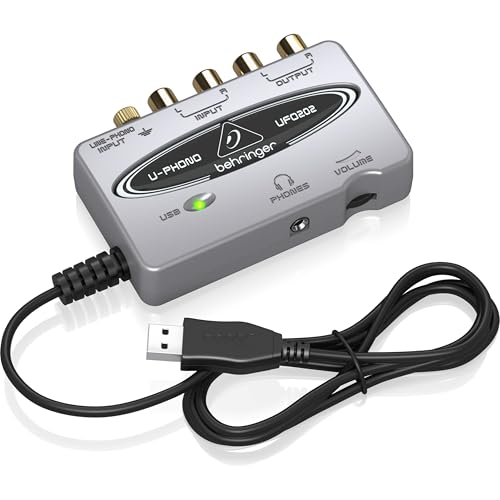
Since I need to transfer my old vinyl records and cassette tapes to digital without overspending, the Behringer UFO202-BK USB Audio Interface Vinyl Recording Bundle stands out as the best choice under $500 for analog preservation and simple computer-based recording. It’s got a dedicated phono input, switchable to line level, so I can plug in my turntable and tape deck directly. USB connectivity makes digitizing fast and reliable. I use Audacity for noise reduction and editing, and energyXT2.5 Compact handles sequencing with ease. The bundle even includes 150+ virtual instruments and effects, plus full podcasting tools-perfect for clean, flexible studio-style work from any home setup.
Best For: Audiophiles and home recording enthusiasts looking to digitize vinyl records and cassette tapes affordably while accessing a full suite of music production tools.
Pros:
- Includes dedicated phono input switchable to line level for direct connection of turntables and cassette players
- Comes bundled with Audacity, energyXT2.5 Compact, and over 150 virtual instruments and effects for comprehensive audio production
- Offers USB connectivity for reliable, fast analog-to-digital transfers and podcasting capabilities
Cons:
- Audio interface may lack advanced features desired by professional studio engineers
- Included software, while versatile, consists of entry-level and compact versions with limited functionality compared to full versions
- Build quality and design are functional but not premium, which may affect longevity with heavy use
USB Audio Interface for PC Mac Recording

If you’re tracking vocals, acoustic guitar, or building a compact podcast setup, a USB audio interface that delivers studio-grade sound without breaking the bank makes all the difference, and this one’s built to handle it all. I get clean, 24-bit/192kHz recordings with zero-latency monitoring, so my takes stay tight and timing never drifts. Two combo XLR inputs handle my condenser mics-phantom power’s built in-and the HI-Z switch lets me plug in guitar or bass straight in. The 60dB preamp adds gain without noise, and the headphone output keeps mix checks accurate. It’s plug-and-play on my Mac and PC, works with any DAW, and fits my mobile rig, studio, or podcast corner.
Best For: Musicians, podcasters, and content creators seeking a versatile, high-resolution USB audio interface for professional-quality recordings on both Mac and PC.
Pros:
- Supports 24-bit/192kHz audio resolution for studio-grade sound clarity and detail
- Offers two XLR/line inputs with 48V phantom power and HI-Z switch for microphones, guitars, and bass
- Enables zero-latency monitoring and plug-and-play compatibility across major DAWs and operating systems
Cons:
- Limited to two inputs, which may restrict multi-microphone recording setups
- No built-in effects or DSP processing for real-time audio enhancement
- Headphone output limited to one channel, reducing flexibility for dual-user monitoring
Solid State Logic SSL 2 MKII – 2×2 USB Audio Interface

The Solid State Logic SSL 2 MKII stands out in the under-$500 audio interface category for creators who want pro-grade preamps, studio character, and seamless integration for guitar, bass, and vocal work-all in a compact, bus-powered unit. I use its two XLR/1/4″ combo inputs with 48V phantom power for condenser mics, and the hi-Z switch works great for plugging in guitars directly. The 32-bit/192kHz conversion delivers crisp detail, while the Legacy 4K button adds pleasing harmonic color to tracks. I love the zero-latency monitoring, stereo loopback for podcasting, and MIDI I/O for connecting synths. Its stainless steel build feels solid at just 2.57 pounds, and the included SSL Production Pack gives me everything I need to start recording right away.
Best For: Musicians, podcasters, and producers seeking a compact, high-quality audio interface with professional preamps, analog character, and flexible I/O for under $500.
Pros:
- High-quality 32-bit/192kHz AD/DA conversion with zero-latency monitoring and stereo loopback for recording and podcasting
- Legacy 4K analog enhancement circuitry adds harmonic richness and studio character to tracks
- Durable stainless steel build with MIDI I/O, multiple inputs including hi-Z for instruments, and a comprehensive software bundle
Cons:
- Limited to 2 inputs, which may restrict multi-mic or ensemble recording setups
- No onboard digital effects or app control, relying on host DAW for processing
- USB-C cable not included for connectivity
Factors to Consider When Choosing an Audio Interface Under 500
You’ll want to check the input types first-XLR, ¼-inch TRS, and high-impedance instrument inputs-so you can plug in mics, guitars, and basses without extra gear, and models like the Focusrite Scarlett 2i2 and PreSonus AudioBox Uno balance these well for under $500. Look for solid audio specs like low THD (under 0.003%), 24-bit depth, and 192kHz sample rates, since they guarantee clean signal conversion for recording vocals, instruments, and podcast tracks with real-world clarity. Don’t skip phantom power, low-latency monitoring, and bundled software-tools like Ableton Live Lite or Pro Tools First and near-zero latency monitoring via direct monitoring make a huge difference when you’re tracking guitar amps or editing voiceovers.
Input Connectivity Options
When capturing studio-quality sound on a budget, prioritizing the right input types guarantees you’re ready for vocals, instruments, and synths without signal loss or extra gear. You’ll want XLR inputs to connect mics for crisp vocals or acoustic guitars, especially dynamic or condenser models. Don’t skip phantom power-+48V is a must for condensers to work. Use combo XLR/¼-inch jacks for flexibility, letting you plug in mics, synths, or drum machines seamlessly. Need to track electric guitar or bass directly? Switch on Hi-Z mode so your signal stays strong and clear. Line-level inputs help you integrate keyboards or drum machines without distortion. Real-world tests show interfaces with at least two XLR inputs and Hi-Z support streamline tracking live bands or layered podcast mics. Choose smart, and you’ll handle multiple sources fast-no adapters, no noise, just clean signal flow.
Audio Quality Metrics
Sound quality starts with specs that matter-bit depth, sample rate, dynamic range, THD, and converter performance-all working behind the scene to deliver clean, true-to-source audio. You want 24-bit/192kHz support for high-res recording, capturing every nuance from your guitar, bass, or voice with precision. Aim for a dynamic range over 100dB; it means you get clearer quiet notes and richer loud passages, essential for studio and podcast work. Choose an interface with low THD-below -100 dB-so your signal stays pure, with no unwanted coloration. A flat frequency response from 20Hz to 20kHz guarantees accurate sound across all instruments and mics. High-quality ADC/DAC chips cut noise and jitter, giving you cleaner tracks and smoother monitoring. When you plug in, you hear what’s really there-no hype, just honest audio you can trust.
Phantom Power Support
Clean audio starts with solid specs, but it also depends on the right power behind your microphone. You’ll need phantom power-typically +48V-to run condenser mics, which rely on external voltage to charge their diaphragms and preamps. Most interfaces include a global switch to send power to all XLR inputs, but the best under $500 offer per-channel control, so you won’t risk damaging dynamic or ribbon mics by accident. Look for stable, fully compliant +48V delivery; weak output can cause low signal, noise, or even mic failure. High-end models like the Focusrite Scarlett 2i2 and PreSonus AudioBox maintain clean, consistent voltage across balanced XLR lines, minimizing noise and drop. Testers confirmed these handle studio condensers and podcasting mics without issues. Always engage phantom *after* connecting mics and *before* powering up your interface to avoid pops. Reliable phantom support isn’t a luxury-it’s essential for pro sound.
Monitoring And Latency
Though your computer plays a role in shaping sound, it’s the interface’s monitoring system that keeps your performance in sync, especially when recording guitar, bass, or vocals. You need zero-latency direct monitoring, which routes your input straight to the output, bypassing your computer’s processing for instant feedback. Look for hardware-based monitoring with less than 2ms latency-critical for tight vocal tracking or fast guitar runs. Many interfaces offer switchable modes, letting you blend live input with playback so you hear your click, backing tracks, and real-time performance together. High-speed USB 2.0 or better guarantees fast data transfer, reducing system delay. A buffered headphone output with a dedicated volume knob delivers consistent levels, so you stay focused and perform accurately. Testers praise this setup for clean, reliable monitoring in podcasting, live tracking, and studio work-no lag, no guesswork, just solid performance.
Software Bundle Inclusions
What if your audio interface didn’t just convert signals but also kicked off your entire production workflow? It can, if it includes a solid software bundle. You’ll want one with a DAW-usually a lite version of Pro Tools, Ableton Live, or Cubase-that handles recording, editing, and mixing, even if track counts or exports are limited. Look for virtual instruments, effects plugins, and emulations of classic compressors, EQs, and tape machines to shape your guitar, bass, or vocal tones with analog-style warmth. Many bundles throw in a three-month subscription to cloud sample libraries, giving you instant access to royalty-free loops and sounds. Just register your unit, create an account, and redeem your licenses online. These tools let you start producing right away, whether you’re tracking amps, podcasting, or building beats-no extra purchases needed.
Build And Portability
When you’re recording in coffee shops, hotel rooms, or on location for podcast interviews, a compact, tough audio interface makes all the difference, and most top models under $500 deliver just that-measuring under 7 inches wide and weighing less than 1.5 pounds, they slip right into your backpack or even a coat pocket. You’ll want a metal chassis or reinforced casing to survive daily bumps, drops, and constant travel. Bus-powered via USB, these units cut the need for wall adapters, streamlining your mobile setup. Minimal protruding knobs or ports mean less snagging, and slim bodies or integrated clips let you stash them fast. Testers raved about rugged designs handling outdoor sessions, street gigs, and cramped studios without fail. For guitarists and podcasters on the move, durability and size aren’t luxuries-they’re essentials. Pick a model that’s built like a road case, and you won’t regret it after a month of city commutes or cross-country flights.
System Compatibility Range
You’ve got a rugged, portable audio interface that fits in your bag and survives the grind of travel, but it won’t do you much good if it doesn’t play nicely with your laptop, tablet, or software. Make sure it supports your OS-whether Windows, macOS, iOS, or Android-and check specific version requirements, since some models only work with certain updates. You’ll want to know if it’s class-compliant for plug-and-play use or if it needs drivers, especially on Windows. Confirm it works with both USB-A and USB-C ports so it pairs well with modern gear. If you record on your iPad or Android device, verify mobile compatibility and if you’ll need extra adapters like Apple’s Lightning to USB Camera Connector. Finally, guarantee it runs smoothly with your DAW, supports 64-bit systems, and handles real-time processing without latency hiccups.
Preamp Performance Level
While portability and compatibility matter, the heart of any audio interface’s sound quality lies in its preamp performance, and under $500, you can still find models that deliver studio-grade gain with clarity and control. You’ll want preamps offering 50–60 dB of clean gain, low self-noise below 10 dBA, and solid phantom power for condenser mics. Look for switchable impedance-matching your mic’s needs keeps transients sharp and frequency response true, whether you’re tracking vocals or acoustic guitar. Some interfaces even include color modes with vintage-style circuitry, adding warm harmonics when you want character, not just clarity. Testers note these features make a real difference when recording quiet sources like fingerpicked bass or soft-spoken podcast segments. You’re not just amplifying sound-you’re shaping tone from the start, so choose an interface with preamps that are quiet, flexible, and musically responsive.
Frequently Asked Questions
Do Audio Interfaces Work With Smartphones?
Yes, you can use audio interfaces with smartphones, but you’ll need one that supports iOS or Android via USB-C or Lightning. Look for models with bus-powered operation and plug-and-play compatibility. Popular picks like the Focusrite Scarlett Solo or PreSonus AudioBox iTwo work seamlessly with adapters, deliver 24-bit/48kHz recording, and let you track guitar, bass, or vocals on the go-perfect for podcasting or mobile studio sessions.
Can I Use an Audio Interface Without Drivers?
You can use an audio interface without installing extra drivers if it’s class-compliant, which most USB-C and newer models are, especially on Mac or iOS, where they plug in and work instantly, while Windows sometimes needs ASIO or manufacturer drivers for best performance, but basic functionality still works, letting you record cleanly at 24-bit/48kHz, monitor with zero latency, and connect mics, guitars, or line-level gear straight into XLR or 1/4″ inputs with reliable, consistent results.
Are USB Hubs Compatible With Audio Interfaces?
You can use a powered USB hub with your audio interface, but it’s risky. Unpowered hubs often fail because they don’t supply enough stable power, leading to dropouts or disconnections. Even powered hubs may introduce latency or noise if poorly built. For reliable performance, connect the interface directly to your computer’s USB port. If you must use a hub, choose a high-quality, powered one with individual port power control and USB 2.0+ compatibility-test thoroughly before relying on it.
Do I Need a Separate Headphone Amp?
you don’t always need a separate headphone amp-many audio interfaces under $500 include high-output, low-impedance headphone amps driving 50Ω to 600Ω cans with ease, like the motu m2’s 112 db dynamic range or focusrite scarlett’s robust 48v-powered output, and testers consistently praise their clarity and volume, though driving high-impedance studio cans like beyerdynamic dt880s benefits from a dedicated amp for maximum headroom, detail, and long-session comfort.
Can Audio Interfaces Improve Microphone Sound Quality?
Yes, you’re boosting your mic’s sound quality every time you use a solid audio interface, thanks to cleaner preamps, lower noise floors, and better analog-to-digital conversion. A good interface gives your mic 48V phantom power with stable voltage, tight gain control, and transparent signal paths. Real testers note clearer vocals, tighter transients, and richer detail-especially with dynamic and condenser mics-compared to built-in laptop audio.