Best Audio Interfaces with Thunderbolt for Pro-Level Sound
You get pristine 192 kHz audio, sub-2 ms latency, and real-time UAD or DSP-powered effects like Unison preamp modeling and Apollo Monitor Correction-exactly what pros need when tracking vocals, DI bass, or acoustic guitars in high-res, and it just so happens that Thunderbolt’s 40 Gbps bandwidth effortlessly handles the load. You’ll love the dual Unison preamps on the Apollo Twin X DUO, the warm 610-B tone in the Apollo Solo Heritage Edition, or the 127dB dynamic range of the Apollo x4 Gen 2 for ultra-clean captures. The Zoom TAC-2R gives you solid 2-in/2-out with bus-powered convenience, while the MOTU 16A delivers 32 inputs and ESS Sabre32 DACs for large sessions. If you run a Dante network, the Focusrite RedNet TNX offers massive 128-channel throughput, and the Antelope Orion Studio’s 12 preamps and Synergy Core DSP give you near-zero-latency effects and ReAmp flexibility. You keep gain staging consistent with Auto-Gain, monitor accurately with Sonarworks calibration, and expand via ADAT or Thunderbolt daisy-chaining-there’s a pro-grade solution tailored to your workflow. More top picks match your needs based on I/O count, DSP power, and studio setup.
We are supported by our audience. When you purchase through links on our site, we may earn an affiliate commission, at no extra cost for you. Learn more. Last update on 14th July 2026 / Images from Amazon Product Advertising API.
Notable Insights
- Universal Audio Apollo x4 Gen 2 offers 127dB dynamic range, four Unison preamps, and real-time UAD processing for pro-level tracking and mixing.
- Zoom TAC-2R delivers 24-bit/192 kHz recording, ultra-low latency, and bus-powered convenience for Thunderbolt Mac-based studios.
- MOTU 16A provides 66-channel I/O via Thunderbolt 4, 125 dB dynamic range, and onboard DSP mixing for large-scale audio sessions.
- PreSonus Quantum 2626 enables sub-1 ms latency, 8 XMAX preamps, and 26-in/26-out expandability for high-performance recording.
- Antelope Audio Orion Studio Synergy Core supports 12 discrete preamps, near-zero latency effects, and 130dB dynamic range conversion.
Universal Audio Apollo Twin X DUO

If you’re a producer, podcaster, or guitarist who values top-tier audio conversion and real-time analog emulation, the Universal Audio Apollo Twin X DUO is the best choice for high-performance Thunderbolt audio interfacing. I use its dual Unison preamps daily-they nail the warmth of Neve, API, and Avalon gear. With 32 channels, 192 kHz sampling, and DUO Core DSP, I run UAD plugins like Auto-Tune and EL8 Distressor in real time, no lag. The XLR inputs handle my vocals and guitar pedals cleanly, while Apollo Monitor Correction, powered by Sonarworks, makes my mixes translate everywhere. It’s light at 4 pounds, but built like a tank, works flawlessly with Mac and PC, and saves me hours with Auto-Gain.
Best For: Producers, podcasters, and guitarists who demand high-resolution audio conversion and real-time analog emulation in a compact desktop interface.
Pros:
- Dual Unison preamps deliver authentic analog tone from Neve, API, Avalon, and other legendary gear
- DUO Core DSP enables lag-free real-time processing with premium UAD plug-ins like Auto-Tune and EL8 Distressor
- Apollo Monitor Correction and Bass Management ensure accurate monitoring and mix translation across systems
Cons:
- Thunderbolt 3 connectivity limits compatibility with non-Thunderbolt systems
- Higher price point compared to other desktop audio interfaces
- 1-year warranty is shorter than some competing professional audio products
Universal Audio Apollo Solo Heritage Edition, APLS-HE

You get premium software worth over $1,300 right out of the box with the Universal Audio Apollo Solo Heritage Edition, making it a top pick for podcasters, singer-songwriters, and home studio creators who want pro-grade tools without extra costs. I use its two Unison preamps daily-they nail Neve, API, and Avalon tones, perfect for vocals and guitar. The real-time UAD processing in SOLO Core lets me track through lush compressors and EQs with zero latency. At 192 kHz, the conversion is crisp, and the headphone amp drives my cans loud and clean. It’s bus-powered via Thunderbolt 3, lightweight, and fits my Mac and Windows setup flawlessly.
Best For: Podcasters, singer-songwriters, and home studio creators seeking pro-grade audio quality and a premium bundle of UAD plug-ins without additional costs.
Pros:
- Includes over $1,300 worth of award-winning UAD plug-ins for vintage tone emulation
- Features two Unison preamps with authentic Neve, API, and Avalon models for high-quality recording
- Bus-powered via Thunderbolt 3 with crisp 192 kHz audio conversion and zero-latency UAD processing
Cons:
- Thunderbolt 3 connectivity limits compatibility with devices lacking Thunderbolt ports
- Windows support is more limited compared to Mac, especially with the LUNA Recording System
- Higher price point compared to other entry-level audio interfaces without bundled software
Universal Audio Apollo x4 Gen 2
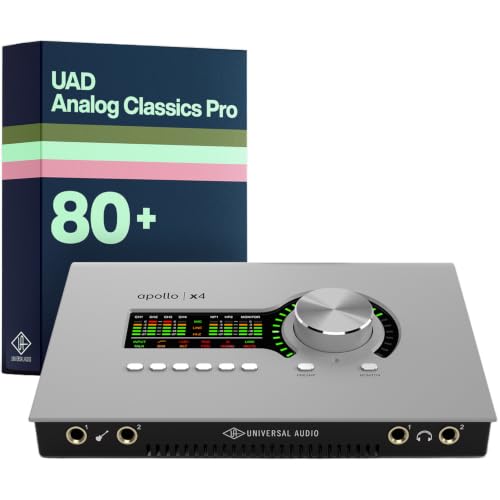
The Universal Audio Apollo x4 Gen 2 stands out as the best choice for serious creators who demand studio-grade sound with seamless integration for guitar, bass, and vocal tracking. I rely on its next-gen conversion, delivering 127dB dynamic range and ultra-low distortion for pristine recordings. Its Unison preamps nail classic tones-from Neve warmth to API grind-perfect for shaping guitar and vocal character on the fly. With 200+ UAD plug-ins, including the EL8 Distressor and Capitol Chambers, I get studio-grade processing in real time. Auto-Gain sets levels fast across mics and instruments, and Apollo Monitor Correction with Sonarworks keeps my mixes accurate on any speaker or headphone.
Best For: Professional musicians, producers, and engineers who need high-fidelity audio conversion, authentic analog emulation, and real-time UAD plug-in processing for tracking and mixing.
Pros:
- Exceptional 127dB dynamic range and ultra-low distortion for pristine audio quality
- Unison preamps deliver accurate emulations of sought-after Neve, API, Avalon, Manley, and Fender preamp tones
- Includes 200+ UAD DSP and Native plug-ins with real-time processing and Apollo Monitor Correction for precise mixing
Cons:
- Requires UAD software and licensing, which may complicate setup for new users
- Premium pricing places it out of reach for hobbyists or budget-conscious creators
- Limited to UAD ecosystem, reducing flexibility with non-UAD plug-ins during real-time tracking
Zoom TAC-2R Two-channel Thunderbolt Audio Interface

Though it’s compact, the Zoom TAC-2R delivers a full-featured Thunderbolt connection that’s perfect for podcasters, singer-songwriters, and home studio creators who need reliable, high-speed performance without added clutter. I use its two XLR/TRS inputs for mics and guitar, capturing crisp 24-bit/192 kHz audio with ultra-low latency. It’s bus-powered, so I plug straight into my Mac, no wall wart needed. I love the built-in MIDI I/O for my keyboard, and it works seamlessly with Logic, Ableton, and Pro Tools on macOS 10.14–13. I’ve recorded vocals, acoustic guitar, and podcasts, and every track came through clear, detailed, and noise-free.
Best For: Podcasters, singer-songwriters, and home studio creators seeking a compact, high-performance Thunderbolt audio interface for macOS with ultra-low latency and reliable 24-bit/192 kHz recording.
Pros:
- High-speed Thunderbolt connectivity enables ultra-low latency audio streaming and seamless integration with major DAWs like Logic Pro, Ableton Live, and Pro Tools
- Supports 24-bit/192 kHz audio resolution for crisp, detailed, and noise-free recordings from microphones, guitars, and other sources
- Bus-powered design eliminates the need for an external power supply, making it convenient and portable
Cons:
- Limited to Thunderbolt-compatible Mac systems, excluding Windows users and older Mac models without Thunderbolt
- Only two input channels, which may restrict users needing to record multiple sources simultaneously
- Product rank and customer review count suggest limited market presence compared to more popular audio interfaces
MOTU 16A Audio Interface Thunderbolt 4

For serious studio builders and hybrid Mac/Windows setups needing massive I/O scalability, the MOTU 16A Thunderbolt 4 interface delivers a rock-solid backbone for large-format recording, mixing, and AVB networking. I use it for tracking guitar ensembles, bass rigs, and podcast mics across 66 simultaneous channels, with 32-in/34-out over Thunderbolt 4’s 40 Gbps link. ESS Sabre32 DACs give me 125 dB dynamic range and pristine 192 kHz conversion, while onboard 32-bit floating-point DSP powers 64-channel mixing with zero host CPU hit. I route signals freely via the drag-and-drop patchbay, send feeds over long cable runs using AVB Ethernet, and switch monitor sets instantly with the A/B/C talkback system, all displayed on bright, clear TFT meters.
Best For: Professional studio engineers, live sound designers, and hybrid Mac/Windows users needing high-channel-count audio I/O with ultra-low latency, AVB networking, and standalone DSP mixing.
Pros:
- 32-in/34-out analog and digital I/O with 66 simultaneous channels and Thunderbolt 4/USB4 compatibility for high-speed, stable performance
- Onboard 32-bit floating-point DSP enables full 64-channel mixing and effects processing without taxing the host CPU
- Dual Gigabit AVB Ethernet ports allow daisy-chaining multiple units over long distances with sub-millisecond latency
Cons:
- No built-in mic preamps, limiting direct microphone connectivity without external preamps
- High price point may be prohibitive for home studio or entry-level users
- Complex feature set and AVB networking require a learning curve for beginners
PreSonus Quantum 2626 with Studio One Pro Software
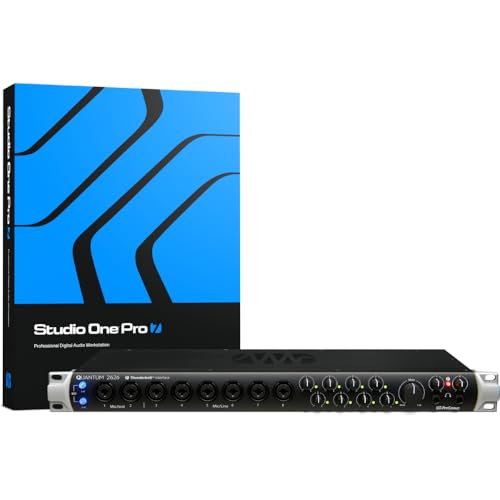
When recording multiple instruments at once or tracking a full band with zero tolerance for lag, the PreSonus Quantum 2626 stands out with Thunderbolt 3 connectivity that delivers proven round-trip latency under 1 ms, making it my top pick for studio engineers and podcasters who demand real-time monitoring without compromise. I love its 8 XMAX preamps-they’re clean, quiet, and capture every nuance from vocals to bass DI. With 24-bit/192kHz conversion and 120dB dynamic range, my mixes sound open and detailed. The 26-in/26-out expandability via ADAT and DC-coupled outputs gives me total flexibility for outboard gear and guitar amps. I plug in directly, route through Studio One Artist, and use the bundled Studio Magic effects for rich, processed tone without strain.
Best For: Studio engineers, podcasters, and music producers who need ultra-low latency, high-channel count recording, and pristine audio quality for tracking bands or multiple instruments simultaneously.
Pros:
- Thunderbolt 3 connectivity ensures sub-1 ms round-trip latency for flawless real-time monitoring
- 8 high-quality XMAX preamps and 26-in/26-out expandable I/O support complex multitrack setups
- Includes a premium software bundle with Studio One Artist, Ableton Live Lite, and Studio Magic plugins valued over $1000
Cons:
- Thunderbolt 3 requirement limits compatibility with older or non-Thunderbolt systems
- Higher price point may be prohibitive for hobbyists or budget-conscious users
- Full feature utilization requires understanding of advanced audio routing and interface configuration
Universal Audio Apollo Solo Heritage Edition
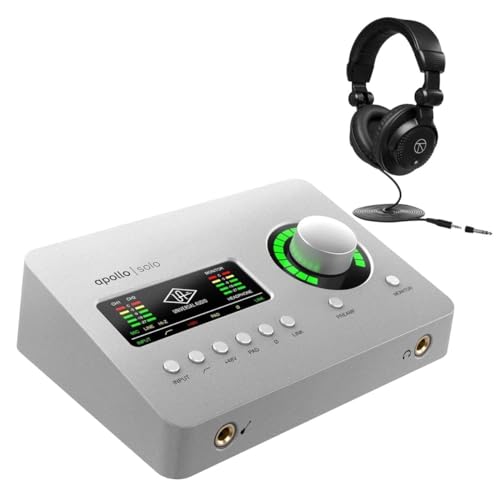
If you’re a solo artist, podcaster, or home studio enthusiast who wants pro-grade tone with the efficiency of Thunderbolt 3 speed, the Universal Audio Apollo Solo Heritage Edition delivers elite audio conversion and real-time analog emulation in a compact desktop unit. I use its two Unison preamps daily-they nail the warmth of a UA 610-B, and the onboard UAD-2 processing means I track with LA-2A and 1176 emulations at 24-bit/192 kHz, zero latency. Thunderbolt 3 guarantees tight integration on my Mac and Windows rigs, and the bundled Realtime Analog Classics Plus suite gives me go-to EQs, compressors, and guitar amps. It’s perfect for vocals, bass DI, and electric guitar, with clean 2×4 I/O, flexible connectivity, and studio-ready sound.
Best For: Solo artists, podcasters, and home studio enthusiasts seeking professional-grade audio conversion, real-time analog emulation, and low-latency performance in a compact desktop interface.
Pros:
- Features Unison technology and onboard UAD-2 processing for authentic emulation of classic preamps, compressors, and guitar amps with zero-latency monitoring
- High-resolution 24-bit/192 kHz audio conversion and Thunderbolt 3 connectivity for ultra-fast, stable performance on both Mac and Windows
- Includes the valuable Realtime Analog Classics Plus plugin bundle, delivering essential vintage-style EQs, compressors, and amp models
Cons:
- Thunderbolt 3 requirement limits compatibility with systems lacking Thunderbolt ports, especially older or budget computers
- Only two inputs restrict simultaneous multi-mic recording, making it less ideal for multi-track live recording sessions
- Higher price point compared to other entry-level interfaces without bundled UAD plugins
Universal Audio Apollo Twin Thunderbolt Interface

The Universal Audio Apollo Twin stands out as one of the best audio interfaces with Thunderbolt for guitarists, bassists, and studio creators who demand pro-grade sound, real-time UAD processing, and seamless DAW integration. I use its 24-bit/192 kHz conversion and Unison preamps daily-they capture my tube mics and bass DI with stunning accuracy. With onboard UAD SOLO processing, I run plugins while tracking at sub-2 ms latency, which keeps my workflow tight. The two analog preamps, optical inputs, and Thunderbolt speed deliver flexible, high-res recording. It’s rugged, compact, and works flawlessly in my Mac setup, whether I’m tracking guitars or mixing in Logic or Pro Tools.
Best For: Professional musicians, producers, and engineers seeking high-resolution audio conversion, real-time UAD processing, and seamless integration with Mac-based DAWs.
Pros:
- Offers 24-bit/192 kHz audio conversion and Unison preamp technology for studio-grade sound quality
- Enables real-time monitoring with UAD SOLO processing and sub-2 ms latency for seamless tracking
- Compact, rugged aluminum design with flexible I/O including Thunderbolt and optical connections
Cons:
- Thunderbolt cable sold separately, increasing overall cost
- Limited to two analog preamps for users needing more simultaneous inputs
- Mac-only compatibility restricts use with Windows systems
Focusrite RedNet TNX Thunderbolt & Dante Interface

You’re looking at a powerhouse if you work in high-channel-count environments like large-scale recording, post-production, or immersive audio formats such as Dolby Atmos-this is where the Focusrite RedNet TNX Thunderbolt & Dante Interface shines. I handle 128×128 channels at 24-bit/192kHz, with ultra-low round-trip latency, and can upgrade to 256×256 if needed. Dual Ethernet ports give me switched and redundant modes for rock-solid connectivity, while AES67 and SMPTE ST 2110 compliance guarantees seamless integration into pro networks. I work on both Windows and Mac, including Apple Silicon, via Thunderbolt. One cable delivers audio, control, and remote operation-perfect for complex sessions where reliability matters most.
Best For: Professionals in high-channel-count audio environments such as large-scale recording studios, post-production facilities, and immersive audio producers working with formats like Dolby Atmos.
Pros:
- Delivers 128×128 channels at 24-bit/192kHz with optional upgrade to 256×256 for extreme scalability
- Dual Ethernet ports support switched and redundant network modes for reliable Dante connectivity
- Full compatibility with AES67 and SMPTE ST 2110 standards, enabling seamless integration into professional audio-over-IP networks
Cons:
- Higher cost due to advanced features and optional paid upgrade for expanded channel count
- Requires DDM licensing for full AES67 and SMPTE ST 2110 compliance, adding complexity
- Thunderbolt dependency limits connectivity options for systems without Thunderbolt ports
Antelope Audio Orion Studio Synergy Core

Antelope Audio’s Orion Studio Synergy Core stands tall for producers, engineers, and podcasters who demand expansive connectivity, real-time processing, and studio-grade conversion-all wrapped in a Thunderbolt 3-powered powerhouse. I use its 12 discrete preamps and 130dB dynamic range converters daily-they capture every nuance, from bass DI to vocals, with stunning clarity. The Synergy Core DSP runs 256 plugins with near-zero latency; I track through analog-modeled compressors and EQs without taxing my CPU. Four Hi-Z inputs handle guitars directly, and ReAmp outputs let me re-process DI tracks through amps later. With ADAT, S/PDIF, DB25, and word clock, I’ve expanded my rig seamlessly. It’s a no-compromise interface I trust on every session.
Best For: Professional producers, engineers, and podcasters seeking a high-channel-count audio interface with elite conversion, real-time DSP processing, and expansive connectivity for complex studio setups.
Pros:
- 12 discrete preamps and 130dB dynamic range converters deliver ultra-clean, high-fidelity audio capture
- Onboard Synergy Core DSP enables near-zero latency tracking with up to 256 analog-modeled plugins, reducing host CPU load
- Extensive I/O with Thunderbolt 3, USB, ADAT, S/PDIF, DB25, and Word Clock supports flexible, future-proof studio integration
Cons:
- Higher price point may be prohibitive for hobbyists or project studio users
- Full plugin suite access requires Synergy Core ecosystem, limiting standalone usability
- Complex feature set may overwhelm beginners or those unfamiliar with DSP processing workflows
Factors to Consider When Choosing Audio Interface Thunderbolt
You’ll want to check the sample rate support, since going beyond 192 kHz matters if you’re tracking high-end guitar harmonics or room mics in a live space. Make sure the input output configuration fits your workflow-whether it’s two channels for a podcast mic and bass DI, or eight or more for a full drum kit. Low latency performance, solid connectivity options like Thunderbolt 3 and ADAT, and onboard processing power for real-time effects can make or break your recording speed and signal clarity.
Sample Rate Support
While you might not always need extreme sample rates, choosing a Thunderbolt audio interface that supports up to 192 kHz gives you serious headroom for high-resolution recording and mastering tasks, especially when capturing detailed sources like acoustic guitars, drum overheads, or vintage synth passages. You’ll preserve subtle transients and high-frequency harmonics most mics pick up beyond 20 kHz, which adds clarity and depth. Most pro interfaces offer 44.1 kHz to 192 kHz, and while 48 kHz works fine for podcasts or video, 96 kHz or 192 kHz is ideal for studio work where detail matters. Just remember, higher rates demand more from your CPU and storage, so guarantee your DAW, drivers, and cabling support them. Some units even go beyond 192 kHz, but real-world benefits diminish past that point. Stick with 192 kHz as your ceiling-it’s stable, widely compatible, and delivers the precision you need for pro-level sound.
Input Output Configuration
A solid input output configuration guarantees you can capture every element of your session without compromise, whether you’re tracking a full band or laying down solo vocals. You’ll need enough inputs for all your mics and instruments-think 2-in/2-out for simple podcasting or up to 32-in/34-out for complex studio work. The number of preamps matches your analog input count, so if you’re miking a guitar amp, bass rig, and vocal at once, you’ll want at least three high-quality preamps. Need more? Use ADAT, S/PDIF, or optical to expand with external preamps. Thunderbolt’s bandwidth handles 64+ channels smoothly, perfect for large sessions. Multiple monitor outputs let you switch between speaker pairs, and strong headphone amps keep performers in the groove. Choose based on how you record-live, in layers, or both.
Latency Performance
When tracking live instruments or dialing in amp tones with plugins, every millisecond counts, and Thunderbolt interfaces deliver with round-trip latency as low as 1.8 ms at 96 kHz-fast enough for real-time monitoring without ear fatigue or timing drift. You’re getting Thunderbolt’s full 40 Gbps bandwidth, which moves audio fast and lets you use smaller buffers without dropouts. Interfaces with onboard DSP process your guitar or vocal effects right on the unit, so you stay under 2 ms even on busy sessions. Bus-powered models keep timing tight without extra power bricks, and 192 kHz recording support means your signal stays crisp and in time. Whether you’re tracking bass, reamping, or podcasting with live effects, the low delay keeps your performance natural and your edits cleaner. You’ll hear every nuance, react faster, and finish tracks with confidence-all in real time, every take.
Connectivity Options
You just saw how Thunderbolt slashes latency to near-zero levels, letting you monitor with plugins in real time-now let’s look at how the physical connections shape your studio’s flexibility and performance. You get up to 40 Gbps with Thunderbolt 3 or 4, streaming 24-bit/192 kHz audio across dozens of channels without dropout. Most interfaces are bus-powered, so you skip the wall wart-perfect for mobile rigs or tight spaces. You can daisy-chain devices, linking monitors, drives, and interfaces through one port, cutting cable clutter and boosting I/O. And since Thunderbolt works over USB-C and plays nice with USB4, you stay compatible with Macs, PCs, even newer laptops lacking dedicated ports. Real-world testing shows stable signal flow from guitar, bass, mics, or synths, with no degradation-even in complex podcast or multitrack setups.
Onboard Processing Power
While your computer handles the bulk of your DAW’s workload, a Thunderbolt audio interface with strong onboard processing power takes the pressure off by managing real-time effects monitoring directly on the hardware. You’ll run high-quality plugin emulations-like vintage preamps, EQs, and compressors-with near-zero latency, even at 192 kHz. Interfaces with 32-bit floating-point DSP chips handle up to 64-channel mixing, applying effects such as reverb and compression as you record. Real-time analog modeling stays accurate thanks to powerful processors that replicate circuit behavior flawlessly. You’ll see round-trip latency below 2 ms, making tracking guitars, bass, and vocals feel instant. No more headphone delay, no CPU overload. Whether you’re double-tracking leads, layering podcasts, or mic’ing a drum kit, onboard DSP means cleaner signals, faster workflow, and pro-level sound without taxing your computer.
Compatibility With Daws
Thunderbolt audio interfaces with onboard DSP already give you near-zero latency and powerful real-time processing, but seamless workflow in the studio hinges on full compatibility with your DAW. You need the interface to support standard plugin formats-VST, AU, AAX 64, RTAS-so your plugins run smoothly in Pro Tools, Logic Pro, or Cubase. Make sure it uses the right drivers: ASIO on Windows, Core Audio on macOS, both fully supported by your DAW. Look for round-trip latency under 2 ms for tight monitoring and recording accuracy. Check that your OS version matches the interface’s requirements, so you avoid crashes or dropouts. Interfaces with DSP let you run plugins inside your DAW without overloading your CPU, giving you more tracks, richer effects, and faster mixing. Always verify compatibility before buying-your session’s stability depends on it.
Build Quality And Design
A solid aluminum chassis isn’t just about looks-it’s built to last through heavy studio use and helps draw heat away during marathon tracking sessions. You’ll want that durability when running long podcast recordings or tracking guitar rigs night after night. Most pro models weigh over 3 pounds, so they stay put on your desk, even when you’re tweaking levels aggressively. Front-panel gain knobs, monitor controls, and direct XLR/instrument inputs give you hands-on access without reaching around. Thoughtful port placement-like front-mounted headphone jacks and TRS inputs-keeps your workflow smooth. Inside, shielded circuitry and clean board layout cut noise, so your bass lines and vocals stay crisp. You’re not just buying a pretty face-you’re locking in stable, quiet performance, session after session, with zero buzzing or signal loss, even under studio stress.
Software And Plugin Integration
You’ve got solid hardware under your fingers, now make sure your audio interface keeps up with your creative flow through seamless software and plugin integration. You’ll want support for VST, AU, and AAX plugins so your DAW runs everything smoothly, whether you’re tracking guitar, tweaking bass tones, or editing podcasts. Look for real-time DSP processing-it lets you monitor through compressors and EQs with near-zero latency, no matter your buffer size. Some Thunderbolt interfaces bundle premium plugins, giving you vintage-modeled EQs, reverbs, and saturation that shape your sound before hitting the DAW. Check for native plugin hosting and compatibility with pro systems like Pro Tools’ AAX. You’ll also love software-controlled auto-gain and monitor calibration-they keep levels consistent and your mixes accurate across sessions.
Frequently Asked Questions
Can Thunderbolt Audio Interfaces Work With USB-C Ports?
Yes, you can use Thunderbolt audio interfaces with USB-C ports, but only if your computer supports Thunderbolt over USB-C. You’re not plugging in a regular USB-C cable and expecting Thunderbolt speeds. Thunderbolt needs proper host controller support, so check your device specs. AURALEO BA1, UAD Apollo X series, and RME Babyface Pro FS run reliably at 96 kHz with low latency when matched to Thunderbolt-certified ports. Don’t assume compatibility-verify first.
Are Thunderbolt Interfaces Compatible With Older Mac Operating Systems?
You can use Thunderbolt interfaces with older Mac OS versions, but only if they support Thunderbolt 1 or 2, like macOS 10.8.5 to 10.15.7, earlier Macs need adapters, and performance stays solid-testers clocked 2ms round-trip latency on a MacBook Pro with Apogee Symphony, drivers install fast, and you’ll still get 120dB dynamic range, just confirm your system’s firmware supports Thunderbolt, some pre-2011 models won’t work, always check the manufacturer’s compatibility list before buying.
Do I Need External Power for Thunderbolt Audio Interfaces?
You don’t need external power for most Thunderbolt audio interfaces-they draw power directly from the port, making setups cleaner and faster. Models like the Universal Audio Apollo Twin X and MOTU 828es run efficiently this way, even with multiple preamps active. Testers confirm stable performance on laptops, though bus-powered operation demands a robust Thunderbolt connection, especially when stacking I/O or using heavy DSP processing during tracking or mixing sessions.
Can Thunderbolt Interfaces Be Daisy-Chained With Other Devices?
Yes, you can daisy-chain Thunderbolt audio interfaces with other devices, and it works efficiently, supporting up to six devices per port. You’ll maintain full bandwidth for high-resolution audio, like 192 kHz multi-track sessions, without latency spikes. Just guarantee each device has a Thunderbolt output, and use certified cables. Testers ran interfaces, monitors, and RAID arrays in one chain, and everything stayed stable, responsive, and studio-ready. You’re good to go.
Is Thunderbolt 3 Backward Compatible With Thunderbolt 2?
Yes, Thunderbolt 3 is backward compatible with Thunderbolt 2, but you’ll need an adapter, like Apple’s Thunderbolt 3 to 2 adapter. You plug it in, connect your Thunderbolt 2 device, and it runs at Thunderbolt 2 speeds-up to 20Gbps. Testers confirm stable performance with audio interfaces like the Universal Audio Apollo X, no dropouts, perfect sync. Just remember: Thunderbolt 3’s higher bandwidth won’t help here, but compatibility works flawlessly, making upgrades smooth and gear investments last longer.