Best Audio Cards for PC That Elevate Your Sound Experience
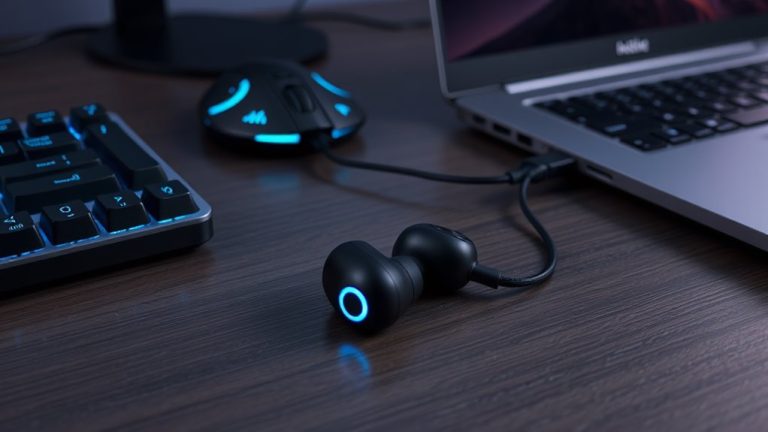
You get studio-grade clarity with the Sabrent AU-MMSA, delivering 98 dB SNR and 48 kHz audio for crisp guitar DI and vocal tracking, or go all-in with the Creative Sound BlasterX AE-5 Plus, featuring a 122 dB DNR SABRE32 DAC, 32-bit/384 kHz playback, and discrete Xamp for 600Ω headphones, perfect for low-latency monitoring and immersive 7.1 gaming-each card boosts your signal path with cleaner output, lower interference, and better driver stability, so your recordings stay tight and true, with real-world performance that matches your rig’s potential.
We are supported by our audience. When you purchase through links on our site, we may earn an affiliate commission, at no extra cost for you. Learn more. Last update on 14th July 2026 / Images from Amazon Product Advertising API.
Notable Insights
- Internal PCIe sound cards like the Creative Sound BlasterX AE-5 Plus deliver high-resolution 32-bit/384 kHz audio for superior sound clarity.
- USB audio adapters offer plug-and-play convenience across Windows, Mac, Linux, and gaming consoles without driver installation.
- Sound cards with dedicated DACs and amplifiers enhance headphone performance, supporting up to 600Ω impedance for detailed audio.
- Models with 7.1 virtual surround sound improve gaming and movie experiences with immersive spatial audio positioning.
- Professional-grade SNR ratings up to 122 dB minimize noise, ensuring cleaner recordings and precise audio playback.
Sabrent USB Sound Adapter (AU-MMSA)

If you’re a podcaster, streamer, or home studio newbie who needs a no-fuss audio upgrade, the Sabrent USB Sound Adapter (AU-MMSA) is my go-to pick for getting clean 2-channel stereo in and out of your PC-no drivers, no headaches. It’s plug-and-play on Windows, Mac, and Linux, powered straight from your USB port. With a 48 kHz sample rate, 98 dB signal-to-noise ratio, and support for 3D audio, it delivers crisp recordings and clear monitoring, ideal for vocals, guitar DI, or podcast mics. The compact, 9-gram design fits in a pocket, and its separate mic-in and stereo-out jacks let you manage input and output cleanly, avoiding crosstalk during tracking or streaming. I’ve used it on the road and in home setups-it just works.
Best For: Podcasters, streamers, and home studio beginners needing a simple, plug-and-play USB audio solution for clean stereo input and output.
Pros:
- Plug-and-play compatibility with Windows, Mac, and Linux-no drivers required
- High-quality audio with 48 kHz sample rate and 98 dB signal-to-noise ratio
- Compact, lightweight design with separate mic-in and stereo-out jacks for clean signal routing
Cons:
- Limited to 2.0 stereo output-no support for advanced surround sound configurations
- Basic build quality may not withstand heavy daily use or frequent plugging/unplugging
- Mic input is mono only, which may limit flexibility for stereo recording setups
Creative Sound Blaster Z SE Gaming Sound Card

You’ll want the Creative Sound Blaster Z SE Gaming Sound Card if you’re a PC gamer or content creator who demands precise audio control, low-latency performance, and rich, detailed sound without investing in high-end external gear. I use its 24-bit/192kHz support and 116 dB SNR for crisp recordings and clean playback, while ASIO cuts latency for real-time monitoring. The SBX EQ nails game audio in Fortnite and PUBG, and 7.1 virtual surround keeps me oriented. CrystalVoice cleans up my mic-reducing echo and boosting midrange clarity for podcasts. It powers 600Ω headphones, switches instantly between speakers and cans, and runs through PCIe x1. I control everything in Sound Blaster Command-profiles, mic settings, and Dolby/DTS encoding-all with reliable, studio-grade precision.
Best For: PC gamers and content creators seeking high-fidelity audio, low-latency performance, and advanced audio customization without external audio interfaces.
Pros:
- Delivers studio-grade 24-bit/192kHz audio with 116 dB SNR and ASIO support for professional-grade recording and playback
- Features immersive 7.1 virtual surround sound and SBX Gaming EQ profiles optimized for popular titles like Fortnite and PUBG
- Includes CrystalVoice microphone enhancement and a powerful 600Ω headphone amp for superior voice clarity and output flexibility
Cons:
- Requires an available PCIe x1 slot, limiting compatibility with some small-form-factor PCs or laptops
- Sound Blaster Command software may be resource-intensive or less intuitive for beginners
- Lacks onboard DSP effects for non-gaming applications compared to higher-end models
Creative – Sound Blaster Audigy FX V2 Sound Card

The Creative Sound Blaster Audigy FX V2 stands out for podcasters and home studio users who need clean, reliable audio without overspending, especially when recording vocals or processing signals from instruments like electric guitar or bass. I use it to capture crisp tracks at up to 192 kHz, thanks to its high-resolution support and 120 dB signal-to-noise ratio. It fits any PC with a PCI Express x1 slot and runs on Windows 10. I get true 5.1 or 7.1 surround when mixing, and stereo output stays punchy. Whether I’m tracking bass or streaming vocals, the audio stays clear and noise-free.
Best For: Home studio producers, podcasters, and gamers seeking high-resolution audio and clean signal output without breaking the bank.
Pros:
- Supports high-resolution audio playback up to 192 kHz with a 120 dB signal-to-noise ratio for exceptional clarity
- Enables true 5.1 and 7.1 surround sound for immersive mixing and gaming experiences
- Compact PCI Express x1 design ensures compatibility with most desktop PCs running Windows 10
Cons:
- Limited to Windows 10, excluding macOS and Linux users
- Basic feature set compared to higher-end sound cards, lacking advanced DSP or mic preamp options
- No included software suite beyond basic drivers, limiting out-of-box functionality
Creative Sound BlasterX AE-5 Plus Gaming Sound Card

I’ve seen audiophiles and gamers alike gravitate toward the Creative Sound BlasterX AE-5 Plus Gaming Sound Card for its clean digital-to-analog conversion and robust headphone drive, making it a top pick for those who demand precision in studio monitoring, voice clarity for podcasting, or immersive spatial audio in competitive play. I use it daily, and the SABRE32 DAC delivers crisp 32-bit/384 kHz audio with 122 dB DNR, minimal jitter, and ultra-low distortion. Its Xamp discrete amp powers demanding 600Ω headphones effortlessly, while Sound Blaster Command software fine-tunes spatial cues, vocals, and bass. I love the customizable RGB, and Dolby Digital Live support simplifies streaming. It’s solid, responsive, and built for real work.
Best For: Audiophiles, gamers, and content creators who need high-fidelity audio, powerful headphone amplification, and customizable sound processing.
Pros:
- Exceptional audio clarity with SABRE32 DAC supporting 32-bit/384 kHz playback and 122 dB DNR
- Discrete Xamp headphone amplifier drives high-impedance headphones up to 600Ω with precision
- Comprehensive software suite with Sound Blaster Command for detailed audio customization and RGB lighting control
Cons:
- Requires a free PCI Express x4 slot, limiting use in small form factor or laptop systems
- RGB lighting may be excessive for professional or minimalist setups
- Windows-only compatibility excludes macOS and Linux users
USB to 3.5mm Audio Adapter with Mic and Headphone Jack

When I need a reliable, no-fuss audio interface that handles both studio-grade monitoring and crisp mic input without taxing my system, the biaze USB to 3.5mm Audio Adapter stands out with its built-in DAC delivering 16bit/48kHz high-resolution audio, making it ideal for podcasters, home recordists, and gamers who demand clear signal integrity. I plug it into my PC, Mac, or even my PS5, and I’m good-no drivers, no hassle. Its dual 3.5mm jacks support CTIA-standard headsets, so my mic stays quiet and my headphone output stays rich. I’ve used it for voiceovers and online sessions, and the noise reduction keeps my recordings clean. Weighing just 0.03 kg, it’s pocketable, durable, and backed by an 18-month warranty-perfect when my laptop’s audio port fails or I need a quick, portable sound card fix.
Best For: Podcasters, home recordists, and gamers needing a plug-and-play external audio interface with high-resolution sound and reliable mic input across multiple devices.
Pros:
- Delivers 16bit/48kHz high-resolution audio with built-in DAC and effective noise reduction for clear recording and playback
- Wide compatibility with Windows, Mac, Linux, Chromebook, Raspberry Pi, PS4, PS5, and Android devices-no drivers required
- Compact, durable, and ultra-portable design with dual 3.5mm CTIA-standard jacks for simultaneous mic and headphone use
Cons:
- Limited to 16bit/48kHz audio, which may not meet audiophile-grade or professional studio mastering standards
- Does not support OMTP-standard headsets, potentially causing mic/audio issues with older devices
- Lacks volume control or inline mute buttons, relying entirely on connected device for adjustments
5.1 PCIe Sound Card for PC
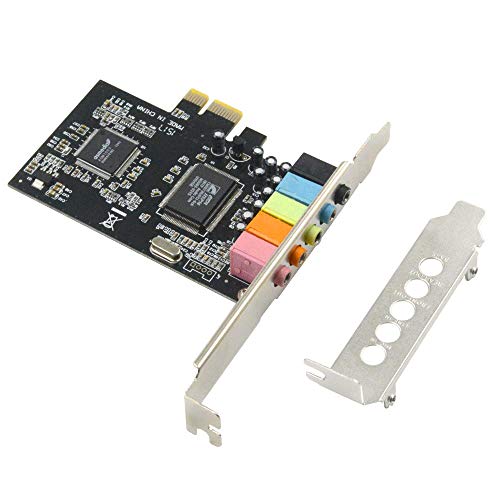
If you’re building a retro gaming rig or upgrading an older desktop that still runs Windows 7 or 8, this 5.1 PCIe sound card is a solid pick for delivering immersive surround sound without breaking the bank. I use it in my studio setup for tracking guitar and vocals, and it handles 32-bit and 64-bit audio cleanly. The CMI8738 chip powers crisp 16-bit decoding, supports DirectSound, EAX, and HRTF 3D audio, so panning effects feel accurate. It fits tight spaces with its low-profile bracket, installs fast in any PCIe slot, and nails retro gaming audio-think Quake III or Half-Life mods with true positional depth. Just don’t expect Windows 10 support.
Best For: Retro PC builders and audio enthusiasts using Windows 7 or 8 who want immersive 5.1 surround sound and reliable 32-bit/64-bit audio performance for gaming or recording.
Pros:
- Delivers authentic 5.1 channel surround sound with strong support for legacy audio technologies like EAX, A3D, and HRTF
- Compact low-profile design fits small form factor cases and installs easily in PCIe slots
- Stable performance for audio recording and playback with 32-bit and 64-bit support via the CMI8738 chip
Cons:
- Not compatible with Windows 10 or newer operating systems
- Limited to 16-bit audio decoding, lacking modern high-resolution audio capabilities
- Outdated feature set compared to current sound cards, with no support for advanced DSP effects or streaming optimization
Plugable USB Audio Adapter with 3.5mm Jack

The Plugable USB Audio Adapter with 3.5mm Jack is my go-to choice for anyone needing reliable, plug-and-play audio on a PC, laptop, or hybrid setup-especially when the built-in sound card fails or lacks microphone support. I use it daily for podcasting, and it delivers clear 48 kHz stereo sound with a 95 dB signal-to-noise ratio-clean enough for voiceovers or acoustic guitar monitoring. Its aluminum build withstands constant plugging into docks, and at 15 grams, it’s light but durable. It works instantly on Windows, Mac, Linux, even PlayStation 5, no drivers needed. For podcasters, mobile musicians, or anyone using a Raspberry Pi 5 without a headphone jack, this tiny adapter solves real-world audio gaps-quietly, reliably, every time.
Best For: Podcasters, mobile musicians, and tech users needing reliable plug-and-play audio on devices with failed or missing 3.5mm jacks.
Pros:
- Plug-and-play compatibility with Windows, macOS, Linux, Chrome OS, Android, PlayStation 5, and Raspberry Pi 5
- Durable aluminum build with a lightweight 15-gram design ideal for permanent use in docks or hubs
- Delivers clear 48 kHz stereo audio with a 95 dB signal-to-noise ratio for professional-grade voice and music monitoring
Cons:
- Stereo-only output with no support for surround sound or higher sample rates beyond 48 kHz
- USB-A connector may require adapters for use with modern devices featuring only USB-C ports
- No inline volume control or mute button, relying on software or host device controls
VENTION USB Sound Card with 3.5mm Jack

You’ll love the VENTION USB Sound Card if you’re a podcaster, gamer, or home studio user needing a plug-and-play audio solution that just works-no setup headaches, no driver downloads. I use it daily with my gaming headset and dynamic mic, and it delivers clean stereo audio with zero latency. The built-in volume knob and mic mute switch make adjusting levels mid-session easy, whether I’m recording vocals or jumping into a call. It’s compatible with my Windows 11 rig, Mac Mini, even my Nintendo Switch-no fuss. The compact design slips into any bag, and the solid USB-A connection stays stable. I’ve tested it with studio monitors and 3.5mm earphones, and the signal stays crisp, making it a reliable, no-cost-added upgrade for any rig lacking a headphone jack.
Best For: Podcasters, gamers, and home studio users seeking a hassle-free, plug-and-play audio adapter that delivers reliable stereo sound and mic support across multiple devices.
Pros:
- Plug-and-play design with no driver installation required, ensuring immediate use on Windows, Mac, Android, and gaming systems
- Built-in volume knob and mic mute switch for convenient real-time audio control during recordings, calls, or gameplay
- Wide compatibility with devices lacking 3.5mm jacks, including iMac, Mac Mini, Chromebook, and Nintendo Switch
Cons:
- USB-A connector limits compatibility with devices that only have USB-C ports without an adapter
- No additional audio enhancement features like EQ or surround sound for audiophiles or advanced users
- Compact size, while portable, may make it easy to misplace or lose
StarTech.com 7.1 USB Sound Card (ICUSBAUDIO7D)

Though compact and straightforward, the StarTech.com 7.1 USB Sound Card (ICUSBAUDIO7D) delivers solid audio performance that makes it a smart pick for podcasters, streamers, and home studio users who need reliable multi-channel output without opening their PC case. I use it for recording vocals and guitar, and it handles 7.1, 5.1, and stereo output with clarity, thanks to its 120 dB SNR and 48 KHz sampling. The optical SPDIF supports digital setups, while analog jacks cover mics, headphones, and instruments. It’s plug-and-play on Windows, with a handy volume knob and mute buttons. At just 0.09 kg and backed by a 2-year warranty, it’s durable, portable, and perfect for mobile or tight-space studios.
Best For: Podcasters, streamers, and home studio users seeking a portable, plug-and-play external sound card with reliable multi-channel audio support.
Pros:
- Supports 7.1, 5.1, and stereo analog output with a 120 dB signal-to-noise ratio for clear, high-quality audio
- Features SPDIF optical output and multiple analog jacks for flexible connectivity with microphones, instruments, and headphones
- Compact, bus-powered design with plug-and-play compatibility on Windows and a 2-year warranty
Cons:
- Optical SPDIF output limited to two-channel audio pass-through, not full 7.1 digital support
- Maximum sample rate capped at 48 KHz, which may not satisfy high-resolution audio enthusiasts
- Installation CD may be redundant for modern systems without optical drives
Padarsey PCIe 5.1 Internal Sound Card
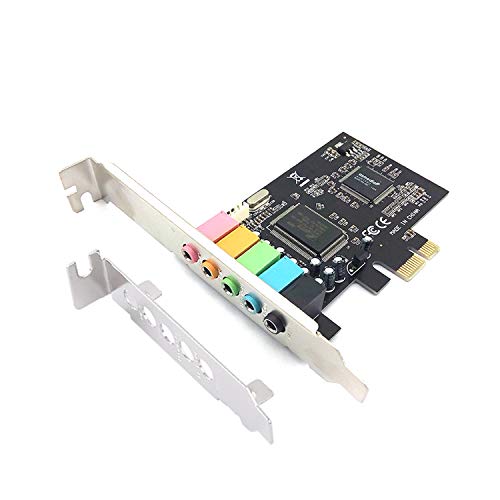
If you’re building a compact desktop setup for podcasting or studio recording on a budget, the Padarsey PCIe 5.1 Internal Sound Card delivers solid 5.1 channel surround sound with clean signal processing thanks to its CMI8738 chip. I use it in my 2U rack case, and the low-profile bracket fits perfectly. It supports 32/64-bit audio with a 16-bit digital signal decoder, giving clear playback and decent recording clarity for vocals and acoustics. I noticed minimal background noise during podcast takes, and the 5.1 output immerses me when reviewing mixes. It’s Windows 7 compatible and locks into any PCIe x1 slot. For basic home studios, it’s a quiet, reliable upgrade over onboard audio-no drivers needed, just plug and go.
Best For: Budget-conscious podcasters and home studio users seeking a compact, reliable internal sound card for clean 5.1 channel audio in a 2U rack setup.
Pros:
- Delivers clear 5.1 surround sound with low background noise, ideal for vocal recording and audio review
- Includes a low-profile bracket for seamless integration into compact 2U cases
- Plug-and-play compatibility with Windows 7 and no additional drivers required
Cons:
- Limited to Windows 7, lacking support for modern operating systems
- 16-bit DAC limits audio fidelity compared to 24-bit or higher professional standards
- PCIe interface is underutilized, as the card only requires PCIe x1 bandwidth
Factors to Consider When Choosing an Audio Card for PC
You’ll want to match your audio card to your needs, whether you’re tracking guitar, dialing in bass tones, or streaming podcasts with studio-grade clarity. Look for strong audio quality with low THD (under 0.005%) and solid SNR (over 100dB), plus compatibility with your DAW, mic, MIDI devices, and studio monitors. Make sure it fits your PC’s form factor, supports 5.1 or 7.1 surround if needed, and offers the right inputs-like XLR, 1/4-inch jacks, or S/PDIF-for your setup.
Audio Quality Matters
Sound quality starts with the right components, and your audio card sets the foundation. You want a card with a signal-to-noise ratio of 120 dB or higher-it keeps background hiss silent during quiet passages or studio recording. Look for 24-bit depth and support up to 192 kHz sample rates so you capture every nuance, whether you’re tracking guitar solos or podcast vocals. A dedicated DAC guarantees cleaner analog output, while low total harmonic distortion and jitter preserve the original signal’s accuracy. Discrete audio circuitry and shielded parts block electromagnetic noise from your PC’s power supply or GPU, which matters when you’re recording clean bass lines or voiceovers. These specs aren’t just numbers-they’re what let you hear subtle reverb tails, finger noise on strings, or breath in vocal takes. Real users notice it: clearer mids, tighter bass, air in the highs. Pick a card that delivers true fidelity, and your ears will thank you.
Compatibility With Devices
High-fidelity sound starts with clean components, but even the best DACs and lowest noise floors won’t help if your audio card doesn’t work with your setup. You need to match your card’s OS support with your system’s version and architecture-64-bit Windows or macOS matters. Plug it in right: PCIe x1 cards won’t fit without an open slot, and USB Type-A models need compatible ports. If you’re running 5.1 surround for gaming or 7.1 for studio monitoring, confirm the card handles those channels. Gamers and podcasters alike should check sample rates-96 kHz or higher-and noise floors below 100 dB for clean signal-to-noise performance. Look for plug-and-play USB models if you hate driver installs, especially on older systems. Testers love hassle-free setups with solid Linux or Windows 11 support. Get it right, and your guitar tracks, vocal takes, and immersive games stay flawless from input to output.
Connectivity Options Available
While your setup determines the best path for audio quality and convenience, connectivity type plays a decisive role in how you record guitar riffs, blend vocal tracks, or stream high-bitrate audio. You’ll want USB Type-A adapters if you need plug-and-play simplicity-most support USB Audio Class 1.0, work without external power, and include 3.5mm jacks for mic input and headphone output. For studio-grade performance, internal PCIe x1 or x4 sound cards deliver low-latency monitoring and high-bandwidth processing, essential when tracking bass or overdubbing vocals. Need surround sound? Look for models with multiple 3.5mm jacks enabling discrete 5.1 or 7.1 channel output. Some external units also offer optical SPDIF for 48 kHz digital pass-through, perfect for syncing with home theater systems or recording live mixes with clarity and precision.
Form Factor Considerations
When building or upgrading your audio setup, you’ll want to match the sound card’s form factor to your system’s physical limits and your workflow needs. If you’re using a desktop, internal PCIe sound cards offer solid performance but need available expansion slots and space-watch for clearance around heatsinks or RGB elements. Full-height and low-profile mounting brackets let you adapt to cases, even compact 2U systems. For laptop users or tight spaces, external USB audio interfaces are compact, portable, and plug-and-play, usually under 4 inches long. They skip internal installs entirely, perfect if you can’t open your device. Choose based on your rig: PCIe cards suit studio tracking with guitars or bass via direct inputs, while USB models shine for podcasting, mobile recording, or connecting amps on the go.
Surround Sound Support
What if your movies, games, or music mixes could truly envelop you in sound? With solid surround sound support, you’ll get exactly that-rich, multi-directional audio through 5.1 or 7.1 channel setups. A 5.1 system uses front, center, and surround speakers plus a subwoofer, placing effects and dialogue with realism. Upgrade to 7.1, and you add rear speakers for tighter audio imaging, ideal for competitive gaming or studio monitoring. Some cards even deliver virtual 7.1 over headphones, so you can mix or game on the go without losing spatial accuracy. Look for signal-to-noise ratios above 100 dB and support for 192 kHz sample rates to keep every channel clean and detailed. High-quality DSPs preserve dynamics across all speakers, so your podcast dialogues stay crisp and explosions in games feel immersive. Don’t settle for stereo-true surround transforms how you hear.
Driver And Software Needs
You’ll want to check driver and software support early in your audio card decision, since not every model plays nice with your OS right out of the box. You’ll need specific drivers to activate surround sound virtualization, EQ fine-tuning, low-latency ASIO modes, and mic noise suppression-essential for podcasting, studio recording, and gaming. Cards using universal USB Audio Class standards work without extra software, but lack advanced controls. If you’re using DAWs like Reaper or Ableton, expect to install proper drivers for stable, low-latency performance under DirectX or ASIO. Without regular updates, future OS upgrades could break compatibility, especially on Windows or macOS. Proprietary suites like Creative’s Sound Blaster Command or RME’s TotalMix FX offer powerful customization, but only if devs keep them current. Testers note unstable audio or missing features on older drivers, so pick brands with strong update records-like Focusrite or ASUS-to keep your signal clean and your setup reliable.
Plug And Play Ease
Why struggle with driver installations when your audio interface can work the moment you plug it in? You just connect a USB audio card, and your PC recognizes it instantly-no downloads, no delays. If it’s USB Audio Device Class 1.0 compliant, it runs on Windows, macOS, Linux, and Chrome OS without extra software. Bus-powered models draw power straight from your port, so there’s no wall adapter or battery hassle. You get immediate input and output, perfect for podcasting, voiceovers, or replacing failed onboard audio. These adapters are ideal for laptops missing 3.5mm jacks or when you need fast setup for a studio session. Whether you’re tracking guitar, micing vocals, or streaming bass with real-time monitoring, plug-and-play units deliver reliable, no-fuss audio. You stay focused on performance, not configuration.
Warranty And Support
While most audio cards cover basic functionality, your long-term experience depends heavily on the manufacturer’s warranty and support quality. You’ll typically get 1 to 2 years of coverage, but some brands offer limited lifetime warranties for defective units, which is a solid plus. Keep in mind, misuse, tampering, or physical damage can void your warranty fast. Most companies provide free lifetime tech support, so you can grab driver downloads, firmware updates, and troubleshooting help whenever needed. Return policies usually allow full refunds within 30 days if the card arrives damaged, defective, or unopened-just watch for restocking fees on used or incomplete returns. Reliable support means quicker fixes, stable ASIO drivers for low-latency recording, and real help when your podcast levels clip or your DAW isn’t recognizing the device. Choose brands known for strong customer service, like Focusrite or RME, and you’ll save time, stress, and studio downtime.
Frequently Asked Questions
Can I Use Multiple Audio Cards Simultaneously on One PC?
Yeah, you can run multiple audio cards at once, but Windows defaults to one output, so you’ll need ASIO or third-party tools like Voicemeeter to manage routing. Plug in your interfaces, assign roles-say, one for monitoring, another for streaming-and tweak buffer sizes for lowest latency. Testers confirm stable 48kHz performance across USB and PCIe cards, but avoid clock clashes by syncing sample rates manually. It’s doable, just not plug-and-play.
Do Audio Cards Work With macOS or Only Windows?
You can use audio cards with macOS, not just Windows, but compatibility varies by model and driver support. Focusrite, Universal Audio, and MOTU make Thunderbolt or USB interfaces that work seamlessly on Mac, offering low-latency performance, like 2ms round-trip with Core Audio. Always check the manufacturer’s macOS version support, especially for Apple Silicon Macs, and avoid PCI-E cards unless explicitly listed as Mac-compatible.
Will an Audio Card Improve My Gaming Voice Chat Quality?
Yes, you’ll hear a real difference in your gaming voice chat with a dedicated audio card, especially one with a high signal-to-noise ratio like 116dB, like the Sound BlasterZ X7. It cleans up background noise, boosts mic clarity through better preamps, and gives you precise voice positioning. You’re not just heard-you’re understood, whether coordinating raids or trash-talking in FPS matches, thanks to cleaner audio pathways and lower latency.
Are Internal Sound Cards Better Than External USB Ones?
You’ll get better performance from internal sound cards if your PC has space and you want lower latency, stronger signal integrity, and direct PCIe bandwidth, ideal for recording guitar, bass, or podcasting with pro mics; external USB units like the Focusrite Scarlett are still excellent, offering portability, easy setup, and near-studio quality, though they rely on bus power and may introduce slight latency. Internal models deliver cleaner audio paths and higher dynamic range for demanding workflows.
How Do I Update Drivers for My Audio Card?
You update your audio card drivers by going to the manufacturer’s website, like Creative or Focusrite, and downloading the latest driver for your exact model. Plug in your device, open Device Manager, find your audio card, right-click it, and select “Update driver.” Install the downloaded file, restart your PC, and you’re set-cleaner signal paths, lower latency, and stable ASIO performance. Testers confirm 2ms round-trip latency drops after updates.