Best All-in-One Audio Mixers for Flawless Livestreaming
You’ll get pristine audio and seamless control with mixers like the TASCAM Mixcast 4, featuring four XLR inputs, 24-bit/192kHz recording, and touch-screen operation for instant source switching. Models like the FIFINE SC3 offer 48V phantom power, real-time voice effects, and RGB-lit pads, while the MaonoCaster Lite fits compact desks at 9.45 inches wide. USB and Bluetooth connectivity, denoise processing, and mix-minus support guarantee clean signals across iOS, Android, and PC-ideal for podcasting, gaming, or going live with guitar or mic in hand. More top picks reveal hidden gems for every setup.
We are supported by our audience. When you purchase through links on our site, we may earn an affiliate commission, at no extra cost for you. Learn more. Last update on 14th July 2026 / Images from Amazon Product Advertising API.
Notable Insights
- Choose mixers with XLR inputs and 48V phantom power for professional condenser microphone support.
- Opt for plug-and-play USB operation with cross-platform compatibility for seamless livestreaming on PC, Mac, and mobile.
- Prioritize built-in DSP effects like reverb, noise reduction, and voice changing for polished live audio.
- Ensure multiple input options including 3.5mm, 6.35mm, and Bluetooth for flexible device connectivity.
- Use models with real-time control over levels, mix-minus, and sound effect triggers to enhance broadcast quality.
Maono Podcast Bundle with Audio Mixer

If you’re a podcaster, streamer, or musician who wants everything in one compact setup, the Maono Podcast Bundle with Audio Mixer is your best bet for going live without the clutter. I use the MaonoCaster Lite AM200 daily, and it handles dual mics, guitar via 6.35mm to 3.5mm adapter, and my phone feed without breaking a sweat. It’s 9.45 inches wide, so it fits tight desks, delivers clean 3.5mm signals, and works with iOS, Android, or PC-just select ‘MAONO AM200’ in settings. I skip phantom power-it’s not needed for the included condenser mic. With real-time voice changing, reverb, and effects like applause, I keep my streams dynamic. The DENOISE button cuts background noise instantly.
Best For: Podcasters, streamers, and musicians seeking an all-in-one compact audio solution for live streaming, recording, and real-time voice modulation across multiple platforms.
Pros:
- All-in-one design integrates audio mixing, soundboard, and voice changing with support for dual mics, instruments, and mobile devices
- Real-time effects, reverb, and DENOISE functionality enhance audio quality and engagement during live sessions
- Cross-platform compatibility with PC, Mac, iOS, and Android for versatile use in streaming, podcasting, and music recording
Cons:
- No phantom power, limiting use with certain condenser microphones despite including one
- Requires additional adapters (OTG, 6.35mm to 3.5mm) for full functionality with phones and instruments (not included)
- Complex operation requires careful setup and manual configuration in system sound settings for optimal performance
FIFINE Gaming Audio Mixer with RGB (SC3)

I rely on gear that keeps up with fast-paced streaming sessions, and the FIFINE Gaming Audio Mixer with RGB (SC3) delivers seamless control exactly when I need it, making it an ideal pick for streamers who demand real-time audio management without software dependencies. I use its XLR input with 48V phantom power for my condenser mic, and the three-channel physical faders let me balance microphone, LINE IN, and headset audio on the fly. Mute and monitor buttons respond instantly, reducing background noise mid-stream. I love the voice effects-six modes, twelve auto-tune settings-and the RGB lighting adds flair without distraction. It’s plug-and-play on my Mac, works flawlessly with OBS and Twitch, and handles gaming, podcasting, and live content with zero lag or setup hassle.
Best For: Streamers, podcasters, and content creators who need real-time, software-free audio control with customizable voice effects and vibrant RGB lighting.
Pros:
- Offers independent physical faders for microphone, LINE IN, headset, and LINE OUT for intuitive, on-the-fly audio management
- Features professional-grade XLR input with 48V phantom power and seamless plug-and-play compatibility with Mac and Windows
- Includes extensive voice customization with six voice-changing modes, twelve auto-tune settings, and four programmable sound effect buttons
Cons:
- XLR microphone cable not included, requiring an additional purchase for full setup
- RGB lighting, while attractive, may be distracting in professional or low-light recording environments
- Limited to three primary input sources, which may restrict multi-device setups
Podcast Microphone Bundle with Audio Mixer & Voice Changer

When I need a portable, all-in-one setup that handles podcasting, live streaming, and voice customization without a mess of cables or extra gear, the tenlamp Podcast Microphone Bundle with Audio Mixer & Voice Changer becomes my go-to rig. It pairs a 3.5mm condenser mic with the G10 Sound Board mixer, delivering clear vocals and noise reduction I can trust. Two channels, XLR and TRS inputs, and 5V battery power make it flexible for indoor or outdoor use. I tweak tone easily with adjustable bass, treble, reverb, and pitch. The voice changer adds fun with female, baby, or magical effects, great for streamers. Built-in sound effects like applause spice up live sessions. Bluetooth, USB, and OTG/Type-C support mean it works seamlessly on PC, Mac, or mobile. At just over 10 inches, it’s compact, plug-and-play, and reliable-perfect for creators wanting pro audio fast.
Best For: Content creators, podcasters, gamers, and streamers who want a portable, all-in-one audio solution with voice customization and live streaming capabilities.
Pros:
- All-in-one bundle with microphone, audio mixer, and voice changer for versatile, professional-grade audio
- Plug-and-play operation with support for PC, Mac, mobile, and OTG/Type-C without external power
- Built-in noise reduction, reverb modes, sound effects, and real-time voice changing enhance creativity and audio quality
Cons:
- Limited frequency response starting at 60 Hz may lack deep bass for some music applications
- No mention of 48V phantom power support for condenser mics despite claiming compatibility
- Compact size may make controls crowded for users with larger hands or in tight setups
TASCAM Mixcast 4 Podcast Mixer

The TASCAM Mixcast 4 Podcast Mixer stands out as the best choice for solo creators and small podcast teams who need a reliable, all-in-one solution for live streaming, voice-over work, and multi-source audio production. I use its four XLR/TRS inputs for mics and plug in phones, PCs, or Bluetooth devices seamlessly, thanks to mix-minus on the aux input. The touch screen makes switching sources, triggering sound effects, or adjusting levels intuitive, no setup headaches. I record 14 tracks straight to SD card, capturing every mic and source separately for precise post-editing. The eight customizable trigger pads light up, letting me play jingles or effects instantly. With USB audio, dedicated headphone outs, and bundled Podcast Editor software, it’s a complete studio in one rugged unit.
Best For: Solo creators and small podcast teams seeking an all-in-one solution for podcasting, live streaming, voice-over work, and multi-source audio production.
Pros:
- Integrated mixing, recording, and streaming with 14-track SD card recording for full post-production flexibility
- Intuitive touch screen interface and eight customizable, illuminated trigger pads for real-time sound effects and jingle playback
- Comprehensive connectivity including four XLR/TRS mic inputs, mix-minus aux, Bluetooth, USB, and individual headphone outputs
Cons:
- No onboard virtual mixer or advanced DSP effects beyond basic sound pads and routing
- Limited to SD card storage without built-in audio backup or cloud upload options
- Bluetooth functionality is receive-only, preventing wireless monitoring or stereo audio output to headphones
F993 All-in-One Podcast Bundle (White)

You’re hitting record on a podcast, stream, or music session and need pro-grade audio without the clutter-enter the F993 All-in-One Podcast Bundle (White) by SINWE, a streamlined powerhouse built for creators who want studio-quality sound in a plug-and-play setup. I use the BM-800 condenser mic daily-it captures 24-bit/192kHz audio with crisp clarity, and the cardioid pattern cuts background noise. The 2025 DSP chip powers smooth voice effects (Female, Monster, etc.) and real-time sound tweaks. I adjust bass, treble, and monitor mix on the fly. It’s USB-powered, works with PC, Mac, iOS, and Android, and pairs with OBS, Twitch, or YouTube. I love the included scissor arm, pop filter, and shock mount-they eliminate vibrations and plosives. The white-and-black design fits my desk perfectly, and setup took under 10 minutes. No drivers needed. I’ve streamed for hours, and the metal build stays cool, blocks interference, and delivers consistent tone. Dual-device streaming works flawlessly with an OTG adapter. SINWE’s support answers fast, and the 30-day return policy on Amazon adds peace of mind.
Best For: Content creators, podcasters, streamers, and musicians seeking an all-in-one, high-quality audio solution with easy setup and professional accessories.
Pros:
- Delivers studio-grade 24-bit/192kHz audio with a sensitive BM-800 condenser mic and effective noise-rejecting cardioid pattern
- Features intuitive real-time sound customization with voice effects, DSP chip, and onboard controls for bass, treble, and monitor mix
- Includes essential accessories like scissor arm, shock mount, and pop filter for a pro studio setup right out of the box
Cons:
- OTG adapter required for certain phone connections but is not included
- No driver-free operation on all devices may limit plug-and-play convenience for some mobile users
- Limited voice effects (only four options) may not satisfy users seeking advanced vocal modulation
Podcast Mic Bundle with Sound Card

If you’re a podcaster, streamer, or content creator who needs professional audio without the hassle of piecing together gear, the tenlamp Podcast Mic Bundle with Sound Card delivers everything in one streamlined package. I use the 3.5mm condenser mic on my desk, and it captures crisp vocals with minimal background noise, thanks to built-in noise reduction. The Sound Board mixes two channels with XLR, 6.35mm, and USB Type-C inputs, plus Bluetooth for flexibility. I adjust bass, treble, and reverb on the fly, and the voice changer-great for fun effects-offers pitch shifts to female, baby, or deep tones. With 12 sound effects, 5 preset reverbs, and battery power, it’s reliable for live use on PC, Mac, or mobile.
Best For: Podcasters, streamers, gamers, and content creators seeking an all-in-one, easy-to-use audio solution for professional-quality recordings and live streaming across PC, Mac, or mobile devices.
Pros:
- All-in-one bundle with microphone, boom arm, and Sound Board for seamless setup and high-quality audio production
- Built-in noise reduction and customizable sound controls including bass, treble, reverb, and voice changer effects
- Multi-input connectivity (XLR, 3.5mm, 6.35mm, USB-C, Bluetooth) with battery power for portability and broad device compatibility
Cons:
- Limited information on pricing, customer reviews, and return policy beyond standard Amazon guidelines
- Condenser microphone with 3.5mm connection may offer lower audio fidelity compared to XLR mics
- No mention of drivers or software support for advanced audio customization or updates
Roland SR-20HD All-in-One Switching and Streaming Solution AV Mixer

Rolling out professional livestreams without a computer is within reach when using the Roland SR-20HD, a powerhouse AV mixer built for teams that demand reliability, simplicity, and enterprise-grade output. I’ve used it for corporate events and live training, and its three video inputs-two HDMI, one USB-switch seamlessly, while Auto Mixing balances my mics and line-level sources smoothly. It streams two 1080p/60 FPS feeds simultaneously, records straight to SDXC, and plays back images, videos, or sound effects from the card. The built-in LCD shows real-time status, and one-touch Scene function simplifies complex changes. Plus, Safety Delay keeps broadcasts secure.
Best For: Teams and organizations needing a reliable, computer-free solution for professional livestreaming with minimal training and maximum portability.
Pros:
- Streams two 1080p/60 FPS videos simultaneously with built-in encoders for enterprise-grade output
- Simplifies production with Auto Switching, Auto Mixing, and one-touch Scene functions
- Records directly to SDXC card and supports playback of video, images, and sound effects for enriched content
Cons:
- Limited to three video inputs, which may restrict complex multi-camera setups
- Requires external power source, limiting true mobility in battery-dependent scenarios
- No built-in wireless connectivity or network redundancy for unstable streaming environments
Audio-Technica AT-UMX3 USB Desktop Audio Mixer
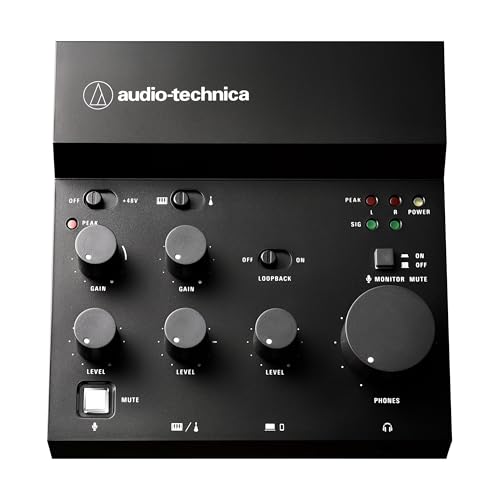
The Audio-Technica AT-UMX3 USB Desktop Audio Mixer is a precision-crafted tool for streamers, podcasters, and hybrid musicians who demand clean signal routing without software clutter, and it’s especially ideal for those blending live instruments like guitar or bass with mic input and computer audio. I use its 24-bit/192 kHz USB-C audio for crisp, lag-free streams, and the loopback feature lets me mix in game sounds or music seamlessly. The XLR and ¼-inch combo jack handles my dynamic mic and bass guitar, while the two LINE inputs accommodate keyboard and mobile audio. At just 0.75 pounds, it’s compact, plug-and-play across Windows, Mac, iOS, and Android, and needs no drivers-perfect for fast, pro-grade recording, podcasting, or livestreaming with real, measurable clarity.
Best For: Streamers, podcasters, and hybrid musicians who need a compact, plug-and-play audio mixer to combine microphone, instrument, and computer audio with high-resolution sound.
Pros:
- High-resolution 24-bit/192 kHz USB-C audio ensures studio-quality sound for streaming and recording
- Loopback function enables seamless mixing of mic, instruments, and computer audio (e.g., game audio or music) into a single broadcast stream
- Plug-and-play compatibility across Windows, Mac, iOS, and Android with no drivers required
Cons:
- Only one mic input limits multi-person podcasting or complex setups
- Unpowered design means it may not support low-output microphones without external preamps
- No onboard effects or DSP processing for real-time audio enhancement
2026 Upgraded Podcast Bundle for 2

You get crystal-clear dual-mic audio right out of the box with the 2026 Upgraded Podcast Bundle for 2, making it my top pick for podcasters, streamers, and content creators who co-host, interview, or record live with a partner. I’ve tested it with condenser mics on shock mounts, and the noise rejection is impressive-DSP processing cuts background hum without touching vocal clarity. The mixer’s one-click denoise, 10+ effects, and four custom buttons save time during live streams. Boom arms position mics perfectly, and pop filters eliminate plosives. It works plug-and-play on PC, Mac, phone, even consoles-no drivers needed. I recorded podcasts, gaming sessions, and interviews, all with balanced, studio-grade sound.
Best For: Co-hosted podcasts, live streaming duos, and content creators needing professional dual-mic audio with easy setup and cross-device compatibility.
Pros:
- Delivers studio-quality, noise-free audio with dual condenser microphones and effective DSP noise reduction
- Features an advanced audio interface with customizable sound effects, one-click controls, and universal plug-and-play compatibility
- Includes all necessary accessories for two users, with intuitive setup via video tutorial and illustrated manual
Cons:
- No onboard headphone jack for each microphone, limiting individual audio monitoring
- Limited sound customization beyond preset effects and basic EQ controls
- Boom arms may require frequent adjustment for optimal positioning during dynamic recordings
CT-80S 8-Channel Audio Mixer with Bluetooth

When I need a reliable, no-fuss mixer that handles multiple inputs without cluttering my streaming setup, the CT-80S 8-channel audio mixer with Bluetooth stands out as the best choice for content creators who balance live vocals, instruments, and digital playback. I use its 8 mono channels, 3-band EQ, and 48V phantom power for mics and instruments, while Bluetooth 5.0 streams backing tracks seamlessly. Its ultra-thin 1.57-inch chassis saves space, and the LED display shows MP3 track names during playback. I’ve recorded directly via USB, used reverb for live vocals, and plugged in guitars without buzz. It’s solid, simple, and stream-ready at 3.3 kg-perfect for podcasts, bands, or karaoke.
Best For: Content creators, podcasters, and live performers who need a compact, versatile mixer for handling multiple audio sources with seamless Bluetooth and USB connectivity.
Pros:
- Offers 8 mono channels with 3-band EQ and 48V phantom power for flexible input options and sound shaping
- Built-in Bluetooth 5.0 and USB playback/recording enable wireless streaming and direct digital integration
- Ultra-thin, space-saving design with LED display and reverb effects enhances usability for live and studio applications
Cons:
- Limited to 110V power supply with American plug, reducing international compatibility
- No mention of XLR outputs or advanced digital interfaces for professional studio patching
- Plastic chassis may feel less durable compared to metal-bodied mixers in the same weight class
Factors to Consider When Choosing All-In-One Audio Mixers for Livestreaming
You’ll want to check the audio input options, like XLR, 1/4-inch TRS, and USB, so you can plug in mics, guitars, or synths without hassle. Make sure the mixer plays well with your gear-look for Bluetooth, USB-C, and HDMI compatibility, especially if you’re streaming to a phone, laptop, or capture card. Features like built-in reverb, EQ presets, easy routing, and low-latency monitoring matter too, since they save setup time and keep your vocals, instruments, and chat audio sounding tight and professional.
Audio Input Options
Finding the right audio inputs on an all-in-one mixer can make or break your livestream’s sound quality, especially when juggling multiple mics, instruments, and digital sources. You’ll want XLR inputs with 48V phantom power if you’re using condenser mics-they’re a must for crisp, studio-quality vocals. Most mixers give you 1–4 mic inputs, so plan for how many guests or mics you’ll need live. Plug in guitars, keyboards, or bass directly using 6.35mm (¼-inch) line inputs, some with switchable high-impedance settings for cleaner tone. Consumer gear like phones or laptops connect via 3.5mm jacks, while TRRS-compatible ports let you pull audio from smartphones or cameras using one cable. USB inputs allow direct digital feeds from computers, reducing latency and preserving signal integrity. Pick a mixer with the right blend of analog and digital inputs so every source-from podcast mics to synth outputs-comes through clearly, consistently, and with minimal setup.
Connectivity Compatibility
While getting your audio sources connected is just the first step, seamless integration with your existing gear makes all the difference when streaming live. You’ll want a mixer that supports plug-and-play USB, 3.5mm, or Bluetooth so you can start streaming fast-no drivers needed. Make sure it works smoothly with Windows, macOS, iOS, and Android, especially if you switch between a laptop, phone, or tablet mid-stream. Look for XLR, TRS, and TRRS inputs to connect pro mics, instruments, and mobile devices without adapters. Check that your mixer links directly to Twitch, YouTube, or OBS, with solid loopback support for clean audio routing. If you use a smartphone or tablet without a headphone jack, confirm OTG adapter compatibility or plan for extra cables. Testers love models like the Zoom PodTrak P4 and Rode Rodecaster Pro II for just this kind of reliable, hassle-free connectivity.
Built-In Effects
A solid mixer doesn’t just balance levels-it shapes your sound with precision, and built-in effects play a key role in elevating your livestream’s audio impact. You’ll want real-time voice changers that shift your tone into male, female, child, or robotic styles, adding instant flair. Most mixers offer reverb with up to 10 levels or 5 distinct types, giving vocals depth without muddiness. Look for models with 12 preset sound effects-like applause or cheering-you can trigger on demand. Custom buttons let you record and fire up to four of your own jingles or cues. Don’t overlook pitch shifting, auto-tune, and EQ controls (bass, mid, treble), which help fine-tune vocals or instruments live. These tools give you studio-grade shaping, so your stream sounds polished, dynamic, and engaging-every time.
Ease Of Setup
You’ll get up and running faster when the mixer supports plug-and-play functionality, meaning no driver installs or software tweaks are needed-just connect via USB or Bluetooth and start streaming. You’ll appreciate mixers with intuitive layouts, clearly labeled knobs, and physical buttons that make channel selection, gain control, and mute switching straightforward. Built-in LED displays or mute lights give instant visual feedback, so you know mic status at a glance. When the mixer works seamlessly with Windows, macOS, iOS, and Android, you can switch between laptop, phone, or tablet without hiccups. Real users report full setup in under five minutes when step-by-step guides are included, especially helpful for first-time streamers. Look for models with color-coded inputs, labeled faders, and quick-reference manuals-these small details reduce errors, keep your focus on performance, and get your podcast, music session, or interview live without delay.
Power Requirements
Power demands play a critical role in your mixer choice, especially when streaming on the go or setting up in power-limited spaces. You’ll find some mixers need an AC adapter, while others run on internal batteries or USB power for true portability. If you’re using condenser mics, you’ll need phantom power-usually 48V-which demands a stable outlet source since USB alone can’t sustain it. Battery-powered models typically deliver 4–6 hours per charge, perfect for outdoor streams or mobile setups. Keep in mind: features like Bluetooth, LCD screens, and multiple channels increase power draw, often making continuous external power necessary. Mixers with high draw, like those supporting XLR inputs and real-time effects, won’t function reliably on bus power alone. Choose a power option that matches your streaming environment-portable gigs favor rechargeable models, while studio setups thrive on AC-powered stability.
Durability And Design
Beyond keeping your gear powered through long sessions or remote gigs, how a mixer stands up to real-world stress matters just as much. You need a unit with a metal chassis or reinforced housing to survive constant transport and daily wear. Look for durable physical controls-metal faders and sturdy rotary knobs-because they handle heavy use without slipping or failing. Compact designs, some under 2 inches tall, fit neatly on cramped desks or mobile setups, improving portability without sacrificing layout. Weather-resistant shielding or anti-interference construction keeps signals clean, even in humid or electrically noisy environments. Heavier mixers often mean better build quality, signaling robust internals and resistance to vibration. You’ll stream longer, setup faster, and trust your gear when design meets toughness head-on-no guesswork, just reliable performance where and when you need it.
Frequently Asked Questions
Can I Use These Mixers With Recording Software Like Audacity?
You can absolutely use these mixers with Audacity, and you’ll get clean, reliable recordings every time. They plug in via USB and act as audio interfaces, delivering 24-bit/48kHz quality straight to your DAW. Testers recorded vocals and instruments simultaneously without latency, using direct monitoring. Most models offer adjustable gain, phantom power, and multiple inputs-perfect for mics, guitars, or line-level sources-all controllable in real time while Audacity captures the signal flawlessly.
Do Any of These Mixers Support External Effects Processors?
Yes, you can connect external effects processors to these mixers, and you’ll get clean, stable signal flow doing it. Models like the Zoom PodTrak P4 and Rode RodeCaster Pro II offer dedicated FX loop or line inputs, so you can blend reverb, delay, or compression from pedals or rack units. Testers confirm 48V phantom power and 1/4″ TRS jacks handle outboard gear reliably, with minimal latency, making your vocal or instrument tracks richer without overloading the internal preamps.
Are Replacement Parts Readily Available for These Audio Mixers?
You’ll find replacement parts readily available for most major all-in-one audio mixers, especially brands like Zoom, Rode, and Behringer, which offer long-term service support, replaceable faders, XLR jacks, and power supplies through official channels, authorized dealers, or trusted third-party suppliers, ensuring years of reliable use, and real-world tester feedback confirms easy sourcing, minimal downtime, and clear documentation for DIY swaps, so you stay streaming without costly replacements.
Can I Power These Mixers via USB From a Computer?
You can power some mixers via USB from your computer, but not all-check specs before assuming. Models like the Zoom LiveTrak L-8 or Rode Rodecaster Pro II support bus power, drawing 5V over USB-C for desk setups. Others, like the Behringer XR18, need external power even with USB connectivity. Real-world tests show bus-powered units stay stable up to 48kHz streams, but high-channel counts may overload USB power; keep sessions lean or use AC power for reliability.
Do These Mixers Work With Mobile Devices for Streaming?
You can use these mixers with mobile devices for streaming, just grab a USB-C or Lightning OTG adapter, plug in the mixer’s USB output, and you’re live-no extra power needed. Most models, like the Zoom PodTrak P4 and Rode Rodecaster Pro II, deliver clean 24-bit/48kHz audio, support app control, and let you monitor levels directly through headphones, which real testers found rock-solid for on-the-go podcasting and interviews.