Best 8 Channel Audio Interfaces Studio Pros Actually Use
You’re tracking drums, vocals, and guitar with pristine preamps like the Focusrite Clarett+ 8Pre’s 128 dB dynamic range, or the Antelope Discrete 8 Oryx’s 130 dB converters and Synergy Core DSP for real-time effects, while Thunderbolt models like the PreSonus Quantum 2626 deliver sub-1 ms latency, and DC-coupled outputs on the Fender Quantum LT 16 let you control modular synths, all with expandable ADAT, clean EIN as low as –130.5 dBu, and rugged designs built for daily studio grind-the pros rely on these for a reason, and there’s more to how they perform in real sessions.
We are supported by our audience. When you purchase through links on our site, we may earn an affiliate commission, at no extra cost for you. Learn more. Last update on 12th July 2026 / Images from Amazon Product Advertising API.
Notable Insights
- Studio pros favor interfaces with high-quality preamps, like Focusrite Clarett+ 8Pre and Antelope Discrete 8, for clean, transparent sound capture.
- Low noise and high gain (up to +75 dB) are critical, with EIN ratings below –130 dBu for handling quiet sources like room mics.
- High sample rates (192 kHz) and sub-1 ms latency via Thunderbolt or USB3 ensure precise timing and detailed audio reproduction.
- Expandability via ADAT I/O allows scaling beyond eight inputs, a key feature in Tascam US-16×08 and Focusrite Clarett+ 8Pre.
- Onboard DSP or mixer control enables zero-latency monitoring with effects, essential for real-time tracking with Antelope and MOTU interfaces.
Fender Quantum LT 16 USB-C Audio Interface

If you’re a studio pro who jacks into a mix of mics, instruments, and modular synths-or you produce podcasts, streams, or full-band tracking sessions-the Fender Quantum LT 16 USB-C is built for your workflow. I rely on its eight MAX-HD preamps, each with +75 dB gain and ultra-low noise, for crisp vocal and guitar tracks. Its 16-in/8-out setup includes six front combo jacks, eight rear TRS inputs, and DC-coupled outputs for modular gear. I use loopback daily for streaming, and the built-in MIDI I/O syncs my drum machines effortlessly. The headphone amp stays clean at high volume, and Studio Pro DAW runs smoothly with Fender’s amp plug-ins-Mustang sounds are dead-on.
Best For: Studio professionals, podcasters, and electronic musicians who need a versatile, high-channel-count interface with modular synth compatibility and built-in MIDI for complex recording and streaming setups.
Pros:
- Eight MAX-HD preamps with +75 dB gain deliver ultra-clean, low-noise signal for vocals and instruments
- DC-coupled outputs and integrated 5-pin MIDI I/O support modular synths and vintage gear seamlessly
- Loopback functionality and included Fender Studio Pro DAW with authentic amp plug-ins enhance podcasting, streaming, and guitar production
Cons:
- No onboard digital I/O (like S/PDIF or ADAT), limiting expandability with external converters
- Rear-panel inputs lack phantom power, restricting microphone use to front six channels
- Fender Studio Pro DAW may feel limited compared to industry-standard DAWs for advanced producers
Behringer ADA8200 8×8 ADAT Interface

I rely on the Behringer ADA8200 when I need a rugged, no-frills 8-channel ADAT interface that delivers clean preamp performance without breaking the bank. I’ve used it to track drums, vocals, and guitar stacks, and its 8 Midas-designed preamps sound detailed and transparent, even at high gain. It handles 24-bit/48kHz audio, sends pristine signals via ADAT optical, and pairs perfectly with audio interfaces lacking mic inputs. At just 4.6 pounds, it’s lightweight but feels solid, and the XLR inputs lock in tight. Pros love its reliability, and with a 4.5-star rating from 574 reviews, it’s clearly a studio workhorse.
Best For: Recording engineers and project studio owners seeking an affordable, reliable 8-channel ADAT interface with high-quality Midas preamps for expanding their audio setup.
Pros:
- Features 8 transparent Midas-designed microphone preamps ideal for multi-track recording
- Delivers 24-bit/48kHz audio quality with low-jitter ADAT optical output for seamless integration
- Compact, rugged design with secure XLR inputs and strong user satisfaction (4.5-star rating from 574 reviews)
Cons:
- Limited to 48kHz maximum sample rate, lacking support for higher-resolution 96kHz or 192kHz recording
- No built-in USB or Thunderbolt interface-requires a separate ADAT-equipped audio interface
- Plastic housing, while lightweight, may feel less durable compared to all-metal alternatives
Focusrite Clarett+ 8Pre Audio Interface

When you’re tracking full-band sessions or need pristine mic preamps for vocal overdubs and guitar amps, the Focusrite Clarett+ 8Pre stands out with eight high-performance Clarett⁺ preamps that deliver low noise, low distortion, and 128 dB of dynamic range, making it a top pick for studio pros who demand transparency and headroom. I rely on its relay-controlled Air circuit to add a smooth 4dB high-end lift, emulating the classic ISA 110 tone when I need presence on vocals or acoustic guitar. The upgraded A-D/D-A converters maintain exceptional clarity, while ADAT support lets me expand with an OctoPre for bigger sessions. Two dead-flat headphone outs keep performers happy, and Focusrite Control with included plugins makes mixing fast, reliable, and professional.
Best For: Studio professionals and producers who need high-channel-count, pristine audio conversion with transparent preamps and expandable I/O for tracking bands or complex sessions.
Pros:
- Eight high-performance Clarett⁺ preamps with ultra-low noise, low distortion, and 128 dB dynamic range for crystal-clear recordings
- Relay-controlled Air circuit emulates the classic Focusrite ISA 110 tone, adding a musical 4dB high-end lift on demand
- ADAT integration allows expansion with external preamps like the Clarett OctoPre, ideal for large-scale recording setups
Cons:
- No onboard DSP or mixing software for real-time effects processing during tracking
- Only two headphone outputs, which may limit monitoring options in multi-performer sessions
- Higher price point compared to entry-level audio interfaces, targeting professional users over beginners
PreSonus Quantum 2626 with Studio One Pro Software
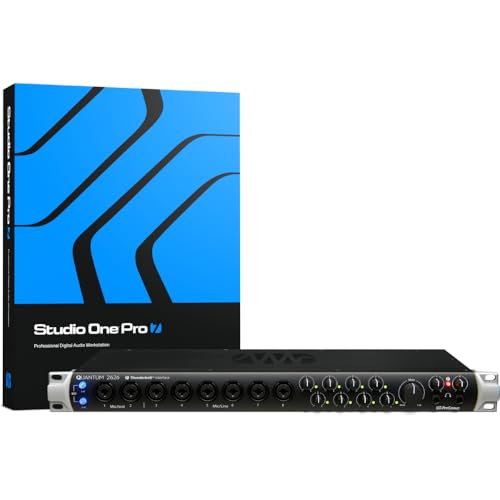
The PreSonus Quantum 2626 is built for studio pros who demand speed, precision, and seamless integration across high-channel-count setups, whether tracking full bands, running external processors, or building complex monitor mixes. I run it with Studio One Pro, and the Thunderbolt 3 connection gives me sub-1 ms latency, 24-bit/192 kHz resolution, and rock-solid performance-even on my M1 Mac. Its eight XMAX preamps sound clean and detailed, great for vocals, guitar, and bass. With 26 ins and outs, including ADAT, S/PDIF, and DC-coupled outputs, I can patch in synths, outboard gear, or feed multiple amp sims. The dedicated headphone amps, BNC word clock, and tight DAW integration make it a no-nonsense powerhouse for real sessions.
Best For: Studio professionals and producers who need high-channel-count I/O, ultra-low latency, and seamless DAW integration for complex tracking, mixing, and external gear workflows.
Pros:
- Thunderbolt 3 connectivity delivers sub-1 ms latency and reliable performance on high-resolution sessions up to 24-bit/192 kHz
- Eight high-quality XMAX preamps and 26-in/26-out routing flexibility via ADAT, S/PDIF, and DC-coupled outputs support large setups and external processing
- Includes Studio One Artist, Ableton Live Lite, and Studio Magic Suite, with full compatibility across major DAWs including Studio One Pro and Logic Pro
Cons:
- Higher price point compared to USB or standard PCIe interfaces may not suit entry-level users
- Requires a Thunderbolt 3 port, limiting compatibility with older computers or non-Mac Windows systems without upgrades
- No onboard DSP or real-time monitoring mix engine, relying entirely on host CPU for processing
Midas StageConnect Interface with 8×8 Analogue In/Out DN4888

You’ll want the Midas StageConnect Interface with 8×8 Analogue In/Out DN4888 if you’re running a professional studio setup that demands rock-solid, low-latency audio expansion, especially when integrating with Midas, Behringer, or Turbosound StageConnect ecosystems. I use it to add 8 balanced XLR inputs and outputs with 24-bit PCM audio at 48 kHz, delivering studio-grade clarity. It runs on StageConnect bus power, cuts latency to under a millisecond, and connects via standard XLR cables-super reliable. I’ve daisy-chained it with DN4816s for bigger rigs, and it handles live feeds, monitor mixes, and recording with ease. Works flawlessly with my Pro Tools and Ableton sessions on Windows.
Best For: Professional audio engineers and studio producers working within Midas, Behringer, or Turbosound StageConnect ecosystems who need reliable, low-latency 8×8 analogue I/O expansion.
Pros:
- Delivers 24-bit uncompressed PCM audio at up to 48 kHz with sub-millisecond latency for studio-grade performance
- Bus-powered via StageConnect and uses standard XLR cables for simple, reliable connectivity
- Easily expandable by daisy-chaining with other StageConnect devices like DN4816-I/O for larger setups
Cons:
- Limited to Windows compatibility, excluding macOS users from direct integration
- Requires StageConnect-compatible systems, reducing versatility outside supported ecosystems
- Warranty support handled through community channels rather than direct manufacturer service
Tascam US-16×08 Rackmount Audio Interface

If you’re tracking live drums, a full band, or managing complex podcast setups with multiple mics and instruments, the Tascam US-16×08 gives you 16 total input channels-8 XLR inputs with Ultra-HDDA preamps delivering 56dB of gain, ultra-low noise, and crisp, transparent signal capture. I use all eight line inputs too, two of which I plug straight into my guitar or bass. Eight balanced outputs let me route mixes cleanly, and the front-panel knobs make level tweaks fast. Its built-in DSP mixer is a game-changer-four-band EQ and compression on every channel means I dial in polished monitor mixes with near-zero latency. I’ve recorded 16-tracks to my laptop over USB without dropouts, and the rackmount build fits tight in my studio rig.
Best For: Musicians, engineers, and podcasters needing a reliable, high-channel-count audio interface for multi-track recording and low-latency monitoring in project studios or mobile setups.
Pros:
- 16 total input channels with high-quality Ultra-HDDA preamps for pristine, low-noise signal capture
- Built-in DSP mixer with per-channel EQ and compression enables flexible, zero-latency monitor mixing
- Rackmount design with front-panel level controls and direct instrument inputs for practical, space-efficient use
Cons:
- No built-in onboard recording without a computer, limiting standalone use
- USB-powered operation may require a powered hub for full channel count stability
- Advanced DSP mixer features have a learning curve for beginners
TOPPING E8x8 Pre Audio Interface (E8X8 Pre-Black)

Who needs eight pristine preamps in a compact rackmount that won’t break the bank or compromise on clarity? I do-and so should you if you’re tracking drums, vocals, or full bands. The TOPPING E8x8 Pre-Black delivers eight ultra-linear preamps with -130.5dBu EIN, ensuring silence between notes. It handles 192kHz/24-bit audio, offers USB plug-and-play on Mac, PC, even iOS, and drives 600-ohm headphones cleanly with 580mW per side. Dual NFCA-LE headphone amps give zero-latency monitoring, critical for real-time recording. I use it with Pro Tools and Ableton-rock-solid, no fuss. At just over a pound, it’s studio-ready, rugged, and backed by a 2-year warranty. This is pro clarity, simplified.
Best For: Musicians, producers, and engineers who need high-quality, low-noise audio preamps for multi-track recording in a compact, affordable, and cross-platform compatible interface.
Pros:
- Eight ultra-linear, low-noise preamps with -130.5dBu EIN for studio-grade clarity and silent operation
- Supports up to 192kHz/24-bit audio with zero-latency monitoring and dual NFCA-LE headphone amps ideal for tracking sessions
- Wide compatibility with Windows, macOS, iOS, and Android, plus seamless integration with major DAWs like Pro Tools and Ableton Live
Cons:
- Limited to USB connectivity, with no Thunderbolt or Ethernet options for higher bandwidth or networked audio
- No built-in audio effects, DSP processing, or software suite mentioned for enhanced production value
- Compact size may make heat dissipation a concern during prolonged high-performance use
Antelope Audio Discrete 8 Oryx
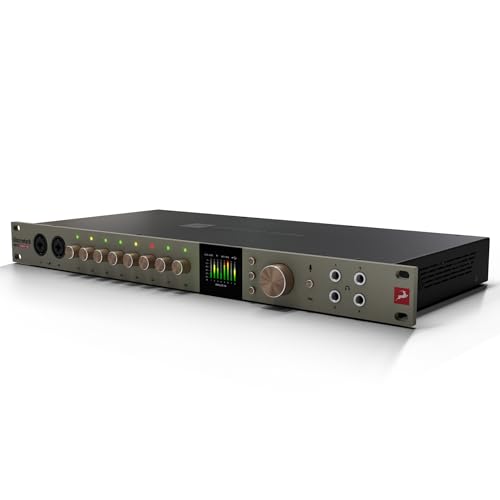
The Antelope Audio Discrete 8 Oryx stands out for studio pros who demand pristine audio conversion, rock-solid clocking, and near-zero-latency monitoring with real-time analog-modeled effects. I use its 130 dB AD/DA converters and 64-bit AFC clocking daily-they deliver ultra-low noise, precise imaging, and a balanced tone I trust for critical mixes. Its eight Discrete Class-A preamps offer 75 dB gain, perfect for condensers, ribbons, and hot guitar signals, sounding warm yet transparent. With 26×38 I/O, ADAT, S/PDIF, and reamp outputs, it fits seamlessly into hybrid studios. I route cues through its four headphone amps, applying zero-latency Synergy Core FX like compressors, modeled mics, and guitar tone shaping-no lag, all tone.
Best For: Studio professionals and hybrid producers who need high-end audio conversion, premium mic preamps, and real-time Synergy Core effects with ultra-low latency.
Pros:
- Offers 130 dB AD/DA conversion and 64-bit AFC clocking for exceptional audio clarity and timing precision
- Features eight Discrete Class-A preamps with 75 dB gain, ideal for a wide range of microphones and instruments
- Enables zero-latency monitoring with 37 analog-modeled effects via powerful dual DSP and FPGA Synergy Core processing
Cons:
- High price point may be prohibitive for hobbyists or project studios on a budget
- Synergy Core effects ecosystem, while powerful, requires learning and management through software
- USB-only computer connectivity limits expandability compared to units with Thunderbolt or Ethernet options
MOTU 828 USB3 Audio Interface

You’ll want the MOTU 828 USB3 if you’re tracking full bands, running a hybrid studio, or need rock-solid I/O expansion with zero compromise on audio quality. I use it for live tracking and podcasting with 28 inputs and 32 outputs, handling 60 channels at up to 192 kHz. Its ESS Sabre32 DAC delivers 125 dB dynamic range, and the preamps offer -114 dB THD+N with 74 dB gain-perfect for quiet mics and hot guitar signals. I love the onboard DSP mixer: 8 stereo buses, reverb, EQ, and compression let me monitor with effects, no CPU hit. The 3.9-inch color screen shows all I/O metering, and I control it wirelessly via CueMix 5 on my iPad.
Best For: Musicians, engineers, and podcasters needing high-channel-count, ultra-low-latency audio interfacing with pristine sound quality and standalone DSP mixing for live tracking or hybrid studio setups.
Pros:
- Offers 28 ins and 32 outs with support for 60 simultaneous channels at up to 192 kHz, ideal for complex multitrack recording
- Features high-end ESS Sabre32 DAC with 125 dB dynamic range and ultra-clean preamps with 74 dB gain, low noise, and flexible I/O options
- Includes onboard DSP mixing with effects and wireless control via CueMix 5 app, reducing CPU load and enabling seamless monitoring
Cons:
- Higher price point may be prohibitive for hobbyists or small project studios
- USB3 performance benefits require a compatible system; slower speeds on USB2
- Complex feature set may overwhelm entry-level users without prior interface experience
SSL 12 USB Audio Interface

If you’re tracking full band sessions or need pristine audio capture for demanding studio work, the SSL 12 USB Audio Interface stands out with its 12 inputs and 8 outputs, making it ideal for engineers who run complex setups over USB. I rely on its 32-bit/192kHz converters, which deliver over 120dB dynamic range and clean +24dB operation. The preamps offer 62dB gain with just -130.5 dBu EIN, so vocals and DI bass stay noise-free. I expand with ADAT for eight extra inputs at 48kHz. On long sessions, the built-in talkback, four headphone mixes, and monitoring controls keep things smooth. Plus, I use the included 3-month SSL Complete suite for mixing-real studio tools that make a difference.
Best For: Professional engineers and producers needing a high-channel-count USB audio interface for complex studio recordings with pristine audio quality and flexible monitoring.
Pros:
- High-quality 32-bit/192kHz converters with over 120dB dynamic range and +24dB operating level for clean, detailed audio capture
- Sixteen mic preamps with 62dB gain and ultra-low -130.5 dBu EIN ensure quiet, studio-grade recordings
- Expandable via ADAT and features four independent headphone mixes, built-in talkback, and bundled SSL Complete plugins for enhanced production
Cons:
- Limited to 8 additional ADAT channels at 48kHz, restricting high-sample-rate expansion capabilities
- USB-powered operation may pose connectivity or power challenges on some systems with multiple peripherals
- 3-month license for SSL Complete suite requires eventual purchase for continued plugin access
Factors to Consider When Choosing 8 Channel Audio Interfaces
You’ll want to check the number of inputs, especially if you’re tracking drums or multiple mics at once-eight XLR-1/4” combos are standard, but some interfaces add extra options for synths or DI boxes. Make sure the preamp quality delivers low noise and 60dB gain, as real-world tests show cleaner recordings with interfaces like the Focusrite Clarett+ series. Look for sample rates up to 192kHz, round-trip latency under 4ms at 48kHz, and solid connectivity like Thunderbolt 3 or ADAT expansion, so you can hook up outboard gear, guitar amps, or podcast mics without hiccups.
Number Of Inputs
While tracking a full band or layering multiple sources, having eight simultaneous inputs gives you the flexibility to capture drums, vocals, guitars, and synths all at once without compromise. You’ll typically find XLR, 1/4″ TRS, or combo jacks supporting mic, line, and instrument signals-perfect for dynamic mics, bass DI, and keyboard rigs. Need more than eight? Look for ADAT optical I/O, which can expand your analog inputs via external preamps. Most 8-channel interfaces offer up to +60 dB to +75 dB of gain, enough to properly drive low-output ribbons or vintage-style dynamics. Testers note clean signal capture, with EIN ratings as low as -130.5 dBu, meaning you get usable gain without added noise. Whether you’re multitracking live amps or hosting podcast guests, eight inputs give you room to record everything in one take-saving time, keeping energy high, and delivering professional results straight to your DAW.
Preamp Quality
Preamp quality makes or breaks your recordings, and with 8-channel interfaces, it’s non-negotiable. You need clean, quiet gain, and top preamps deliver as low as –129 dBu EIN, so hiss stays out of your acoustic guitar or vocal tracks. Aim for at least +70 dB of gain to capture soft sources like room mics or bass amps without cranking levels and adding distortion. Discrete Class-A circuitry gives you that warm, transparent sound pros love-ideal for detailed podcasting or tracking live bands. Look for relay-controlled analog paths, too; they cut contact resistance and keep your signal pure from mic to DAW. High common-mode rejection ratio (CMRR) matters if you’re recording in noisy studios or near gear hum-it blocks interference so your takes stay clean. These specs aren’t just numbers; they’re what turn good recordings into pro ones, every time.
Sample Rate Support
When capturing high-resolution audio in a professional studio setup, sample rate support directly shapes the clarity and detail of your recordings, so choosing an 8-channel interface that goes beyond basics is essential. You’ll want support for at least 48 kHz, but top-tier models offer 96 kHz or even 192 kHz for crisper transients and lifelike guitar, bass, and vocal captures. High sample rates preserve the snap of a snare, the growl of an overdriven amp, and subtle studio nuances you’d otherwise lose. Just make sure your interface’s USB or Thunderbolt connection can handle the data load-some units throttle max sample rates when all eight channels run simultaneously. Pros typically stick with 48 kHz or higher not just for audio quality, but for clean video sync and smoother plugin processing. Pick a unit that sustains full sample rates across all ins and outs, like the Universal Audio Apollo x8 or RME Babyface Pro FS, so your podcast, scoring, or tracking sessions stay future-proof and flawlessly detailed.
Latency Performance
You’ve got your sample rates locked in, now let’s talk about what happens in real time-how fast your interface gets your sound from instrument to ears without delay. You need round-trip latency below 2 ms at 96 kHz for tight, responsive monitoring, especially when tracking guitar or bass with effects. Look for interfaces with onboard DSP-these give you zero-latency monitoring by processing reverb, compression, or amp sims before the signal hits your DAW. Thunderbolt or USB3 models can hit sub-1 ms latency, perfect for fast overdubs or podcasting with live processing. Pair 192 kHz sample rates with 32-sample buffers to cut lag, but remember: your computer and drivers matter just as much. Interfaces with built-in digital mixers let you tweak monitor blends on the fly using physical knobs, so you’re not waiting on software updates. That’s real-world reliability-studio pros rely on it every session.
Connectivity Options
While your studio setup might start with eight inputs, it’s the connectivity options that determine how far it can grow. You’ll want USB-C or Thunderbolt for fast, stable computer links, especially when tracking guitars, bass, or voiceovers with zero lag. Look for ADAT optical I/O-it lets you add eight more digital inputs at 48 kHz by hooking up an external preamp, perfect for live drums or ensemble podcasting. Balanced XLR and TRS outputs guarantee clean signal transfer from mics and line-level gear, while resisting noise in long cable runs. If you use modular synths, go for interfaces with DC-coupled outputs to pass control voltage and shape sounds directly. Built-in MIDI I/O via 5-pin DIN ports means you can plug in keyboards, drum machines, or effects without extra boxes. These connections keep your rig flexible, future-proof, and ready for any session.
Software Integration
What if your audio interface could streamline your entire workflow, not just connect your mics and instruments? You need seamless software integration that works right away with your DAW-Ableton, Pro Tools, or Reaper-using stable ASIO or Core Audio drivers. Look for class-compliant USB so you can plug into any system without extra setup. Real-time control matters: use the manufacturer’s app to manage zero-latency monitoring, route signals, and adjust input levels without taxing your CPU. Many 8-channel interfaces include onboard DSP mixers, so you can set cue mixes while recording multiple mics. Bonus: bundled DAW software, synths, or effects speed up your first session. Reliable firmware updates keep your unit compatible with new OS versions. High-end models even let you tweak settings from your phone over Wi-Fi, making multi-mic vocal or ensemble takes easier than ever.
Headphone Outputs
A solid headphone output section is essential when tracking bands or vocalists, and top-tier 8-channel interfaces deliver exactly that-multiple, high-output headphone amps with independent controls for flexible monitoring. You’ll typically get two to four headphone outputs, each capable of driving headphones from 32 to 600 ohms cleanly. High-output amps guarantee strong, distortion-free sound even with power-hungry studio cans. Independent level controls let each musician adjust their own mix on the fly. Low-noise designs, with noise floors as low as 1μVrms, keep audio pristine during quiet passages. Many pro interfaces also include software-controlled cue mixes with zero-latency monitoring, so you can tweak volume, effects, and routing in real time. This is vital when recording guitarists who need reverb or bassists wanting direct DI blend in their ears. Performers stay engaged, timing stays tight, and takes sound natural-exactly what you need in fast-paced sessions.
Build And Design
Durability starts with design, and pro-grade 8-channel audio interfaces are built to survive the studio and the road. You need a rugged metal chassis-it blocks electromagnetic interference and handles bumps during transport. If you’re mounting in a rack, go for the standard 19-inch width; it fits snugly and stays secure. Look for front-panel gain knobs, input switches, and headphone controls-they keep your hands on gear, not buried in menus. For clean power and less noise, pick units with internal power supplies, though external adapters help reduce heat. If space matters, choose compact enclosures with shallow depth and low profile-they sit neatly on desktops without blocking ports or airflow. You’ll still get full I/O access and solid cooling. Pros trust these designs because they’re tough, efficient, and ready when you are.
Frequently Asked Questions
Can I Use These Interfaces With iPads or iOS Devices?
You can use many modern audio interfaces with iPads and iOS devices, just grab a USB-C or Lightning adapter, guarantee the interface is Core Audio–compliant, and check for iOS power demands, since bus-powered units like the Focusrite Scarlett Solo or PreSonus AudioBox work seamlessly, while others need extra power, testers confirm reliable performance with GarageBand, Cubasis, and Auria Pro, making mobile recording smooth, stable, and studio-quality when you match gear to your iPad’s capabilities.
Do Any of These Support AVB or Dante Protocols?
You won’t find AVB or Dante on most mainstream interfaces, but you can get solid USB-C compatibility with iOS devices, plug-and-play setup, low-latency monitoring, and high-res conversion, like 24-bit/192kHz, from models like the Focusrite Scarlett 2i2 or Universal Audio Volt series; pros choose them for reliable drivers, durable builds, and crisp preamps, not networked audio protocols-keep it simple, stay in the groove, and track with confidence.
Are Drivers Available for Linux Operating Systems?
You won’t find official Linux drivers for most pro audio interfaces, but some models do support open-source alternatives like ALSA or JACK, especially those using standard USB audio class compliance. Devices from Motu, Rme, and Focusrite often work with community-driven drivers, though setup demands technical know-how. Always verify compatibility with your distro, test latency at 48 kHz sample rates, and confirm plug-in functionality before relying on them for tracking or mixing sessions.
Which Models Have Loopback or Integrated Effects?
You’ll find loopback and integrated effects in models like the Audient iD4 MkII, which offers real-time monitor mixing, and the Focusrite Scarlett Solo 4th Gen, featuring Air mode for brighter tone shaping. The Universal Audio Volt 2 gives you analog saturation, while the PreSonus AudioBox Go includes basic effects. Testers note loopback’s essential for podcasters streaming live, and subtle, high-headroom effects enhance tracking without extra plugins.
Do They Come With Free Plugin Bundles or Software?
Yeah, they usually come with free plugin bundles or software you’ll actually use. You get DAWs like Ableton Live Lite or Pro Tools First, plus effects-reverbs, compressors, amp sims-from big names like Avid, Universal Audio, or Softube. Some include virtual instruments and drum kits, too. Testers found the included suites cut startup costs by hundreds, and they run smoothly even on modest laptops, making your first tracking sessions fast, easy, and surprisingly pro-grade right out the box.